
Specs are compiled from manufacturer listings and verified buyer reviews and can change over time — please confirm the key details on the product page before buying.
Buying accessories for a handheld is where most people waste money — not on the console itself, but on a dock that drops the signal or a case that squeezes the sticks. The ASUS ROG Ally X is a specific machine with a specific shape, and plenty of accessories sold as “handheld compatible” do not actually fit it. What follows is the short list of gear that genuinely works with the Ally X, sorted by what each piece actually solves for you.
This guide is built by comparing the manufacturers’ published specifications and the patterns across verified customer reviews, so you get each pick’s real strengths and trade-offs instead of marketing spin.
You need a case that holds the console without pressing the triggers, a dock that keeps a 30W Turbo Mode session alive, and a stick upgrade only if drift has already found you. Here is the honest breakdown of the ASUS ROG Ally X Accessories worth your money, and the ones with a caveat you should read before you click buy.
Top Picks

How To Choose The Best ASUS ROG Ally X Accessories
The Ally X shares a name with the original Ally but not the same chassis, and that single fact causes more bad purchases than anything else in this category. Several listings that say “ROG Ally” in the title quietly exclude the X, or exclude the newer ROG Xbox Ally models from 2025. Read the compatibility line before anything else.
Check the model year, not just the brand name
The Ally X is the 2024 model. A case or cover built for the 2023 Ally can leave gaps around the ports or press where it should not. When a listing spells out “ROG Ally X 2024” and separately warns you away from the ROG Xbox Ally, that is a maker who actually measured. Treat that specificity as a good sign, and treat a vague “fits ROG Ally” as a question mark.
Match the dock to your Turbo Mode wattage
Turbo Mode pulls real power, and a dock passes only as much as its power input allows. Most good hubs list a pass-through figure and ask you to supply your own adapter. If you plan to run the console hard with a keyboard, mouse, and a monitor attached, a higher-wattage charger in the chain keeps the session stable. A weaker one will charge more slowly and can fall behind under load.
Decide if you need a stand or just a hub
These are two different products and the listings blur them. A hub is a block of ports you plug into with a cable. A dock with a cradle holds the console upright and often adds a stand. If you want a desk setup where the screen faces you, you want the cradle. If you just need more ports in a bag, the compact hub is lighter and does the job.
Side-by-Side Comparison
| Model | Best For | Type | Key Spec | Weight | Amazon |
|---|---|---|---|---|---|
| Syntech Hard Carrying Case★ Best Overall | Everyday transport and storage | Hard case | EVA shell, 2 compartments | 0.5 kg | Amazon |
| ButterFox Large Carry CaseBest for Travel | Travel with charger and power bank | Hard case with stand | Built-in stand, 2 compartments | 1 pound | Amazon |
| HandheldDIY TMR Hall JoystickTop Performer | FPS and racing players fighting drift | Joystick pair | TMR Hall effect, up to 190gf resistance | 150 g | Amazon |
| SAVAGE RAVEN x Skull & Co. Hardshell Cover | Drop protection with grip and stand | Front shell + grip bundle | Polycarbonate shell, charging port cutout | — | Amazon |
| Yenyoh 100W USB-C Charger | Replacing or adding a travel charger | Wall charger + cable | 100W max, 5A, PD 3.0 | 0.37 kg | Amazon |
| iVANKY 8-in-1 Dock | Desktop setup with fast display | Cradle dock | 4K@144Hz HDMI, 100W PD | — | Amazon |
| SABRENT 6-Port USB-C Dock | Portable extra ports, no cradle | Compact hub | 4K@60Hz HDMI, 95W pass-through | 220 g | Amazon |
| JSAUX 6-in-1 Dock + 65W Charger | One-box dock and charger kit | Dock with charger | 4K@120Hz HDMI, 100W PD | — | Amazon |
| Mechanism Gaming Pillow | Long sessions in bed or on the sofa | Gaming pillow + mount | 360-degree ball socket, 12″ x 12″ | 1.4 pounds | Amazon |
Detailed Reviews
1. Syntech Hard Carrying Case for ROG Ally X
Our pick — 4.5+★ from 800+ verified ratings; the strongest balance of quality and price.
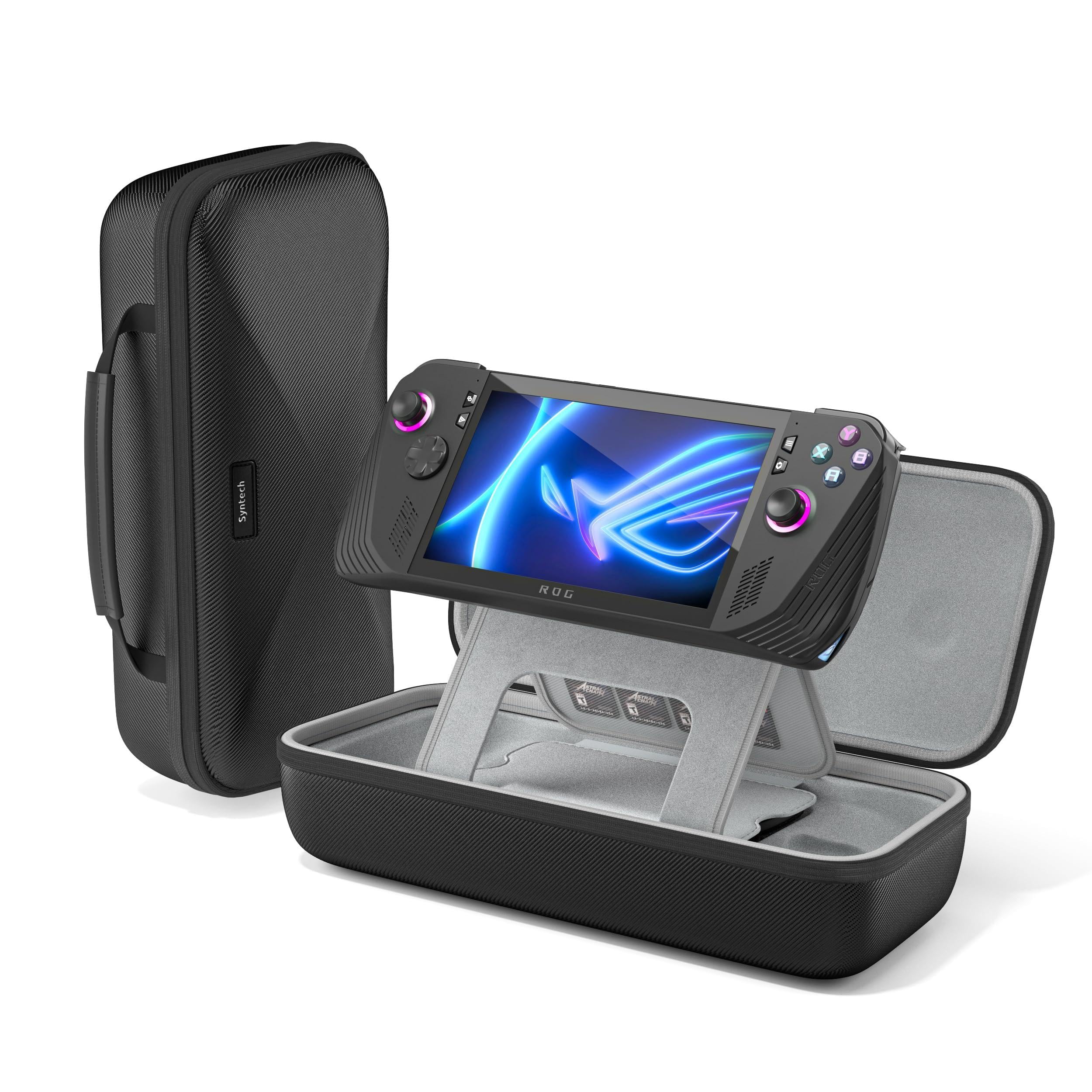
A hard EVA shell with two compartments that lets you pack the Ally X and its charger in one bag.
A case for the Ally X has one job: keep the console safe in a bag. The Syntech answers that with a hard EVA shell — a molded, foam-like plastic that shrugs off pressure — wrapped around a soft velvet lining that cushions the console against bumps and scratches. It weighs 0.5 kg, which is heavy enough to feel like real protection and light enough that you notice the console, not the bag. The package, before you even open it, is the crowd favorite here at 4.5+ stars across 800+ owners, and the durability and protection threads read clean across the board.
Where it earns its keep is the storage math. Two compartments, with the bottom one sized for the original AC charger, a small power bank, and headphones, plus a zippered mesh pocket on top for game cards. The built-in foldable partition doubles as a stand, and its hollow design lets air move while you charge — a small thing that matters when you are using it as a desk prop. Unlike a soft sleeve, this one also puts a layer between the screen and whatever is pressing on it from the outside.
The recurring gripe is the zipper, and it is worth hearing plainly. Some owners find it smooth and easy to close; others report it snapping off or being stiff to open. It is not a dealbreaker on a case this well protected, but treat the zip gently and do not overstuff the bottom compartment. Also check the model line: this one covers the ROG Ally 2023, the Ally X 2024, and the Nintendo Switch 2, but it explicitly does not fit the ROG Xbox Ally or Xbox Ally X from 2025.
What the case nails
- Hard EVA shell with velvet lining absorbs pressure and scratches in transit
- Two compartments plus a mesh pocket hold the charger, a power bank, and game cards
- Foldable partition works as a stand and protects the screen in storage
- PU handle and double zippers make it easy to carry or hang
What to keep in mind
- The zipper is the weak point — a few buyers report it snapping or sticking
- Not compatible with the ROG Xbox Ally or Xbox Ally X from 2025
Grab it if: you carry the Ally X between home and work and want hard-shell protection plus room for the charger in one bag.
skip it if: you own the newer ROG Xbox Ally models — this case will not fit them.
2. ButterFox Large Carry Case with Built-In Stand
A case built around the charger, not just the console — the travel bag for people who pack a power bank.
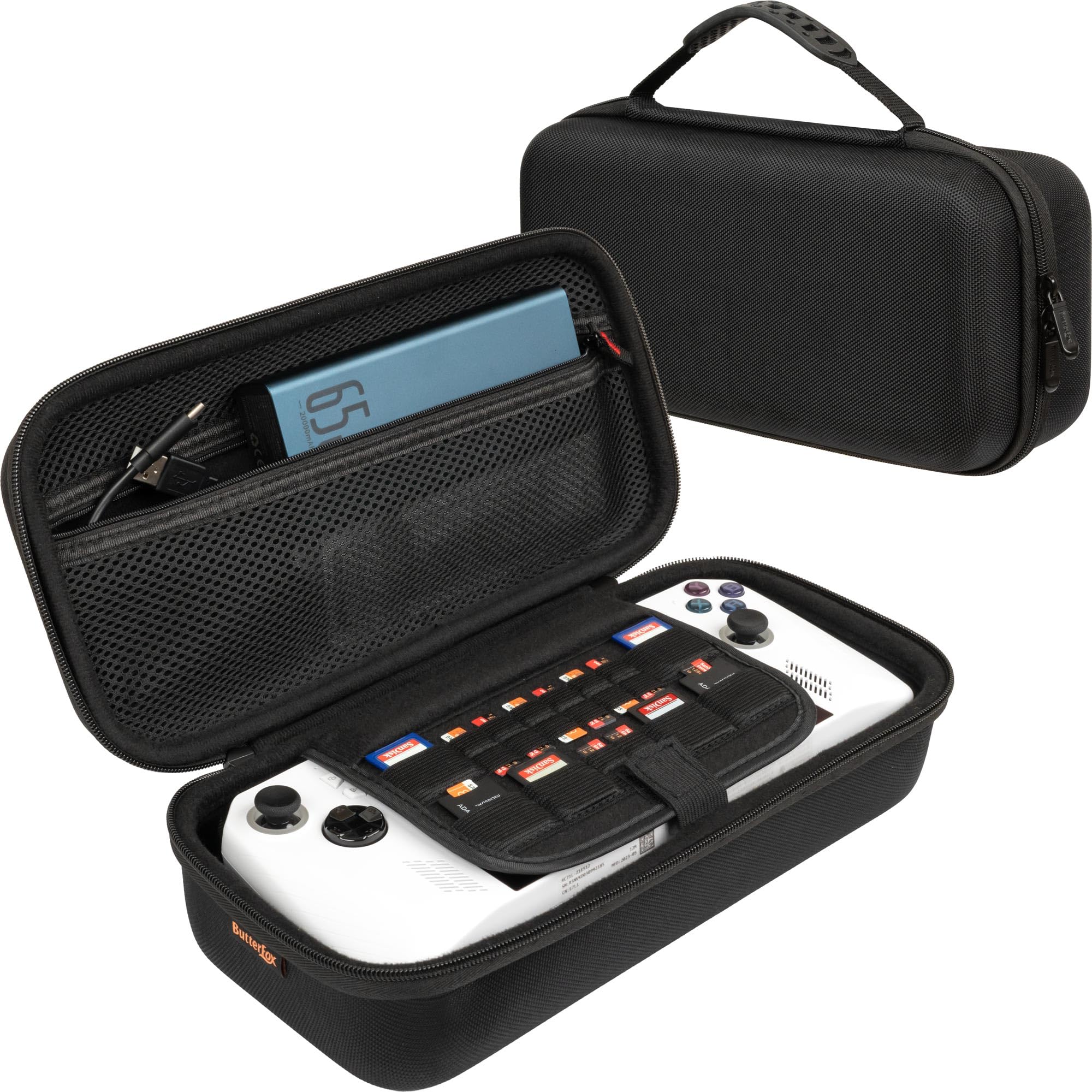
You get a snug fit on both the Ally and Ally X, with room left around the trigger buttons so they are not pinched. The larger accessories pocket is sized for the ASUS charging dock, a 65W power bank, a slim mouse, and an HDMI cable. If your bag has to carry a full desk’s worth of gear, this is the case that swallows it.
Two details stand out. The first is the lift strap: it lets you pull the console out without grabbing the thumb sticks, which is the small daily annoyance most cases ignore. The second is the built-in stand, which uses that same strap to prop the console at a viewing angle. It is a neat trick because it adds the stand function without adding a separate kickstand part. At 1 pound, it is a heftier case than the Syntech, and the bulk is the trade-off for all that pocket space.
The one compatibility catch is the charger. The listing states the US stock charger fits but the UK charger does not, so if you travel with a UK plug, the bottom compartment will not take it. That aside, the pattern across owners is straightforward: high-quality shell, sturdy build, and a fit that accommodates the Ally X and its essentials without complaint. A few find it bigger than they expected, which is fair — this is a bag for people who carry a lot, not a slim sleeve.
Where it shines: the room for a 65W power bank, a slim mouse, and an HDMI cable is the reason this case exists. The lift strap and the strap-as-stand are clever uses of the same piece of fabric.
The trade-off: 1 pound and a molded shell mean bulk. If you want slim, this is not the one; if you want everything in one bag, it is.
Reach for this if: your travel setup includes a power bank, a mouse, and a cable, and you want them all inside one case.
Look elsewhere if: you use a UK charger or want a slim carry — the bottom compartment will not take the UK plug.
3. HandheldDIY TMR Hall Joystick for ROG Ally X
The stick upgrade for FPS players whose aim is already better than their drift.
You get finer aim near the edge of the stick’s throw, because it takes up to 190gf of rotational resistance to push the thumbstick to its edge — a 30% increase over the stock stick. That tighter feel is why it is pitched at FPS games. Underneath sits TMR (tunnel magnetic resistance) Hall effect tech, a magnetic sensor that reads stick position without physical contact. The maker positions it as a step up from standard Hall sticks in durability, power consumption, and rated voltage.
The other headline is the diagonal response. Stock sticks have a 45-degree diagonal limitation, meaning circles have slightly squared-off corners. This stick converts those into square corners for better accuracy and game compatibility, with a circle error rate around 14% for what the listing calls optimal performance. Calibration is handled by dual keys and works with ASUS Armoury Crate and the SteamOS calibrator on the Ally X. A toolkit and a step-by-step installation video in the manual mean the job is doable, and owners consistently rate the install as easy.
The drift fix is not guaranteed on every unit. This stick resolves the stock joystick drift problem for most owners — no more drifting at low sensitivity is the common experience — but some still report drift persisting even at the lowest sensitivity setting. It is not a guaranteed fix for every unit. Second, be careful with third-party thumbstick caps: the listing warns that some caps can cause irregular circles on Gamepad Tester, so stick with the stock caps unless you have tested. And this pairs with the Ally X only — not the original Ally, not the ROG Xbox Ally.
The feel, in plain terms: a tighter rotational resistance and a squared-off diagonal make fine aim adjustments easier, which is exactly what competitive shooters reward.
What it costs you: an install, and the drift fix is not universal — a handful of owners still find drift at low sensitivity.
Best for: an FPS or racing player on the Ally X who is comfortable opening the shell with the included tools.
Not for: anyone expecting a plug-in fix with zero installation, or a guaranteed end to drift on every unit.
4. SAVAGE RAVEN x Skull & Co. Hardshell Front Cover Bundle

A front shell that clips on and quietly turns your Ally X into a self-standing desk machine.
You get protection that stays on the console, not a carry case. The bundle is a hard front cover plus a GripCase for the Ally X, and the shell is polycarbonate, the same tough plastic used in impact-rated cases. It is light and hard, built to resist scratching and squeezing, and it clips into the GripCase on the StandGrip base so the whole rig can stand up on its own. Owners describe the design as well thought out, and it earns that label: the shell gently clips into place, the joystick area is fitted to the stick, and there is a reserved opening for the charging port so you can charge it without pulling the shell off.
Two compatibility notes matter here. The fit is for the 2024 Ally X specifically — not the 2023 Ally and not the ROG Xbox Ally from 2025. And the joystick design works with Skull & Co. Thumb Grips sets, but not the FPS Master grips. Neither is a flaw; they are the kind of details that separate a measured product from a one-size claim. A few owners find the grip feel mixed — some say it makes the unit feel better in hand, others are neutral — so if you are very particular about texture, know that going in.
What makes it worth shortlisting is that it solves two problems in one piece of plastic: protection when it is in a bag, and a stand when it is on a desk. If you already own the GripCase, adding the shell is a cheap way to get a hard front without buying a separate case.
Why it earns a spot
- Hard polycarbonate front resists scratches and squeezing
- Clips into the GripCase on the StandGrip base so the console stands upright
- Reserved charging port opening means no removal to charge
- Fitted joystick cutouts compatible with Skull & Co. Thumb Grips
Before you commit
- Only for the 2024 Ally X — not the 2023 Ally or ROG Xbox Ally
- Grip texture splits opinion; a few find the feel neutral
Pick it if: you want on-console protection that doubles as a stand and already own or plan to own the GripCase.
Think twice if: you have the 2023 Ally — this shell is shaped for the 2024 Ally X.
5. Yenyoh 100W USB-C Charger for ROG Ally X
A big-wattage travel brick that behaves like the original cord — until it does not.
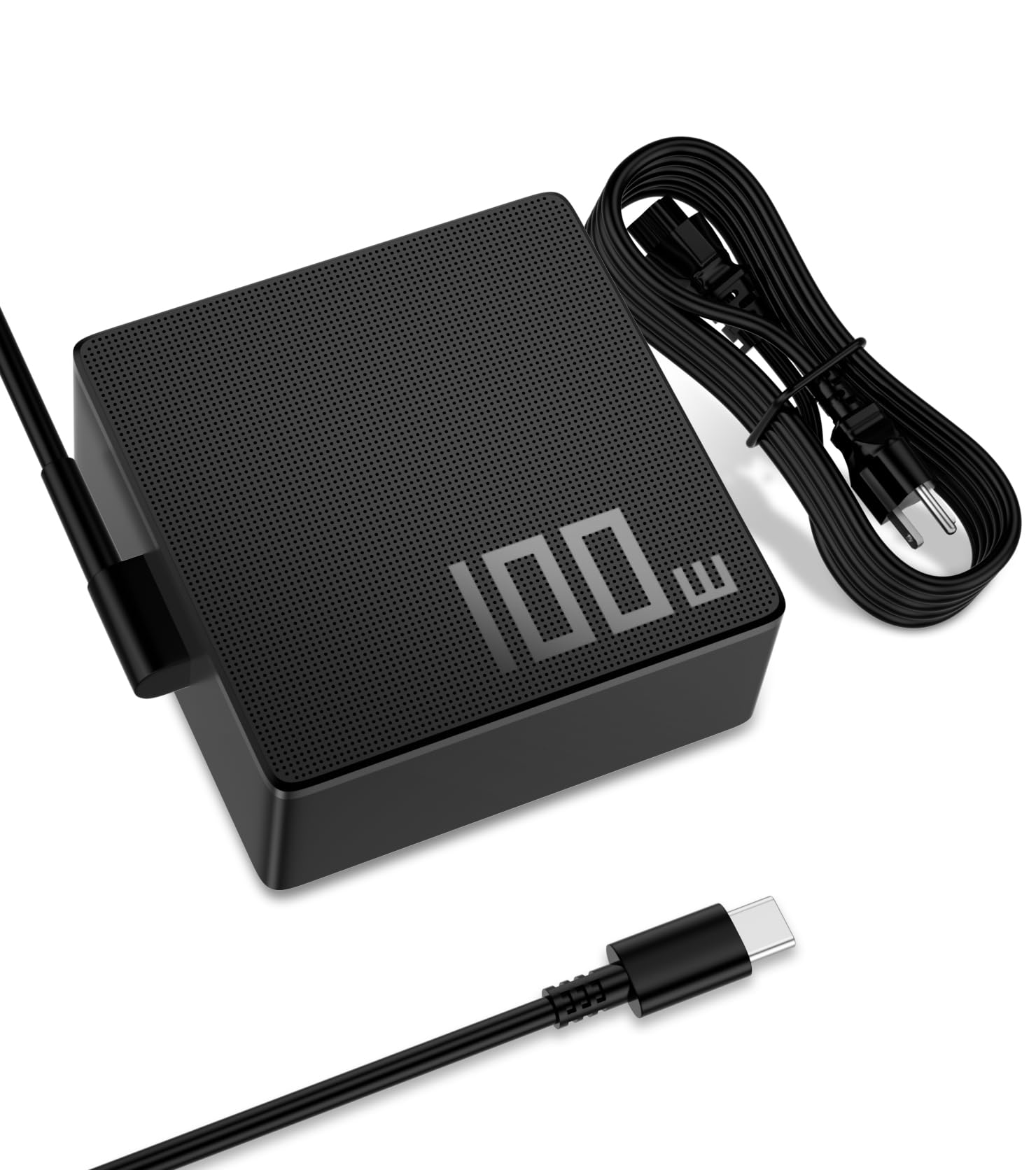
You can charge a lot of devices from one brick. It delivers 15W, 27W, 45W, 65W, or 100W depending on the device, uses PD 3.0 (the fast-charging standard most modern laptops and handhelds speak), and comes with a 5A USB-C output cable plus a 6ft power cord and a 6ft AC cord. The 5A rating is the important bit — a 100W charger needs a cable that can carry the current, and this bundles one. It is 0.37 kg with a compact body, so it drops in a backpack without a second thought, and the compatibility list runs from the Ally X and the ROG Flow series through ThinkPads, Dells, HPs, and MacBooks.
Reliability is where the reviews point, and mostly in a good direction. Owners mention it working like the original cord and better than the original, and the plurality of complaints center on the same thing: durability. Some units break after three months of use, per the listing’s own summary of negative reviews. That is the trade-off you accept for the value — a wide-compatibility charger that a subset of buyers want to replace, while a much larger group would buy it again.
One more thing to check: the listing’s charging performance feedback is mixed for some HP and Dell laptops, though the Ally X is inside its stated compatibility range. If you own an HP or Dell laptop and are buying this mostly for that, test it early and keep the packaging handy.
What you get: one brick that covers 15W to 100W over PD 3.0, with the 5A cable included, so you do not have to buy the cable separately.
The honest limit: durability is the repeated complaint — a share of units fail within a few months, so treat this as a travel spare rather than a permanent desk anchor.
Suits you if: you want a single charger that covers the Ally X and a laptop on the road, without buying a cable.
Pass if: you need one charger to live on a desk for years — the durability record does not promise that.
6. iVANKY 8-in-1 Docking Station for ROG Ally X
The dock that makes your Ally X look like a desktop PC — 4K at 144Hz through one cable.
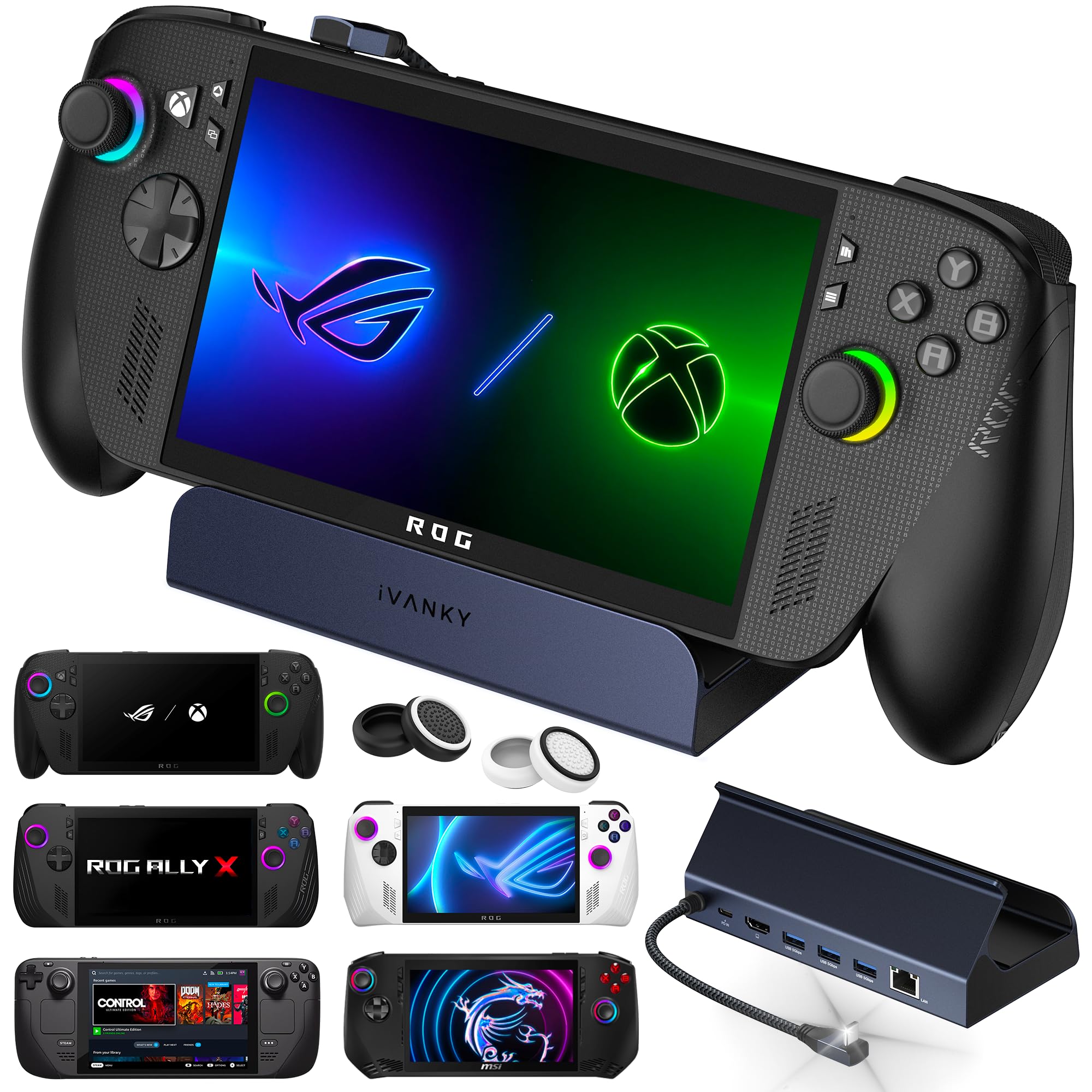
You get the fastest display output on this list: the iVANKY runs 4K at 144Hz out of an HDMI 2.1 port, a faster refresh than most TVs and many monitors can accept. It pairs that with a 1Gbps Ethernet jack and three 5Gbps USB-A ports for a keyboard, mouse, and storage at the same time. The 100W PD charging port delivers 65W to the Ally X, so the dock powers the console while you play. Owners describe it as working really well, and the functionality is the thing they consistently praise.
Two setup notes come from the maker, not from guesswork. Update the BIOS to version 323 to open up the Ally X’s 30W Turbo Mode through the dock. And update the dock’s firmware to avoid HDMI mirroring issues when you use an extended display — both instructions are covered in the video guide. Do those two steps and the desktop experience is clean. Skip them and you may see the screen mirrored instead of extended, which is the single most common complaint pattern in this class.
There is one thing you should know going in: the 30W Turbo Mode, per the listing, needs a charger that matches it — the dock passes power from your adapter, so bring the right one. And the port topic splits opinion, with some owners finding all the connections they need and a few reporting connectivity issues. It is a dock, not a miracle — but as a desktop hub for the Ally X, it earns the premium slot.
Why it stands out
- 4K@144Hz over HDMI 2.1 — the fastest display output on this list
- 8 ports including 1Gbps Ethernet and three 5Gbps USB-A
- 100W PD input, 65W to the Ally X for charging while you play
What to watch for
- Requires a BIOS update (version 323) to open up 30W Turbo Mode
- A few customers note port connectivity quirks; update the dock firmware first
Built for: a desktop setup where you want the Ally X to drive a fast monitor and a keyboard-and-mouse.
Not ideal for: someone unwilling to update firmware and BIOS — the setup steps are part of ownership here.
7. SABRENT 6-Port USB-C Dock (DS-RA6P)

The dock that fits in a pocket and expects you to bring your own charger.
You get a hub you can move, not a cradle that stays put: SABRENT’s take sits on a desk or drops in a bag, and you connect it with a USB-C cable. It has six ports: a 4K@60Hz HDMI 2.0 output with HDCP 1.4/2.2 (copy-protection support for streaming apps), three USB-A 3.2 Gen 1×1 ports and one USB-C downstream port, all at 5Gbps. That is enough for a keyboard, mouse, controller, and external storage at once. It also passes up to 95W of PD 3.0 power through to the handheld from your adapter, so you can charge and play in Turbo Mode — the catch being that the dock ships without a power adapter, so you bring your own charger.
Build quality is where it earns positive marks: it is described as solid, and the quality and appearance topics run positive. The 220g body is small enough to live in a bag without adding noticeable weight. At 4.84″ x 3.07″ x 1.17″, it is compact enough to sit beside a laptop without competing for space.
Now the honest part. Some reviewers point out connectivity problems — either it works well or it does not work at all — and a separate group says it does not align properly with the ROG device and feels too small. One more hard fact from the listing: this is a dock, not a stand. It does not cradle or prop the console, so if you want something that holds the Ally X upright, look elsewhere. And check one thing before buying: your device’s USB-C port must support DisplayPort Alt Mode, or video output will not work at all.
The reason to choose it: the smallest, lightest dock here at 220g, with 4K@60Hz HDMI and 95W pass-through in a 6-port block.
The reason to hesitate: it does not hold the console, it ships without a charger, and a subset of owners hit connectivity failures.
Get it if: you want extra ports in a bag and already carry the Ally X charger.
Don’t get it if: you want a stand that cradles the console, or need guaranteed connectivity on the first try.
8. JSAUX 6-in-1 Docking Station & 65W Charger
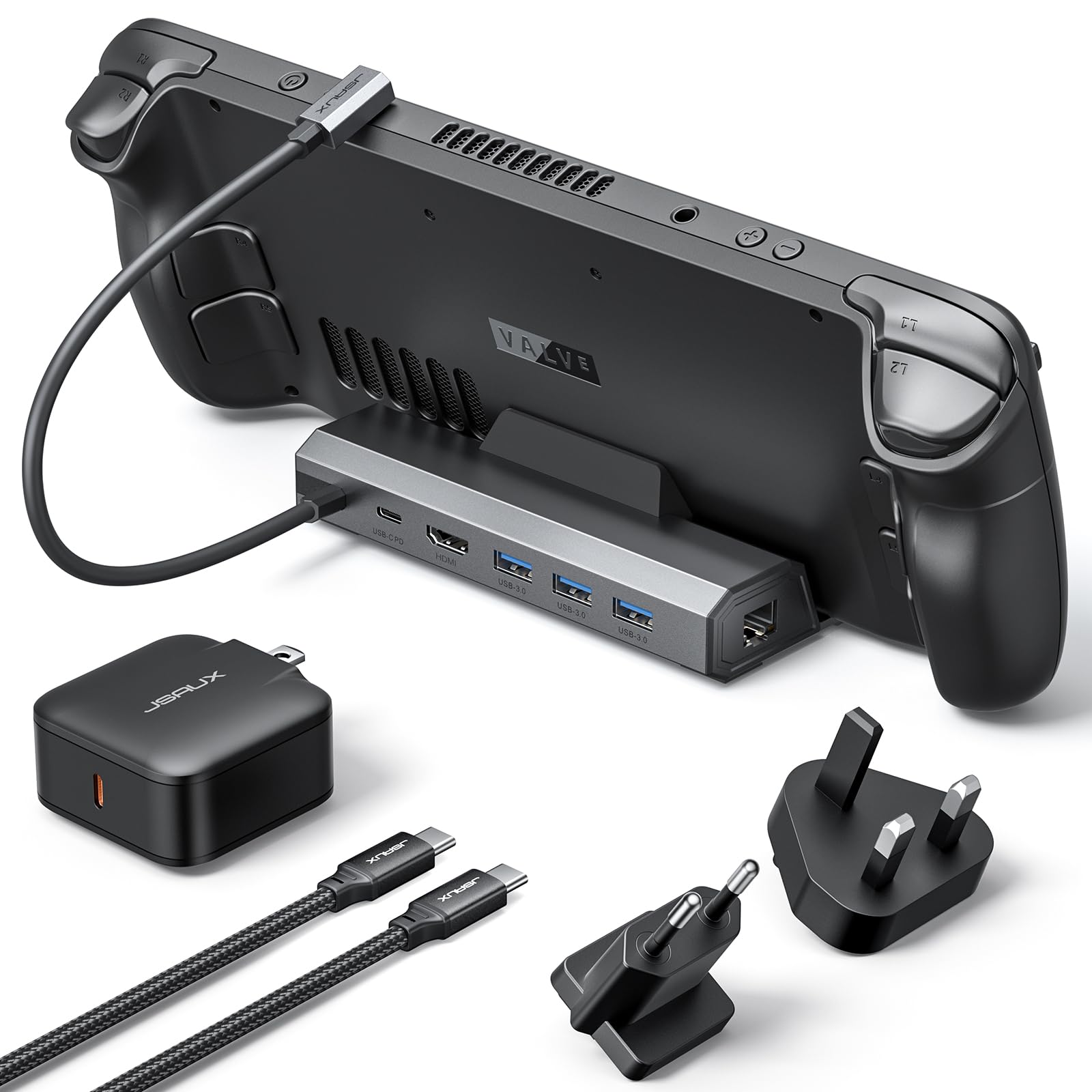
Dock and charger in one box — the only pick here that does not make you dig out an adapter.
JSAUX bundles the two things a new dock owner always forgets. The 6-in-1 dock runs HDMI 2.1 at 4K@120Hz — double the refresh of JSAUX’s previous 4K@60Hz version — and adds 3 fast USB-A 3.0 ports and a Gigabit Ethernet jack. It also includes a 65W Steam Deck charger, a USB-C to USB-C cable, a European plug adapter, and a UK plug adapter. For someone who has just moved from a Steam Deck and wants one package, that is the appeal: no separate charger to hunt down, and it works from the start with a European or UK plug.
You can run the Ally X in Turbo Mode, but know the power split first. The dock supports up to 100W PD and can power the Ally X in Turbo Mode, yet the bundled charger is 65W — enough for most scenarios. The maker recommends stepping up to a 100W PD charger if you run a 30W Turbo Mode session with multiple peripherals. It also explicitly does not fit the ROG Xbox Ally or Xbox Ally X. And if you already own a 100W charger, this is a reasonable buy for the dock alone, with the bundled 65W as a backup.
Long-term reliability is the thing to weigh. The larger share of feedback says it works surprisingly well and does everything the listing says it can. A smaller but real group reports it stops working after two months. Build quality also splits — some call it outstanding, others call it low quality. So the honest read is: this is a good all-in-one for the price, but it is the one with the most variance in long-term durability. If that worries you, buy it knowing you may need to use the warranty.
Why it earns the kit label: a 4K@120Hz HDMI 2.1 dock, three USB-A 3.0 ports, Gigabit Ethernet, and a 65W charger with EU and UK plugs, all in one purchase.
What you give up: the bundled 65W charger is not the 100W the maker recommends for heavy Turbo Mode sessions, and a subset of shoppers say failures after a couple of months.
Pick this if: you want one box that covers the dock and the charger, and you travel between UK and EU plugs.
pass on it if: you need a 100W charger in the box or want the longest-lasting dock on the list.
9. Mechanism Gaming Pillow for ASUS ROG Ally X
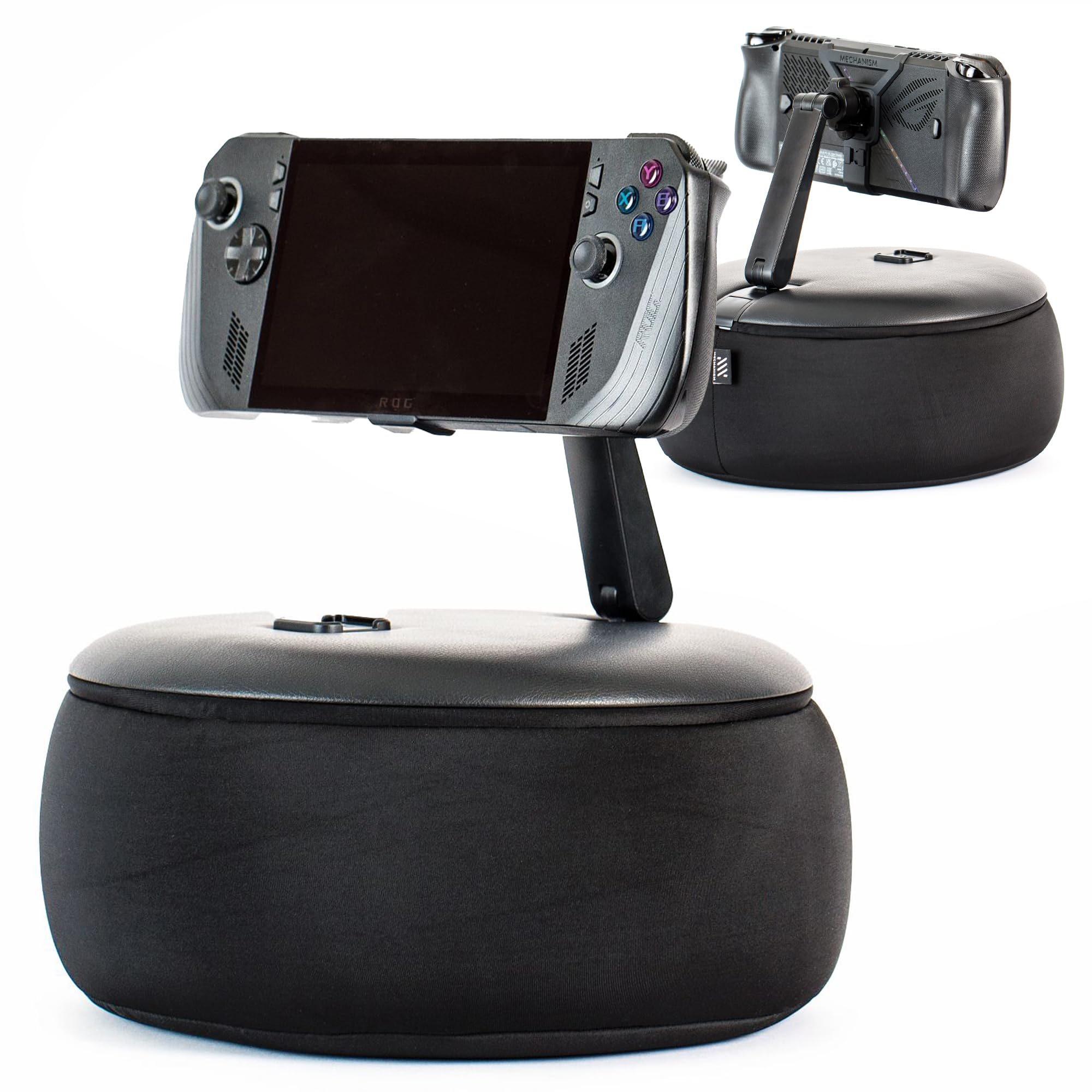
A beanbag that holds the console so your wrists stop doing the holding.
It is the only pick here that holds the console for you instead of protecting or powering it. The Mechanism Gaming Pillow is filled with lightweight beads that mold to your shape, wrapped in Lycra fabric, and mounted on a 360-degree ball socket that lets you put the console exactly where your eyes want it. The ball socket holds the Ally X at eye level, so your arms rest while the screen stays in view. The grip that comes with it is designed for the original ROG Ally, per the listing, and positions the Ally X for what the maker calls zero-gravity gaming.
What people respond to is the comfort and the arm support. Owners say it takes the strain off the wrists and stops the tingling that comes from gripping a handheld for hours. The fill is machine washable, which is the detail that keeps a beanbag from becoming a problem, and the premium faux leather cover adds a bit of structure.
Two honest limits. First, the grip is the mixed part — some report it holds the console securely while others say the grip would not stay on, so if you are used to a locked-in feel, test the fit early. Second, the build splits: some find it sturdy, others describe it as flimsy and wobbly. For a beanbag, that is partly a taste question. It is the largest footprint here at 12″ x 12″, so it lives on a couch or a bed rather than in a bag. It is also the priciest pick on the list, and a few owners think an item in this category should cost less.
The case for the pillow
- 360-degree ball socket puts the console exactly where you want it
- Lycra cover and bead fill are machine washable
- Holds the console’s weight so your arms and wrists rest during long sessions
- Extra mount point for accessories and double-screen play
Before you buy
- Grip fit splits opinion — some find it does not hold firmly
- Wobbly versus sturdy reports; not a hard-shell feel
- 12″ x 12″ footprint and a premium-tier price
Made for: long sessions in bed or on the sofa where you want the console to float in front of you.
Not for: travel, or anyone who wants a locked-in grip — this is a comfort accessory, not a mount.
Know the Specs
Hall Effect and TMR Joysticks
A standard analog stick uses a physical wiper that wears down over time, which is what causes drift. A Hall effect stick replaces the contact with a magnetic sensor that reads position without touching anything. TMR, or tunnel magnetic resistance, is a newer version of that idea, and the maker here claims improvements in durability, power consumption, and rated voltage over standard Hall sticks. The number that matters for feel is rotational resistance: 190gf means the stick is firmer to push, which suits fine aiming in FPS games. If you are not fighting drift, you do not need this upgrade yet.
Dock Refresh Rate and Pass-Through Wattage
Two separate numbers decide what a dock can actually do. The refresh rate (4K@60Hz, 4K@120Hz, 4K@144Hz) is how many times per second the external screen updates — a higher number means smoother motion, and it depends on the dock’s HDMI version. The pass-through wattage is how much power it sends through to the console, which is what keeps a Turbo Mode session alive. A dock with 95W or 100W pass-through still needs a charger that can supply it, so check that your adapter matches the dock’s input before blaming the dock for slow charging.
Common Questions
Will the Syntech case fit the ROG Xbox Ally from 2025?
Do I need a BIOS update to get 30W Turbo Mode through a dock?
Is a 65W charger enough for the ROG Ally X in a dock?
Will the SABRENT dock hold my Ally X upright?
Why does my dock output no video at all?
How much resistance do the HandheldDIY sticks add compared with the stock ones?
Are the HandheldDIY joysticks compatible with the original ROG Ally?
Can I use third-party thumbstick caps with the HandheldDIY joysticks?
Does the ButterFox case fit a UK charger?
Will the gaming pillow hold the console securely during play?
The Bottom Line
For most people buying ASUS ROG Ally X Accessories, the smart first purchase is the Syntech Hard Carrying Case — a hard EVA shell, two compartments, and a stand function for one carry, with the crowd behind it at 4.5+ stars across 800+ owners. If you want a desktop setup, the iVANKY 8-in-1 Dock leads on display speed with 4K@144Hz and adds 1Gbps Ethernet. And if drift has already found your sticks, the HandheldDIY TMR Hall Joystick is the fix worth opening the shell for. One last thing: the accessories that actually last are the ones whose compatibility line names your exact model year — read that line first, and the rest of the buying decision gets a lot easier.
How we choose
We do not accept paid placement. Every pick is matched to a real buyer and a real use-case; we do not hands-on test units.
Sources
Specifications: manufacturer listings and product documentation. Review insights: verified customer reviews, as of November 2026. Pricing: not shown on this page (it changes often); check the current price via the retailer link.
As an Amazon Associate, Gamepad Test earns from qualifying purchases. This does not affect which products we feature.