
Specs are compiled from manufacturer listings and verified buyer reviews and can change over time — please confirm the key details on the product page before buying.
If you want the short answer: buy a board whose switch travel matches how you actually play. A fast mouse can’t compensate for a key that fires late, and no amount of RGB hides a mushy press. Below you’ll find nine mechanical boards that each solve a different gaming problem — one for instant inputs, one for pure desk presence, one for budget buyers who still want real switches. Every claim here comes from the maker’s published specs and what owners actually report after living with these decks.
This guide is built by comparing the manufacturers’ published specifications and the patterns across verified customer reviews, so you get each pick’s real strengths and trade-offs instead of marketing spin.
Start with switch type, then layout, then how you’ll connect it to your rig. Keycaps, lighting and knobs are personal taste layered on top. Here are nine boards worth your desk space, chosen as the best mechanical keyboard for gaming setups of every shape and budget.
Top Picks


How To Choose The Best Mechanical Keyboard for Gaming
Most gaming keyboards fail you in one of two ways: the keyswitches are too slow for the game you play, or the layout crowds out your mouse arm. Get switch speed and layout right first, and everything else becomes a preference.
Switch type before switch brand
A linear switch glides straight down with no bump — good for rapid repeated taps in shooters. A tactile switch gives a small bump partway down, which many typists prefer and some gamers find distracting. Blue-style clicky switches add an audible click; they feel great and they will be heard through a headset mic on a call.
What matters for gaming is the actuation point — the exact depth at which the key registers a press. The GravaStar Mercury K1 Pro’s Speedy Mint linear switches actuate at 1.2mm of pre-travel with a 45gf actuation force, which is a shallow, light press. The Razer BlackWidow V4 X Yellow switches also use a 1.2mm actuation distance with 45g of force and zero gap between actuation and reset. Shallow means shorter input delay between your finger and what happens on screen.
Layout: how much desk you are willing to give up
A full-size board keeps the number pad, which some players use for MMO or sim hotkeys. A 75% board compresses everything into fewer keys and frees a wide runway for your mouse — the GravaStar’s 75% frame carries 79 keys plus a control knob, and the ASUS ROG Azoth packs 81 keys into a 12.83-inch-wide body. Tenkeyless sits in between, keeping the arrow cluster while dropping the number pad.
Wired, 2.4GHz, or Bluetooth
2.4GHz wireless through a dedicated dongle is the mode most gamers should use for competitive play — it behaves like a wire. Bluetooth is for laptops and tablets where convenience beats latency. Wired USB-C is the simplest, never-needs-charging option and the safest pick if you hate remembering to top up a battery.
Side-by-Side Comparison
| Model | Best For | Switch Type | Layout / Keys | Connection | Amazon |
|---|---|---|---|---|---|
| GravaStar Mercury K1 Pro★ Best Overall | Best Overall | Linear (45gf, 1.2mm) | 75% / 79 keys | 2.4GHz, Bluetooth, USB-C | Amazon |
| SteelSeries Apex Pro TKL Gen 3Best for Competitive Play | Best for Competitive Play | Magnetic Hall Effect (45gf) | TKL / 84 keys | USB-C wired | Amazon |
| ASUS ROG AzothPremium Build Pick | Premium Build Pick | Linear (NX Snow) | 75% / 81 keys | 2.4GHz, Bluetooth, USB | Amazon |
| Keychron K10 HE | Best Full-Size Magnetic | Magnetic Hall Effect | Full-size / 104 keys | 2.4GHz, Bluetooth 5.2, USB-C | Amazon |
| Logitech G515 LIGHTSPEED TKL | Best Low-Profile Wireless | Tactile (GL Brown) | TKL / 104 keys | LIGHTSPEED, Bluetooth, USB | Amazon |
| AULA S98 Pro | Most Feature-Packed | Linear (hot-swap) | 96% / 96 keys | 2.4GHz, BT5.0, USB-C | Amazon |
| RK ROYAL KLUDGE R98 Pro | Best Typing-Feel Value | Linear (cream, pre-lubed) | 96% / 98 keys | USB-C wired | Amazon |
| Razer BlackWidow V4 X | Best Macro Layout | Linear (Yellow, 45g) | Full-size / 104 keys | Wired | Amazon |
| Redragon Typewriter Style | Best Budget Retro | Clicky (Blue) | Full-size / 104 keys | 2.4GHz, Bluetooth 3.0/5.0, USB-C | Amazon |
Detailed Reviews
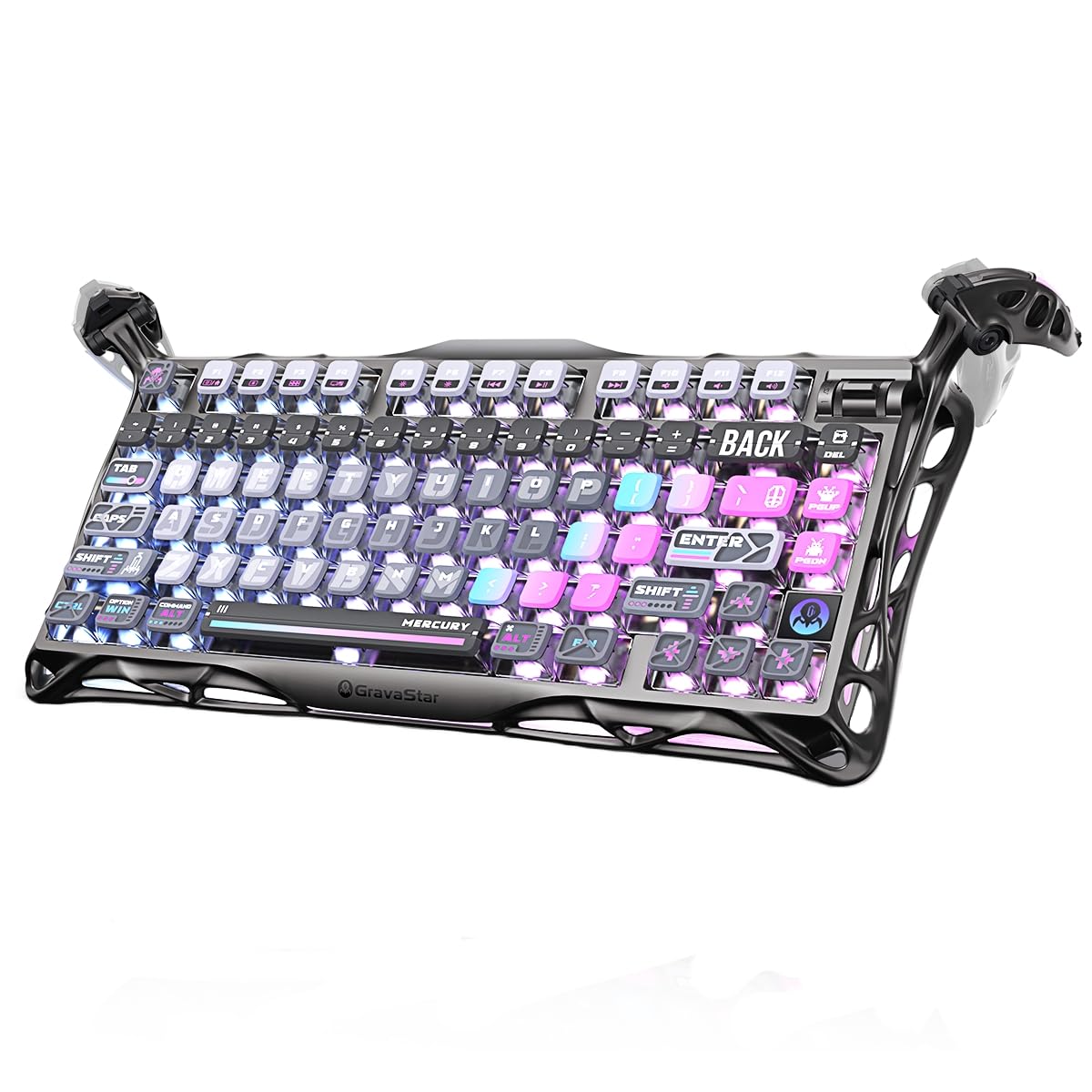
1. GravaStar Mercury K1 Pro Wireless Mechanical Gaming Keyboard
Our pick — 4.5+★ from 900+ verified ratings; the strongest balance of quality and price.
A skeletal aluminum frame that thocks instead of pings — and still fires at 1.2mm.
You get a keyboard that feels like a piece of desk hardware rather than a plastic tray. The exoskeleton is aluminum alloy with an open skeletal frame, and that metal does two jobs at once: it steadies the board during hard gaming sessions and it makes the whole setup look intentional in a dark room. What wins people over is the overall quality of the thing — by a wide margin the most-praised part of this board in the review pages.
The switches are GravaStar’s collaboration with Kailh, a Speedy Mint linear rated for 70,000,000 keystrokes. Actuation force is 45gf with 1.2mm pre-travel, so the key bottoms out fast and light — exactly what you want when you’re tapping A and D to strafe. It’s a hot-swap board too, so you can pull those switches later without a soldering iron. Underneath sit a gasket-mounted FR4 plate and a 5-layer foam damping structure, which is the reason it produces a deeper “thock” at moderate volume instead of a hollow clack.
Wireless is genuinely flexible here: 2.4GHz for gaming, Bluetooth for a laptop or tablet, and USB-C wired when you’d rather not think about charging. GravaStar rates the battery at up to 470 hours with lighting off or up to 40 hours with it on. Compare the layouts and the trade-off is obvious — 79 keys here versus 104 on the Redragon, a 32% narrower key count that buys you mouse room. You lose the number pad and the function-row spacing full-size users are used to. The knob handles volume and mute, which softens that loss.
What earns the top spot
- Aluminum alloy exoskeleton keeps the board planted during fast input
- 1.2mm pre-travel and 45gf force give quick, light keystrokes
- Gasket mount plus 5-layer foam delivers a deep, controlled thock
- Up to 470 hours with lighting off means multi-day sessions unwired
- Two independent RGB systems with 13 lighting modes
Where it asks something back
- 79 keys means no number pad for MMO or spreadsheet work
- The metal frame makes it noticeably hefty to carry around
Reach for this if: you want one board that looks like a centerpiece and still actuates at 1.2mm for shooters.
Think twice if: your games live on the number pad — a 104-key board suits you better.
2. SteelSeries Apex Pro TKL Gen 3 Gaming Keyboard
The one board where you dial in exactly how far each key has to travel before it fires.
This is the pick for players who treat a missed ult as a personal failure. The OmniPoint 3 Hall Effect switches let you set actuation anywhere from 0.1mm to 4.0mm across 40 levels, with a 45g bottom-out force. Hall Effect means the switch reads your press with a magnetic sensor rather than metal touching metal — so there is no fixed contact point, just a number you choose. Set it shallow for movement keys and deeper for anything you don’t want to trigger by accident.
Then there’s the triple-threat software layer. Rapid Trigger resets the key the moment you release it, so stopping and starting again costs you less in a strafe duel. Rapid Tap snaps to your latest key press for faster direction changes. Protection Mode is a patent-pending feature that reduces accidental presses on neighbouring keys — the difference between a clean play and a wasted ultimate. QUICKSET Auto-Presets launch pro-level configs the second your game loads, so you aren’t rebuilding profiles between matches.
An OLED smart display lets you change settings on the board itself, with your configs saved onboard so you never leave the match to tweak something. It’s a compact TKL body with 84 keys and USB-C wired connectivity only — no wireless mode here. Compare that to the GravaStar’s tri-mode setup and you can see the philosophy: SteelSeries spent on switch technology instead of a battery. That is the right call for a tournament board, and the wrong one if you want to game from a couch.
Where the money went: the adjustable 0.1mm-to-4.0mm actuation and the Rapid Trigger / Rapid Tap / Protection Mode trio — features with no equivalent on any other board in this list, all reachable in seconds per game.
The honest limit: value is the recurring friction point. Owners who love it call it the best they’ve used, players who don’t feel the spend is steep. If you never touch actuation settings, you’re paying for a toolkit you’ll ignore — and remember it is wired only, so plan for the cable.
The verdict in one line: the competitive pick — choose it and you buy the deepest switch customization here; choose something else and you keep the cash.
3. ASUS ROG Azoth Wireless Mechanical Gaming Keyboard
Comes with the lubricant and the lube station — the board assumes you’re going to tinker.
Most keyboards treat modding as something you figure out alone. ASUS ships this one with Krytox GPL-205-GD0 lubricant, a switch opener, keycap and switch pullers, a lube station and a brush, plus 3 ROG NX switches and 8 stabilizer mats. If you have ever watched a modding video and thought “I could do that,” this board hands you the toolbox. Build quality is the standout — owners consistently describe the construction as solid, and the PBT doubleshot keycaps back that up.
The ROG NX Snow linear switches come pre-lubed and are hot-swappable, so you can swap in your own 3-pin switches down the road. A silicone gasket mount and three-layer dampening foam absorb vibration and kill the pinging sound cheap boards make. The 75% body is 81 keys wide and just 12.83 inches long, which leaves a generous strip of desk for your mouse. A 2-inch OLED screen shows CPU and GPU stats, media playback and keyboard settings in real time — genuinely useful mid-game if you overclock, decorative if you don’t.
Connectivity covers Bluetooth for up to three devices, ROG SpeedNova 2.4GHz for low-latency play, and wired USB. ASUS rates battery life at 2000+ hours with the OLED and RGB off, a figure that makes most wireless boards look thirsty. The caveat worth weighing: value comes in for criticism more than any other aspect of this board. You are paying premium money for the build and the modding kit, not for flashy features you’d find on a cheaper board.
Pick this if: you want a board you’ll open up, lube, and keep for years — the included tool kit is the whole point.
Pass if: you’ll never touch the switches; a cheaper hot-swap board does the same daily job.
4. Keychron K10 HE Full-Size Hall Effect Keyboard Wireless
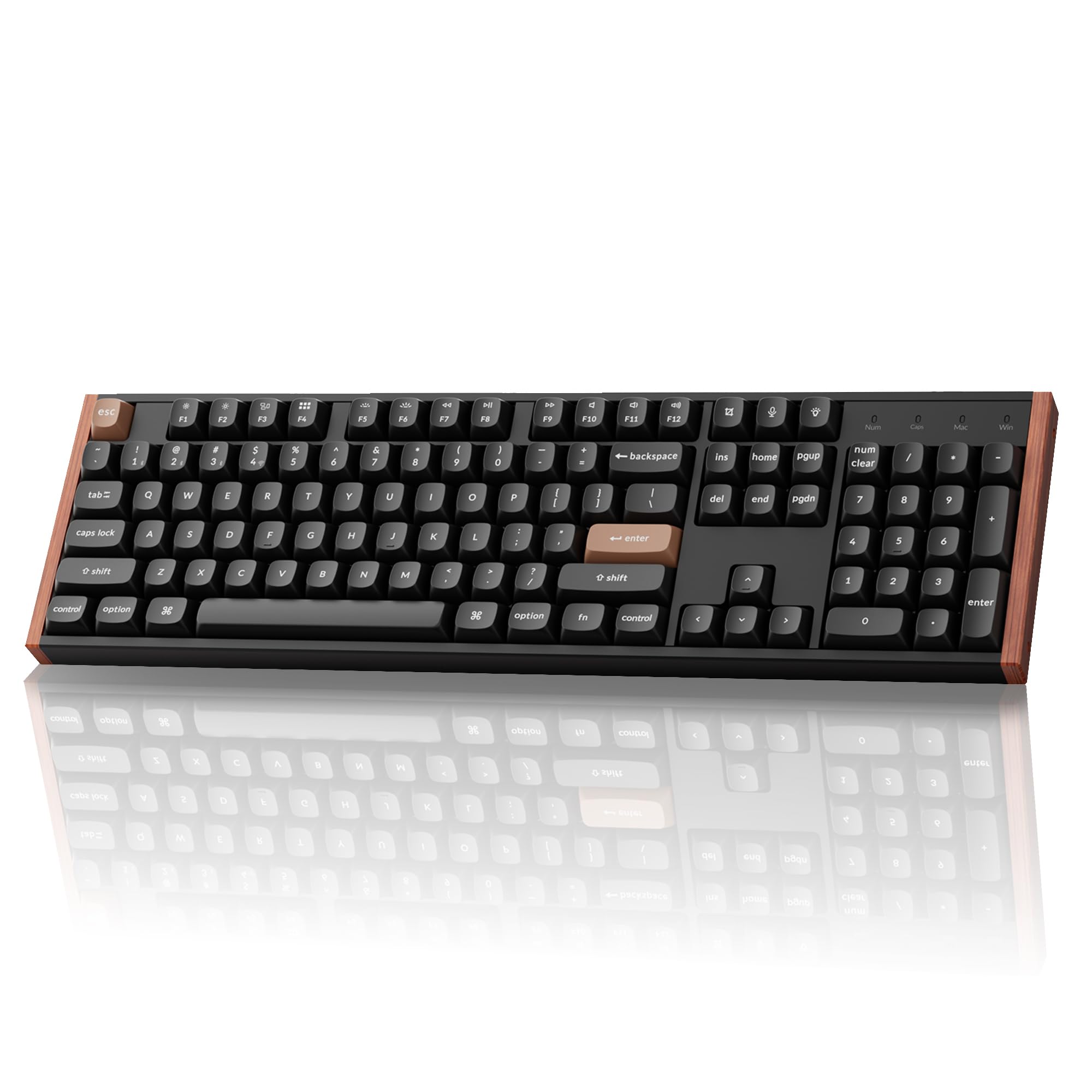
A full 104-key deck with magnetic switches and real wood down the sides.
If you need a number pad for MMO hotbars or sim bindings, magnetic switches have historically meant a smaller layout. Not here. The K10 HE runs a full 100% layout with 104 keys and still uses Hall Effect magnetic switches, hot-swappable and rated at 0.1mm sensitivity with an actuation range from 0.2mm to 3.8mm. You set that in the Keychron Launcher web configurator, which also handles macros and rapid trigger.
Tri-mode connectivity means Bluetooth 5.2 with up to three paired devices, 2.4GHz wireless, and Type-C wired. Cross-system support covers macOS and Windows with dedicated media keys and extra keycaps, and Linux remapping works too — useful if your gaming rig dual-boots. The OSA-profile doubleshot PBT keycaps resist shine, and natural wood sidings give it a look no all-black plastic board can match.
What wins people over is how the keys feel and sound — smooth and silky is the recurring description, with a muted press that won’t wake a household. Two honest notes. First, the magnetic switch technology is the reason to buy this board; if you don’t want to touch actuation settings, a cheaper standard mechanical board does the same job. Second, connectivity and reliability draw mixed feedback — some units hold a perfect Bluetooth link, others drop from the PC. Wired mode sidesteps that entirely.
Why it holds its place
- 104 keys with Hall Effect switches — full-size layout without giving up magnetic actuation
- Adjustable 0.2mm to 3.8mm range with rapir trigger via Launcher
- OSA-profile PBT keycaps and wood sidings separate it from plastic boards
- Bluetooth 5.2 pairs up to three devices for a console, PC, and laptop
Where to be careful
- Wireless link quality is the least consistent part of the package
- Full-size footprint eats desk width a 75% board would leave for your mouse
Best matched with: players who need number-pad bindings and want magnetic switches anyway — a rare combination.
Skip if: you mostly play gamepad-style shooters with a wired mouse and no need for the number pad.
5. Logitech G515 LIGHTSPEED TKL Wireless Gaming Keyboard

A slim wireless TKL that sits low enough your wrists stop complaining mid-session.
The low-profile frame is the defining spec here — the keys sit close to the deck, so your wrist rests at a shallower angle than a tall mechanical board demands. Switches are GL Brown tactile, factory-lubed for smoother travel with that discernible bump halfway down. Double-shot PBT keycaps with an anti-oil finish mean the letters stay legible after months of sweaty palms. Logitech markets it for gaming professionals, and buyers report it handles both play and work without fuss.
Wireless runs on LIGHTSPEED, Logitech’s low-latency 2.4GHz connection, with Bluetooth and wired USB data modes alongside it. A single charge is rated for up to 36 hours of continuous play — enough for a long weekend of sessions, short enough that you’ll want the USB-C cable nearby if you game seriously. KEYCONTROL lets you program up to 15 functions on a single key via firmware, so remap depth goes further than most boards allow.
Where it flexes is sound. Owners note it isn’t loud or clacky — just the right amount of clicking, which makes it a board you can use on a call without apologizing. The catch sits in functionality rather than feel: some units run flawlessly while others hit issues, so keep the receipt and test every key inside the return window.
Sound and feel: a PBT-capped, factory-lubed low-profile deck that keeps the noise floor low — the opposite of a clacky gamer board, and a good match for shared rooms.
Check before you commit: 36 hours with the backlight running means charging is part of your routine, not a rare event. Plenty of owners never notice; heavy weekend players should keep the cable handy.
One-line call: the TKL to buy if your wrists prefer a low deck and you want LIGHTSPEED wireless without bulk.
6. AULA S98 Pro Wireless Mechanical Gaming Keyboard
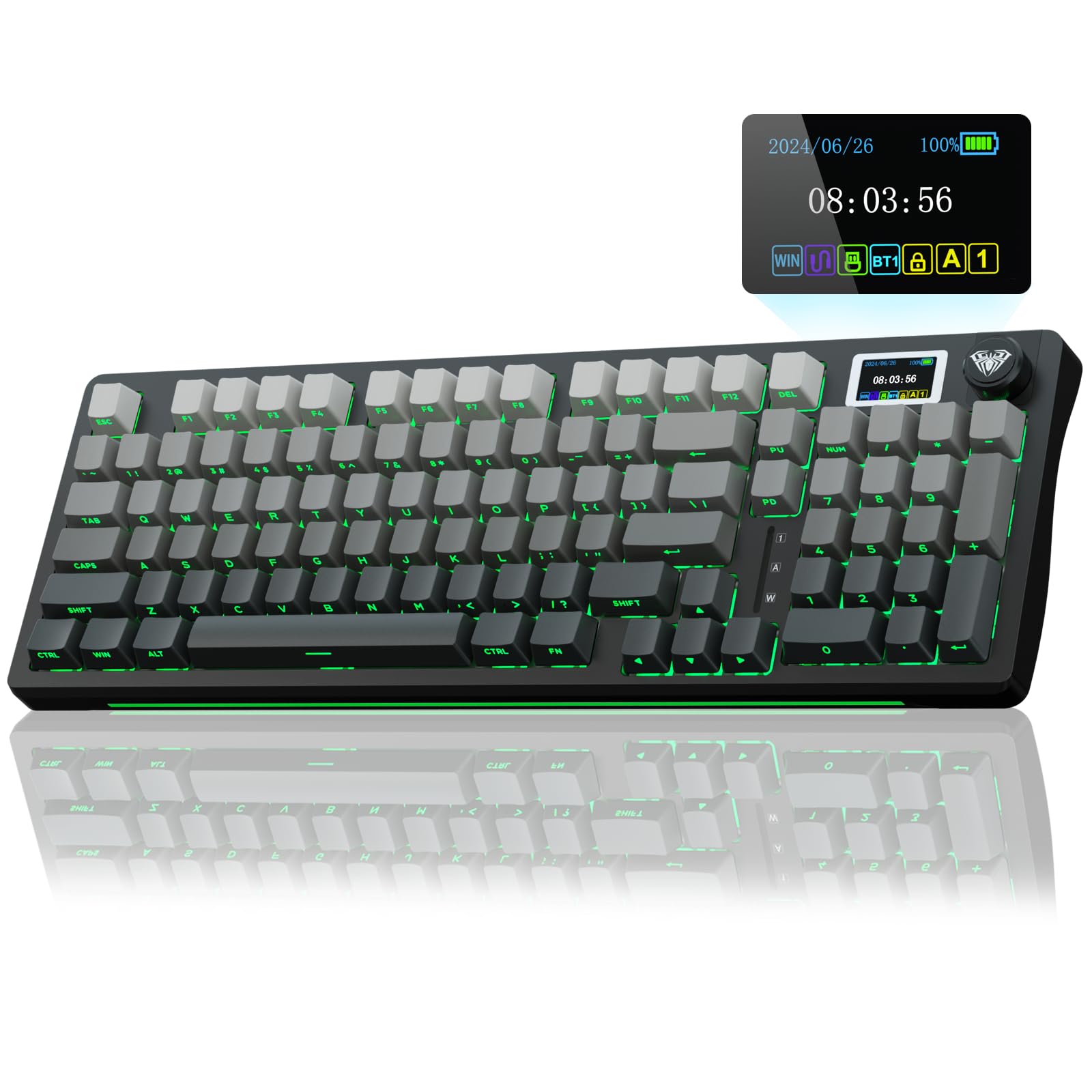
A little LCD screen that shows your battery, your connection, and your GIFs.
Most keyboards hide their status in software. This one puts a smart LCD screen on the deck showing date, time, battery level, system, connection mode and status. The multi-function knob rotates or clicks to adjust connection mode, volume, RGB mode, language and even the screen image or GIF. Configure it in the Windows-only software while in wired mode, then the setting sticks. It is a gimmick if you don’t care and genuinely useful if you swap between a PC, laptop and console.
The internal spec matters more: 5,000mAh of battery in the deck, which is what lets it run long sessions away from a cable. Tri-mode connectivity covers BT5.0, 2.4GHz wireless and USB-C wired, and it can remember up to five devices switched from the knob. Hot-swap base takes 3-pin or 5-pin switches with pre-lubed stabilizers already in place, so you can swap in new switches without a soldering iron. Five layers of sound deadening material fills the space between PCB and plate, killing cavity noise.
Nineteen RGB effects over 16.8 million colors plus front-side light put on a show, and side-engraved PBT keycaps in double injection molding resist fading. What wins people over is the typing feel — creamy in both sound and touch, on 96 keys with a number pad kept in the layout. The trade-off: reliability is the one aspect that divides owners, with some units stopping after a period of use while others run without complaint.
Choose it for: switching speed — one knob to hop between a gaming PC, an iPad and a console, with a 5,000mAh cell behind the fun.
Choose something simpler if: you want a leaner board with less software to learn; the screen setup needs a Windows PC on wired mode.
7. RK ROYAL KLUDGE R98 Pro Wired Mechanical Keyboard
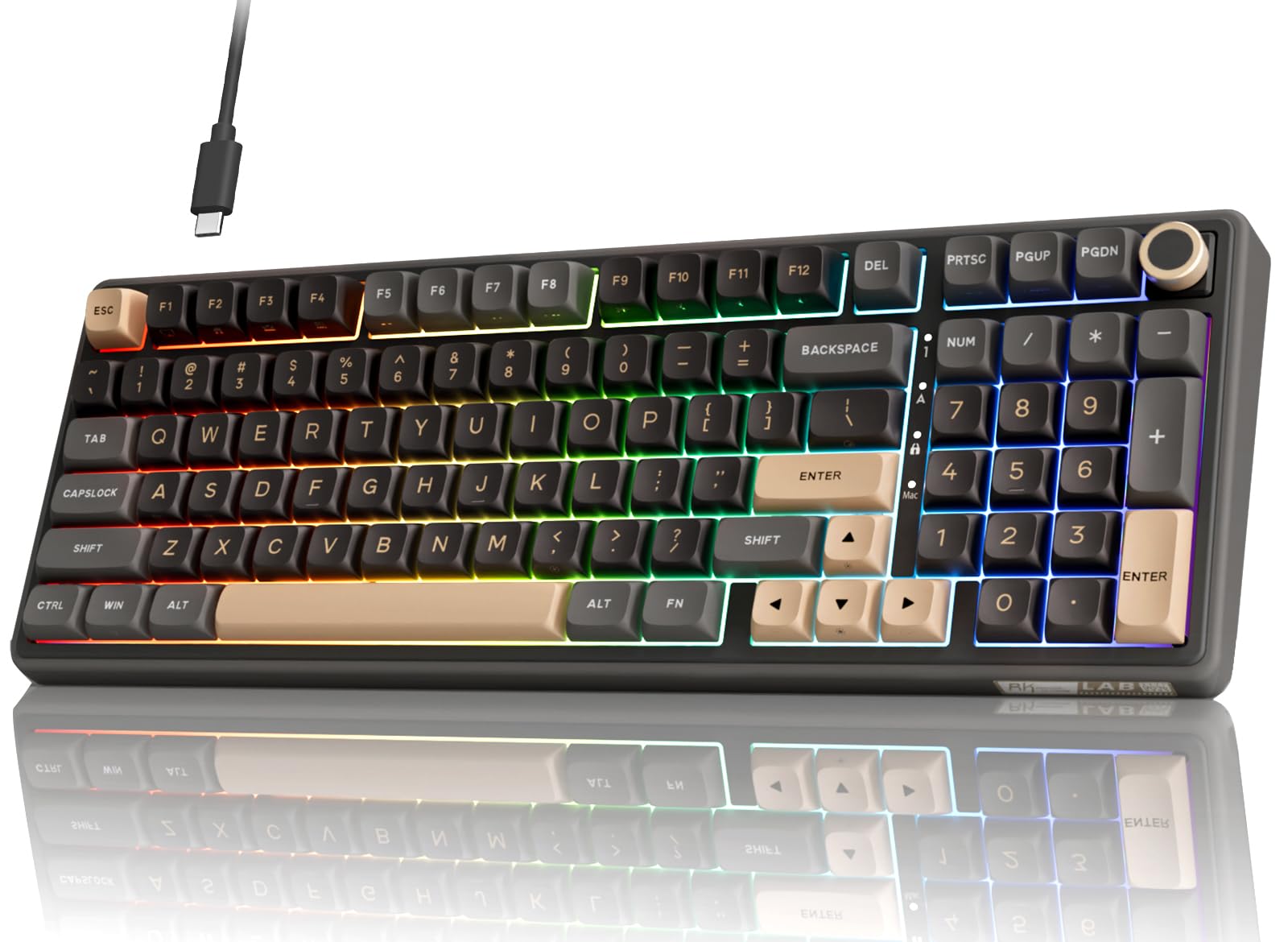
Five layers of foam and a creamy pre-lubed linear switch for a sound most boards miss.
Here’s a 96% board that keeps the number pad, the arrow keys and most of the function row while trimming width. The signature is acoustic: five layers of sound-absorbing foam under the gasket mount shape a creamy, deep sound that goes well beyond its price tier. The switches are pre-lubed linear “cream” switches, hot-swappable for 3-pin or 5-pin replacements. Owners describe the typing feel as buttery smooth, which is why the keyboard-feel feedback lands so unanimously positive.
The 98-key layout is 15.3 inches long and 5.5 inches wide, which is 12% wider front-to-back than the Redragon’s 4.7 inches — that extra depth is what fits the gasket mount and foam stack inside. Keycaps are MDA profile PBT with a matte surface, double-shot so the legends won’t rub away, and they wrap your fingertips more than flat keycaps do. A detachable aluminum CNC knob handles volume, and four indicator lights show Num Lock, Caps Lock, Win Lock and Mac Mode at a glance.
Connectivity is USB-C wired only — no wireless option, which is why the sound and build can be this good at this tier. Over 20 RGB modes and programmable keys via the RK online driver on Windows and Mac round it out. The honest trade-off: functionality is the one mixed aspect, with some units reporting keys that stop working. Test the full keyboard on arrival.
The sound case: a five-layer foam gasket and pre-lubed cream switches to deliver a thocky, creamy profile you normally have to mod into a board yourself.
Know going in: wired only. If you move between a desktop and a couch setup, this is not the board to reach for.
Best for: the typist-gamer who wants a 96% layout with a number pad and cares how the board sounds as much as how it fires.
8. Razer BlackWidow V4 X Mechanical Gaming Keyboard

Six dedicated macro keys on the left edge, for the builds that need a second keybar.
The defining feature is the six dedicated macro keys flanking the main block. Every one is programmable to your playstyle, which is exactly what MMO and sim players want without remapping precious main keys. The Yellow mechanical linear switches actuate at 1.2mm with 45g required and zero distance between actuation and reset — instant, rapid-fire inputs, and quieter than you’d expect thanks to built-in sound dampeners. A layer of foam under the circuit board and lubricated stabilizers further cut the noise.
Chroma RGB per-key lighting covers over 16.8 million colors and effects, with dynamic lighting tied into Chroma-integrated games. Doubleshot ABS keycaps with extra-thick walls hold up to intense use without the labels wearing off. A multi-function roller plus secondary media keys control playback, volume and brightness without alt-tabbing out. The board is wired over USB, standard 104-key full-size, so it assumes a desktop setup rather than a laptop bag.
The fair warning is durability and responsiveness. Quality feedback leans mixed here — some owners are thrilled with the performance, others report trouble or keys that stop responding. That’s not universal, but it’s common enough to mention. Buy this board because you want six macro keys and quiet linear actuation, and test the responsive keys thoroughly in the first week.
The macro advantage
- 6 dedicated programmable macro keys — extra commands without sacrificing movement keys
- 1.2mm actuation with zero reset gap for fast repeated inputs
- Foam layer and lubricated stabilizers keep it quieter than the Yellow switch name suggests
- Doubleshot ABS keycaps with extra-thick walls resist label wear
Worth knowing
- Full-size 104-key footprint plus the macro column demands desk width
- Post-sale feedback on durability divides owners, so test all keys early
For the MMO and sim crowd: the six-key macro bank is a real control advantage no 75% board offers.
Not for minimalists: if you play a single genre with few hotkeys, the extra macro column is clutter.
9. Redragon Wireless Typewriter Style Mechanical Gaming Keyboard
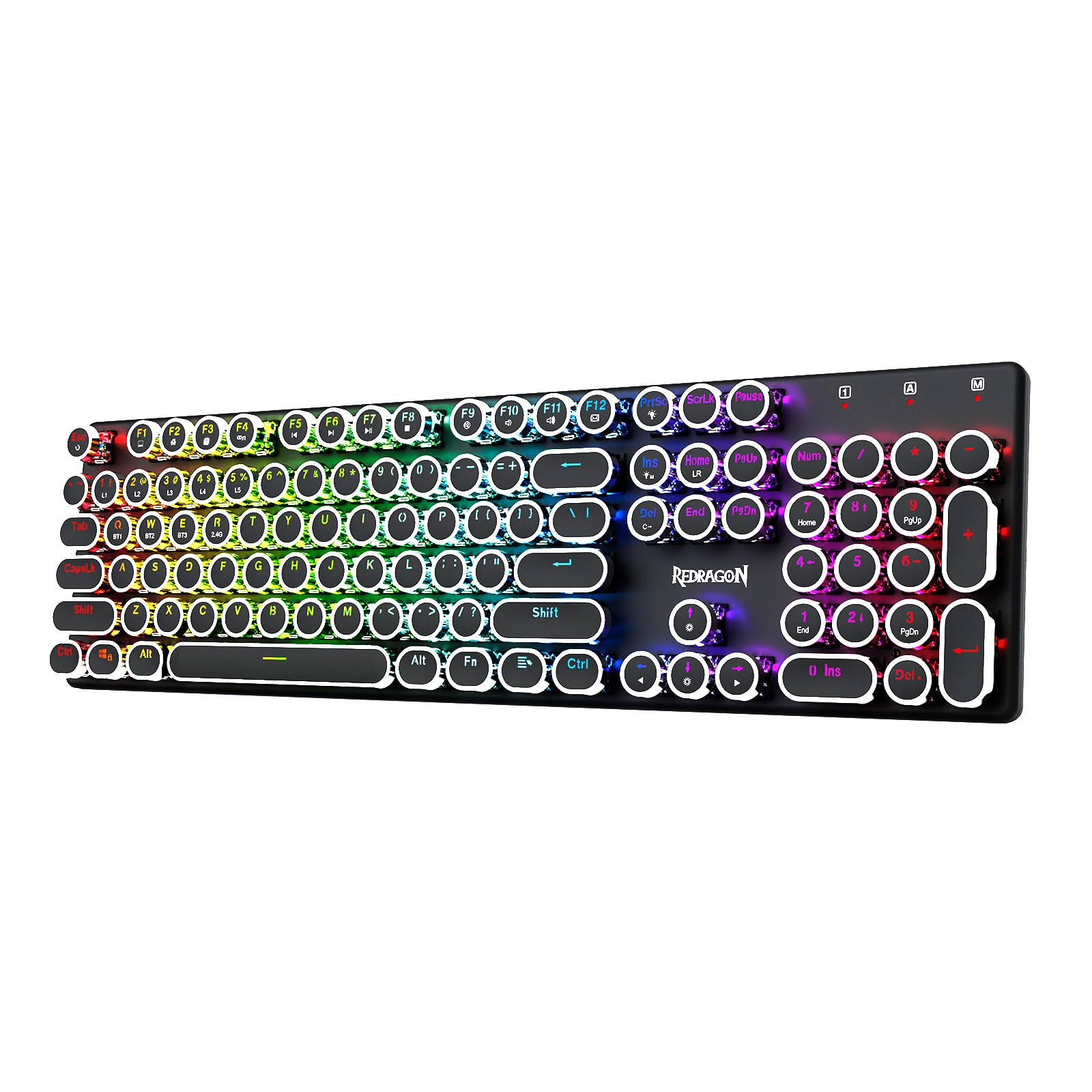
Round keycaps, an audible blue click, and a 4,000mAh battery behind it all.
The look is the hook — round vintage keycaps fixed to a metal panel, arranged like a classical typewriter. Below the styling, the Redragon’s Blue mechanical switches take medium resistance with an audible click and tactile feedback, which means every press announces itself. Clickiness draws a dedicated fanbase that likes the typewriter feel; on a shared mic, that same click is the trade-off. The 4,000mAh rechargeable battery feeds three connection modes: USB-C wired, Bluetooth 3.0/5.0, and 2.4GHz wireless, switched with FN plus Q, W, E or R.
You get up to 16 preset backlighting modes on board with brightness and speed adjustable directly, plus 7 solid color options and per-key color customization with software. The 104-key layout supports anti-ghosting, so multiple keys register at once without conflicts. At 17.1 inches long and 4.7 inches wide, it’s the widest board here. Metal and plastic construction keeps it planted on the desk.
Two things to know honestly. Durability descriptions are mixed — the plastic rings under the round keycaps are the point of friction. And value divides owners, split between players who feel the build matches the price and those who expect more. Neither undermines it as a display piece or a novelty board. Buy it because the retro look is the reason you’re shopping, not an afterthought.
Pick it when: the typewriter aesthetic and the loud, tactile blue click are what you actually want from a keyboard.
Look elsewhere if: your teammates are on the same voice call — a clicky switch is a broadcast, not a quiet press.
Know the Specs
Actuation distance and reset point
Actuation is the depth a key travels before the keyboard registers the press. A shallow setting like 1.2mm asks your finger to move less before the input fires — good for rapid repeated taps. Hall Effect boards go further: you set actuation anywhere from 0.1mm to 4.0mm, and Rapid Trigger resets the moment you release the key rather than at a fixed point. For anyone who plays games where stopping and starting a strafe matters, that reset gap is the number to care about.
Switch feel, sound, and force
Switch force is measured in grams (gf). A lighter force like 45g is easy on your fingers; heavier switches push back more. Linear switches glide straight down, tactile ones add a bump, clicky ones add an audible click. Gasket mounting and foam layers shape the sound: the Keychron K10 HE’s muted press and the AULA S98 Pro’s creamy tone come from exactly this — the plate is suspended on soft material rather than screwed tight to metal.
Layout and key count
A 75% board drops the number pad and squeezes the function row, typically landing around 79 to 81 keys. A 96% board keeps the number pad and arrows in a tighter frame, with key counts in the high 90s. Full-size runs 104 keys and takes the most desk space. The right layout keeps the keys your games use without crowding your mouse arm.
Connectivity and battery
2.4GHz through a dedicated dongle behaves like a cable and is what most gamers should use. Bluetooth is convenient for laptops and tablets but can be less consistent. Wired USB-C never needs charging. Battery figures are usually quoted with lighting off — the GravaStar’s up to 470 hours drops to up to 40 with the RGB on, so read the number that matches how you’ll actually use the board.
Common Questions
Is a Hall Effect keyboard actually faster for gaming than a regular mechanical one?
Will a 75% keyboard like the GravaStar Mercury K1 Pro be enough for MMO raiding?
What is a hot-swappable keyboard and do I need one?
Does tri-mode wireless add input lag compared to a wired keyboard?
How long does a wireless keyboard battery really last between charges?
Are clicky Blue switches bad for gaming?
Can I use a mechanical gaming keyboard with a Mac or iPad?
Is a number pad worth the desk space on a gaming keyboard?
What PBT versus ABS keycaps means for a gaming board?
Do I need a gasket-mounted keyboard or is it just marketing?
The Bottom Line
The mechanical keyboard for gaming that comes out ahead for most desks is the GravaStar Mercury K1 Pro — a 75% aluminum board with 1.2mm linear actuation, a real thock from its gasket mount and five-layer foam, and up to 470 hours unwired with the lights off. It’s the crowd favorite here at 4.5+ stars across 900+ owners, and it earns the spot by covering looks, feel and battery in one frame.
If your game rewards stopping and starting faster than everyone else, the SteelSeries Apex Pro TKL Gen 3 is worth the spend for Rapid Trigger and its 0.1mm-to-4.0mm actuation range alone. Need a number pad for MMO hotbars? The Keychron K10 HE keeps all 104 keys and still runs Hall Effect switches. And on the tightest budget, the Redragon Typewriter Style delivers real Blue mechanical switches, 104 anti-ghosting keys and a 4,000mAh battery in tri-mode wireless for the price of a casual game.
How we choose
We do not accept paid placement. Every pick is matched to a real buyer and a real use-case; we do not hands-on test units.
Sources
Specifications: manufacturer listings and product documentation. Review insights: verified customer reviews, as of November 2026. Pricing: not shown on this page (it changes often); check the current price via the retailer link.
As an Amazon Associate, Gamepad Test earns from qualifying purchases. This does not affect which products we feature.