
Specs are compiled from manufacturer listings and verified buyer reviews and can change over time — please confirm the key details on the product page before buying.
A Switch Lite controller has to pair cleanly, wake the console from sleep, and keep its sticks centered past the first month. The problem is that most third-party pads on the shelf look identical and promise the same things, yet the small details — stick technology, battery capacity, button count — decide whether you get months of clean play or a drifting thumbstick. This guide covers six Switch Lite controllers, sorted by what each one does best.
This guide is built by comparing the manufacturers’ published specifications and the patterns across verified customer reviews, so you get each pick’s real strengths and trade-offs instead of marketing spin.
You will see which pads survive long sessions, which ones pack drift-resistant sticks, and which bundles make sense for families. Here is the short answer on the best Switch Lite controller for your setup.
Top Picks
How To Choose The Best Nintendo Switch Lite Joy-Con Controller
Your Switch Lite has built-in controls, so adding a wireless pad is about comfort during long sessions and saving the built-in sticks from wear. The controller you pick needs to pair cleanly, wake the console from sleep, and feel right in your hands for hours. These four specs separate a good buy from a frustrating one.
Stick technology is the first thing to check
Analog sticks wear out. Traditional contact-based sticks can develop drift, where the cursor creeps even when you are not touching the stick. Look for magnetic sensing — TMR (Tunnel Magnetoresistance) or Hall Effect — which uses magnets instead of physical contact, so there is no friction to wear down. The Spican pad is the clearest example here, built with TMR joysticks designed to eliminate drift and offering a zero dead zone setting.
Battery capacity in mAh, not marketing hours
Battery size is measured in mAh (milliamp-hours, the amount of charge the cell holds). A 1000mAh cell generally outlasts a 600 mAh one, and the data here backs that up: the ZRZLMVP’s 1000mAh battery runs for over 16 hours, while the Gamekaws pad’s 600 mAh cell manages 12-15 hours. Higher mAh means fewer charging breaks during a long play session.
Button count and programmable back buttons
Button count tells you how many inputs the pad exposes. The ZRZLMVP lists 19 buttons, giving it the most inputs of the group, while the Gamekaws pad lists 8. More buttons plus programmable M1/M2 back paddles mean you can map combos to a single press instead of stretching your fingers.
Two-pack math for families and multiplayer
If two people play at once, a bundle changes the value picture. The pedroshaw and Fliresy packages each ship two controllers, and the Fliresy set adds a charging dock that holds both pads plus room for extra Joy-Cons. One purchase equips two players.
Side-by-Side Comparison
| Model | Best For | Battery | Buttons | Standout Feature | Amazon |
|---|---|---|---|---|---|
| ZRZLMVP Switch Controller★ Best Overall | Long sessions and custom lighting | 1000mAh / 16 hours | 19 | 9-color LED, 5 light modes | Amazon |
| FASIGO Switch ControllersBudget Friendly | Budget-friendly wireless play | Built-in rechargeable | — | 6-axis gyro, 30-foot range | Amazon |
| Gamekaws Wireless Pro Controller | Simple no-frills replacement | 600 mAh / 12-15 hours | 8 | Wake up and screenshot | Amazon |
| Spican Switch 2 Controller | Drift-free competitive play | 1000mAh / 10+ hours RGB | 12 | TMR joysticks, charging dock | Amazon |
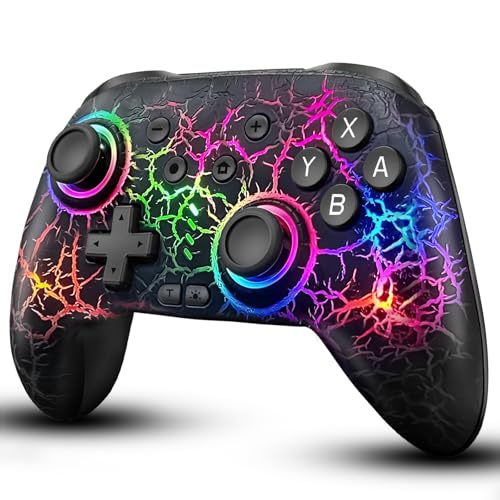
| pedroshaw 2 Pack Controller | Two players, two pads | 1000mAh / 10-15 hours | 6 | Cracked design, headphone jack | Amazon |
| Fliresy 2 Pack with Dock | Full family setup with dock | 800 mAh / 10-12 hours | — | Charging dock for 2 pads | Amazon |
Detailed Reviews
1. ZRZLMVP Switch Controller Wireless
Our pick — 4.5+★ from 400+ verified ratings; the strongest balance of quality and price.
The crowd favorite: a light-up pad that runs 16 hours on a single charge.
The headline number is 19 buttons — the most of any controller here. That count matters because it includes programmable M1 and M2 back paddles, which you can map to combos instead of stretching your fingers. Compare that to the Gamekaws pad’s 8 buttons and you can see where the extra inputs go.
Battery life is the other big draw. The 1000mAh cell (a measure of stored charge) delivers over 16 hours of play with the LEDs on, and a full charge takes 2-3 hours via the included USB Type-C cable. That 16-hour figure beats the Gamekaws pad’s 12-15 hours, so you charge less often. The pad also supports an automatic and manual Turbo mode at three speeds — 5, 12, and 25 shots per second — which helps with grind-heavy games.
The lighting is the draw: 9 colors across 5 modes, including rainbow breathing and static, with brightness adjustable from 40% to 100%. In a dim room the glow makes the pad easy to find without a lamp. Motion control comes from a built-in 6-axis gyro sensor (a motion sensor that reads tilt), and rumble has 4 levels from none to strong.
What earns its place
- 19 buttons with programmable M1/M2 back paddles
- 1000mAh battery gives over 16 hours with lights on
- 9 LED colors across 5 modes with 4 brightness levels
- Turbo at 5, 12, and 25 shots per second
Where it asks patience
- No NFC function, so Amiibo support is out
- Some units develop stick drift over time
- Reliability is a mixed bag — most hold up, a few fail early
Go for it if: you want the longest battery life and the most buttons for combo mapping.
Think twice if: you rely on Amiibo cards — there is no NFC here.
2. FASIGO Switch Controllers
Weighs just 1.6 ounces — the lightest pad in this lineup by a wide margin.
If you play lying back on a couch or in bed with the Switch Lite propped up, weight becomes the whole game. At 1.6 ounces this pad barely registers in your hands, and the ergonomic grip keeps it comfortable through a long session. The 30-foot Bluetooth range (about ten paces) means you can sit well back from the console without drops.
Motion controls are handled by a built-in 6-axis gyro sensor plus an accelerometer (a sensor that detects speed and direction of movement). Together they track your tilt for aiming in motion-sensing titles. Dual vibration motors deliver feedback on every hit, and the built-in rechargeable battery charges over USB-C.
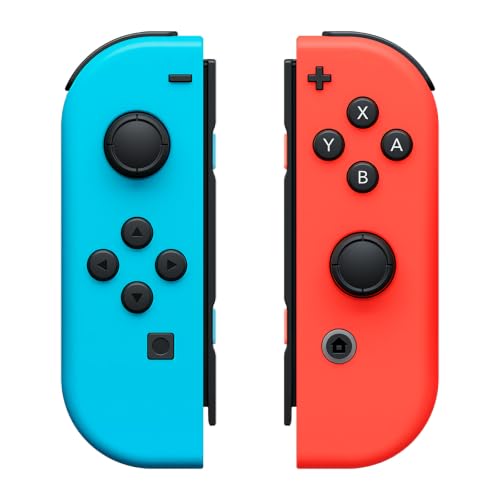
The honest read: this is the no-fuss pick. It pairs with Switch, Switch OLED, and Switch Lite, and the blue and red colorway keeps it easy to spot in a bag. The catch is that FASIGO does not publish its battery capacity, so you cannot compare its hours against the 1000mAh pads on this list.
Best suited to: handheld players who want a featherweight pad and quick USB-C top-ups.
Look elsewhere if: you need published battery specs before buying.
3. Gamekaws Wireless Pro Controller

A straightforward black pad that wakes your console and handles the basics well.
This is the pad you grab when you do not want to think about settings. Press the HOME button and the Switch wakes from sleep, ready to play. It has 8 buttons, dual motors with 3 vibration levels, and a 6-axis gyro for motion control in titles that support it.
The 600 mAh battery is the smallest here, running 12-15 hours after a 2-hour charge. That is fewer hours than the ZRZLMVP’s 16, but still more than enough for several evenings of play before you plug in. Wireless range is listed as 10 meters in a barrier-free environment.
The build is where the focus sits: non-slip, low-friction reinforced rings around each thumbstick reduce wear, and the smooth action means quicker thumb input. What owners keep coming back to is the functionality — the pad simply works and works the same way every time.
Where it fits: the button responsiveness and right-stick feel are the mixed parts. Some find the controls stiff, and a few report right-stick drift. If you are sensitive to stick feel, this is a try-before-you-trust situation.
Worth it when: you want a reliable basic pad for plug-in-and-play gaming.
Pass if: you need the longest possible battery life — 600 mAh is on the lower end.
4. Spican Switch 2 Controller with Charging Dock
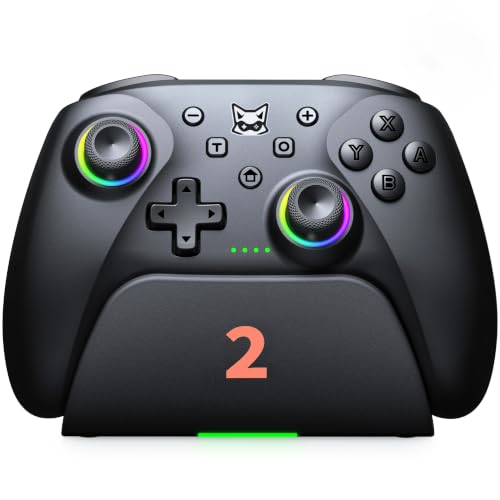
Magnetic sticks built to beat drift, plus a dock that charges and displays.
Stick drift is the slow death of every controller, so the TMR joysticks here are the whole reason to consider this pad. TMR stands for Tunnel Magnetoresistance — magnetic sensors that use no physical contact, so there is nothing to wear down. You can also switch to a zero dead zone mode for competitive shooters and fighting games, then flip back if it feels too twitchy.
The triggers are Hall Effect analog, meaning they read input through a magnetic field and give smooth linear travel instead of a clicky on-off. In racing games that means you can feather the throttle and brake. The 1000mAh cell delivers 10+ hours with full RGB running, and the dock tops it off in about 3 hours with an LED that turns from red to green when done.
There are 7 RGB modes across both joysticks and the dock, with 4 brightness levels and a dock button that kills the lights for night play. Turbo runs on A, B, X, Y, L, R, ZL, and ZR at 5, 12, or 20 presses per second. Build quality is what earns its place, and the ergonomics feel right during long sits.
Cross-check the specs: the 12-button layout sits between the ZRZLMVP’s 19 and the Gamekaws pad’s 8, so you get back-button and turbo options without a clutter of inputs.
The honest catch: wake-up pairing takes a specific setup sequence, and the one-key wake feature is where reliability complaints cluster. Some units also show button durability issues over time.
Choose it for: drift-free aiming and a dock that keeps the pad charged and on display.
skip it if: you want a pad you never have to re-pair after a console sleep.
5. pedroshaw 2 Pack Wireless Switch Controller

Two controllers in black and white, so a friend can join without buying a second pad.
Family and split-screen games need a second controller, and this bundle solves that in one purchase. Both pads carry a 1000mAh battery — the same capacity as the ZRZLMVP — which charges fully in about 2 hours and runs 10 to 15 hours per charge. That is roughly double the capacity of the Gamekaws pad’s 600 mAh cell.
The cracked black-and-white finish is not just looks: the textured surface adds grip, so sweaty hands do not slip mid-match. There are 9 LED colors including a rainbow option, plus a 3.5mm audio jack (a standard headphone port) for private play. For combo-heavy games, 2 back buttons labeled M1 and M2 can absorb mapped inputs — 1 to 22 basic buttons can be programmed into them.
Gyro and 4-level vibration (none, weak, standard, strong) are both on board, and turbo runs at 5, 12, or 20 times per second. What earns it a spot is the build quality — both pads feel solid and the pair works reliably.
One caveat, sized fairly: battery-life and durability experiences vary. A smaller share of buyers report a pad that will not hold a charge or that gives out early, so treat the pair as a value buy rather than a long-term premium investment.
Right call for: households that need two pads for co-op and family play.
Not for you if: you want a single pad built to last years — long-term durability is the open question here.
6. Fliresy 2 Pack Controllers with Charging Dock
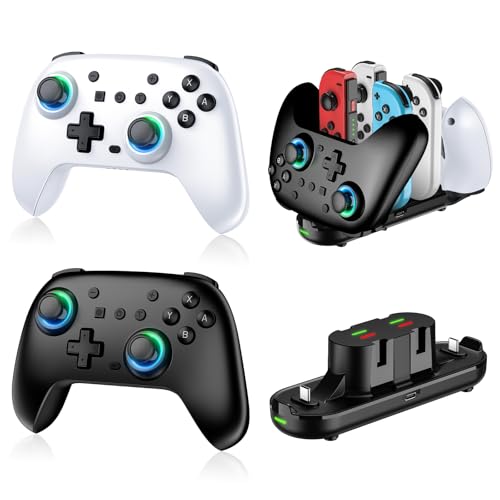
Two pads with a dock that charges both and keeps your setup tidy between sessions.
This is the most complete package on the list. You get two controllers in black and white, a charging dock, and three USB cables, so both players are equipped from day one. The dock also holds up to 4 Joy-Con controllers (Switch 2 Joy-Cons excluded), which means it doubles as a storage station.
The 800 mAh battery is a step above the pedroshaw pair’s listed capacity, running 10-12 hours after a 2-3 hour charge. Safety circuits guard against over-charging, over-voltage, over-current, and short circuits, and a non-slip rubber base keeps the dock steady on a shelf. Hall Effect buttons are on the spec sheet, which points to magnetic input sensing rather than physical contact.
RGB lighting offers 7 colors and 4 modes, adjustable from the pad itself. Turbo works across A, B, X, Y and 7 other keys at 5, 10, or 15Hz, with dual vibration at 4 levels from strong to none. The dock earning its keep is the point — both pads stay charged and ready without hunting for cables.
Weighing the trade: the dock and the two pads are the value here, and owners love the convenience of keeping both charged. The vibration feedback gets mixed reactions, and stick drift shows up for some players, so this one is best for casual family use rather than tournament-level precision.
Strongest fit: a household that wants two pads and a tidy charging home for them.
Consider the Spican instead: if drift prevention matters more than having two controllers.
Know the Specs
mAh (Battery Capacity)
mAh means milliamp-hours — how much charge the battery holds. A 1000mAh cell holds more than a 600 mAh cell, which usually means more hours between charges. The figure matters more than a “long battery life” label because it lets you compare pads directly. Higher capacity also adds a little weight, which is the trade-off.
TMR and Hall Effect Sticks
These are magnetic sensing methods for analog sticks. Instead of physical parts rubbing together (which wears down and can cause drift), they read the stick’s position through a magnetic field with no contact. Less wear means a stick that keeps its center over time. Hall Effect triggers apply the same principle to the trigger buttons for smooth, linear control.
Turbo Speed in Shots per Second
Turbo automates rapid button presses. Speeds listed as 5, 12, or 25 shots per second tell you how fast the auto-press runs. Higher speeds suit action games and farming sessions; lower settings give you more control in games that punish over-firing. Adjustability matters more than raw top speed.
Programmable Buttons
Back buttons with names like M1 and M2 are extra inputs, separate from the main face buttons. You map existing buttons onto them so a combo becomes a single press. This reduces finger strain in fighting games and complex action titles. More programmable slots give you more flexibility across different games.
Common Questions
Will these controllers work with the Nintendo Switch Lite?
What causes stick drift and how do I avoid it?
How many hours of play can I expect from a charge?
Do these controllers wake the console from sleep mode?
Is a two-pack worth it over a single premium controller?
Can I use these controllers on PC or mobile too?
What is the difference between TMR and Hall Effect joysticks?
Do these pads support motion control and rumble?
How long does it take to fully charge these controllers?
Do these controllers have a headphone jack or NFC?
The Bottom Line
For most players, the nintendo switch lite joy-con controller to buy is the ZRZLMVP Switch Controller because its 1000mAh battery lasts over 16 hours and its 19 buttons give you the most programmable inputs here. If drift prevention is your worry, grab the Spican Switch 2 Controller with its TMR joysticks and charging dock. And for two-player family sessions, the Fliresy 2 Pack with Dock keeps both pads charged and ready. One honest nudge: the Spican pairs drift-resistant sticks with a dock at a mid-range price, which is worth a closer look if you plan to play for years.
How we choose
We do not accept paid placement. Every pick is matched to a real buyer and a real use-case; we do not hands-on test units.
Sources
Specifications: manufacturer listings and product documentation. Review insights: verified customer reviews, as of November 2026. Pricing: not shown on this page (it changes often); check the current price via the retailer link.
As an Amazon Associate, Gamepad Test earns from qualifying purchases. This does not affect which products we feature.