
Specs are compiled from manufacturer listings and verified buyer reviews and can change over time — please confirm the key details on the product page before buying.
Own a PS5? Buy a DualSense. Its haptics (directional rumble that mimics textures) and adaptive triggers (triggers that push back with real tension) are the reason to own one, and no other pad on this list reproduces them. Still on a PS4? A DualShock 4 works, but a DualSense also works better on PS4 games. So the choice mostly depends on how much you care about directional haptics and trigger tension.
This guide is built by comparing the manufacturers’ published specifications and the patterns across verified customer reviews, so you get each pick’s real strengths and trade-offs instead of marketing spin.
The gap between the two generations is not cosmetic: the DualSense has haptic actuators and USB-C, the DualShock 4 has a micro-USB port and no haptics. Below you will find out which side of that line your hands actually belong on with the best ps5 vs ps4 controller.
Top Picks

How To Choose The Best PS5 vs PS4 Controller
The first decision is not brand or colour — it is which console the pad has to talk to. A DualSense is built for the PS5, and a DualShock 4 is built for the PS4. Everything else follows from that split.
Match the pad to the console you actually play on
A DualSense connects to a PS5 over Bluetooth or the USB Type-C cable in the box. Pairing is a one-time job: turn the console on, plug the pad in, press the PS button, and the light bar blinks until the player indicator settles.
The DualShock 4 is the PS4 pad. Its own listing is careful about this — it is compatible with PS5 only when you are playing PS4 games. If your library is all PS5 discs, a DualShock 4 will not carry you through it.
Decide if you want the rumble to talk back
Haptic feedback replaces the old spin-motor buzz with directional vibration, so a horse gallop or a sword clash lands in the part of the pad where it happens. Adaptive triggers add resistance that changes as you pull, which is why a bowstring feels heavy halfway through the draw.
Neither feature exists on a DualShock 4. That is the single biggest reason people upgrade, and it is also the reason a PS4 pad still feels perfectly fine on a game that was never designed around it.
Know the button-count trap before you compare listings
A high button count does not make a better pad. The numbers on these listings range from 6 to 29 because some sellers count the D-pad (the four-direction pad on the left) as one input and others count every direction. Read the feature list, not the number, when you want to know what a pad actually adds.
Check the connection before you buy a cheaper variant
The DualSense family charges and connects over USB Type-C. The DualShock 4 uses a micro-USB terminal, and its listing notes the type-A-to-micro-B cable is sold separately. If you have already lost every micro-USB cable in your house, budget for that.
Side-by-Side Comparison
| Model | Best For | Buttons | Weight / Size | Connection | Amazon |
|---|---|---|---|---|---|
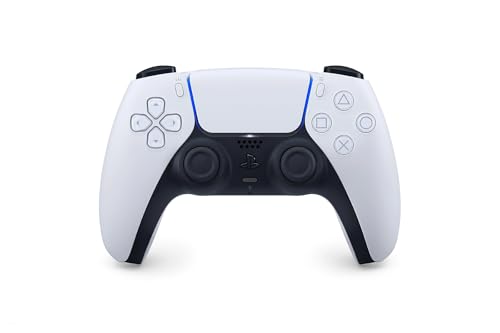
| PlayStation DualSense Wireless Controller (White)★ Best Overall | Most PS5 owners | 14 | 7.87 x 7.48 x 2.87 in | Bluetooth / USB-C | Amazon |
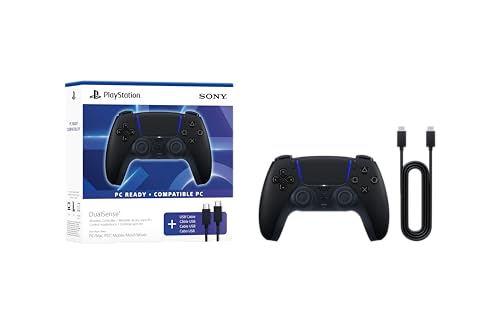
| DualSense Midnight Black + USB CableBest for PC | PC and Steam players | 19 | 16 ounces | USB-C / Bluetooth | Amazon |
| Sony PS5 DualSense Midnight BlackFamily Favourite | Kids and family play | 16 | 280 g | Wireless | Amazon |
| DualShock 4 Jet Black | PS4 die-hards | 20 | 12 ounces | Bluetooth / Micro-USB | Amazon |
| Sony PlayStation 4 DualShock 4 Controller | Replacing an ageing PS4 pad | 16 | 6.69 x 1.97 x 3.94 in | USB | Amazon |
| Razer Wolverine V2 Pro | Competitive combo players | 6 | 0.57 kg / 6.36 x 4.17 x 2.57 in | USB | Amazon |
| DualSense Ghost of Yotei Black Limited Edition | Collectors and single-player fans | — | — | USB / Bluetooth | Amazon |
| SCUF OMEGA PS5 Wireless Performance Controller | Esports-level play | 29 | 0.25 kg / 6.46 x 4.53 x 2.52 in | USB-C / Bluetooth 5.0 | Amazon |
Detailed Reviews
1. PlayStation DualSense Wireless Controller
Our pick — 4.5+★ from 52,000+ verified ratings; the strongest balance of quality and price.
The default answer for a reason — it is the only pad the console was tuned around.
This is the crowd favourite by a wide margin, and the numbers back the reputation: 4.5+ stars across 52,000+ owners. What wins people over is build quality first and reliability second — the two things a controller has to get right before anything else matters.
The feature set explains the affection. Haptic feedback (directional vibration that replaces the old single-motor buzz) puts the rumble where the action happens in the game, so a footstep behind you is felt behind you. Adaptive triggers (triggers that change resistance as you pull) turn a bow draw into a two-stage squeeze instead of a flat button press. There is also a built-in microphone and a 3.5mm jack for a headset, plus a dedicated mute button so you can kill voice capture without hunting through a menu.
Compatibility runs wider than the PS5 badge suggests: Bluetooth or the USB Type-C cable gets you onto Windows PC, Mac, and Android or iOS phones. The catch is the mixed feeling about price — plenty of owners think it is worth it, a fair number think it is steep for a pad you may replace in a couple of years. And the first pairing is a small ritual: power the console on, cable the pad to it, press the PS button, and wait for the light bar to blink and the player indicator to settle.
What earns the top spot
- 4.5+ stars across 52,000+ owners — the strongest track record here
- Haptic feedback and adaptive triggers that no PS4 pad can imitate
- Built-in mic, 3.5mm headset jack and a dedicated mute button in one pad
- USB-C or Bluetooth, so it carries over to PC, Mac and mobile
Where it asks you to compromise
- Owners split on whether it is worth the money
- First-time pairing with a PS5 needs a cable and a button press
- 14 buttons — the fewest of the DualSense family listings, because some sellers count the D-pad as one input
Buy this one: you own a PS5 and want the pad the games were designed around, with no caveats.
Look past it: if you only play PS4 titles and never touch haptics — a DualShock 4 does that job for less.
2. PlayStation DualSense Wireless Controller + USB Cable
The same DualSense, sold with the cable and the PC instructions in the same box.
If your gaming happens at a desk, start here. This bundle covers over 10,000 supported Steam games and pairs to a Windows PC directly over Bluetooth, and the included USB Type-C cable lets you keep playing while it charges instead of parking the pad for an hour.
What matters more for a desktop setup is the pairing memory: it holds up to four different Bluetooth devices, so you can bounce between a PC, a Mac, a PS5 and a phone without re-running setup every time. There is also a free PlayStation Accessories app for PC that pushes firmware updates straight from the desktop, and PS Remote Play support if you stream games from a PS5 or PS4 console to your monitor.
The honest catch is weight. At 16 ounces this is a substantial pad in the hand — noticeably heavier than the DualShock 4 below at 12 ounces — which some desk players love and others find tiring over a long session. Its smaller review base also means fewer data points than the standard DualSense, though the quality and functionality marks it does have are overwhelmingly favourable.
Why PC owners gravitate here: the bundle is honest about its purpose — cable included, Steam compatibility stated up front, firmware updates handled from the PC rather than the console.
The trade-off to size: 16 ounces is the heaviest DualSense variant on this list, and it is a wired-leaning pick for a reason.
Reach for this if: you play on a PC or Mac most nights and want the DualSense features without buying a separate cable.
Pass it over if: you mostly play on a TV from the sofa — the standard DualSense does the same job with less heft.
3. Sony PlayStation 5 DualSense Wireless Controller
A black DualSense at 280 g, sized to disappear into smaller hands.
This is the most compact DualSense here, so it fits smaller hands. It measures 6.3 x 2.6 x 4.17 inches against the 7.87 x 7.48 x 2.87 inches of the standard white pad. At 280 g it stays light enough to hand to a child without a running commentary about the weight. Owners with kids in the house talk about exactly that.
The DualSense toolkit carries over intact: haptic feedback, adaptive triggers, a built-in speaker for higher-fidelity sound effects in supported games, a 3.5mm headset jack, a built-in microphone and a create button for capturing clips. On a PC it also brings haptics and adaptive triggers into supported blockbuster titles, over USB Type-C or Bluetooth.
The caveat is button reliability. Functionality splits close to even here, and button faults are the specific complaint. So if you are buying for a rough-and-tumble household, treat it as a pad that may need replacing rather than one that will outlive the console.
The compact case: 280 g and the smallest footprint of the DualSense family makes this the natural spare pad for a second player or a kid.
One honest note: button faults are a recurring enough theme that it is worth testing the face buttons within the return window.
Go for this: you want a second DualSense for family play and a lighter pad matters more than a spotless fault record.
Think twice: if this is your only controller — the button reliability here is shakier than the white standard model.
4. DualShock 4 Wireless Controller

The pad that defined a generation — 20 buttons, a micro-USB port and a stubbornly famous shape.
Count the buttons and the difference is stark: 20 here against 14 on the standard DualSense, though the two listings count the D-pad differently. Some of that is counting convention, some of it is the multi-touch clickable touch pad on the face, which opens up inputs the DualSense pad does not offer in the same layout.
It is also the lighter pad — 12 ounces against the 16-ounce Midnight Black DualSense — and that lightness is the thing long-session PS4 players notice first. The motion sensors (an accelerometer and gyroscope that detect tilt and rotation) still do their job, and the built-in speaker and stereo headset jack give you audio options without a dongle.
The one place you should go in clear-eyed is durability. Buyers report the analog stick breaking after three months of use, the most-discussed negative on the pad. Recharging is easy — plug into the PS4 even in rest mode, or use any standard charger with a type-A-to-micro-B cable, which is sold separately.
Why PS4 players stick with it
- 20 buttons and a multi-touch clickable touch pad for extra inputs
- 12 ounces — 4 ounces lighter than the Midnight Black DualSense
- Recharges straight from the PS4, even in rest mode
- Motion sensing, built-in speaker and stereo headset jack in one pad
What you should know going in
- Analog stick failures after three months of use are a real reported pattern
- Works on a PS5 only when playing PS4 games
- Micro-USB cable sold separately
Pick it up: your console is a PS4 and you want the pad it shipped with, not an adaptor-friendly compromise.
Dodge it: if long-term stick longevity is your priority — that is the one place this pad falls down.
5. Sony Playstation 4 Dual Shock 4 Controller

A PS4 pad in a multicolour shell — 16 buttons and a straightforward USB connection.
This is the older DualShock 4 listing, and it behaves like one. It is a gamepad with a battery, USB connectivity, and a multicolour finish that separates it from the Jet Black standard. It works with the PS4 only, which makes it a replacement pad rather than an upgrade path.
What makes it worth considering is the quality reputation — 4.5+ stars across 4,000+ owners, and quality the thing people praise most. Functionality is the uneven part: it works well for a lot of players, and stops working for a smaller but real share, with the down arrow button the specific fault that shows up.
Its footprint is the other useful detail — 6.69 x 1.97 x 3.94 inches, the tidiest shape on this list, so it slips into a drawer or a bag without the broad shoulders of a DualSense.
What stands out: a solid quality record and a compact PS4 footprint make this an easy replacement when an old pad finally gives up.
What to watch for: functionality is mixed rather than clean, so check the D-pad within the return period.
Best used as: a drop-in replacement for a PS4 pad that has stopped responding, especially if you want a multicolour finish.
Not the right call if: you are on a PS5 — this pad will not carry you into PS5-native games.
6. Razer Wolverine V2 Pro Wireless Gaming Controller

Microswitch everything — an 8-way D-pad that clicks, and triggers that snap into mouse clicks.
For fighting games and intricate combos, the 8-way microswitch D-pad is the whole argument: every directional press engages a switch you can hear and feel, so a quarter-circle input lands the same way twice. The mecha-tactile action buttons shorten the actuation distance for a quicker press, and the HyperTrigger switches from a full measured pull to a lightning-quick click.
Customisation goes deep. Six remappable buttons let you map four extra triggers and two custom bumpers, so you can set controls your way. Two additional thumbstick caps come in the box. Chroma RGB (customisable lighting) runs over 16.8 million colours and effects through the Razer Controller app on iOS and Android.
Now the fair warning. At 3.5+ stars across 600+ owners this is the weakest-reviewed pad here, and the gripes are specific. Wireless connectivity drops for some players, reliability is a genuine worry, the sticks draw drift (the cursor moves on its own) and grip complaints, and the 0.57 kg weight is heavy in the hand. What the pad does have is feel: the ergonomics are the thing people like most, and it clicks beautifully. Just know what you are buying.
The competitive case
- 8-way microswitch D-pad that clicks audibly on every direction
- HyperTrigger toggles between a measured pull and a quick click
- Six remappable buttons plus two spare thumbstick caps in the box
The honest costs
- Wireless drops and reliability complaints drag the rating down
- Stick drift and grip are recurring gripes
- 0.57 kg is the heaviest pad on this list
Made for: the player who lives in fighting games and wants a clickable D-pad more than a rumble motor.
skip it if: you want a fuss-free pad that just pairs and stays paired — this one asks for patience.
7. DualSense Wireless Controller Ghost of Yotei
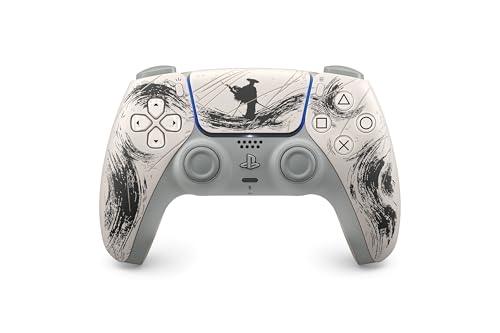
A DualSense dressed for one game — and priced like it knows it.
Inside, nothing changes. Haptic feedback and adaptive triggers work exactly as they do on the standard DualSense, and the pad connects over USB Type-C or Bluetooth to a PS5, Windows PC, Mac, and Android or iOS phones.
Outside, everything changes. The Ghost of Yotei design is the point. The listing sells the feeling of a horse galloping across a Japanese countryside and the clang of forged steel, which is exactly the kind of moment haptics were built for. At 4.5+ stars across 400+ owners it is also the best-reviewed pad on this list. The limited-edition run is why it carries the highest price of the DualSense variants.
The question you have to answer honestly is whether a finish is worth a premium over the standard white DualSense, which does the same job. If you played the game and want the pad to match, the answer is obvious. If you are buying your first controller, it is not the sensible starting point.
The collector case: best-in-list owner sentiment sits behind a design that only one game fans will recognise — which is exactly who it is for.
The sensible-buyer question: identical internals to a cheaper DualSense mean you are paying for the shell, not the sensation.
Reach for it: the game meant something to you and you want the pad to sit next to it on the shelf.
Leave it: you have not played the game — the standard DualSense gives you the same haptics and triggers.
8. SCUF OMEGA PS5 Wireless Performance Controller – Light Gray
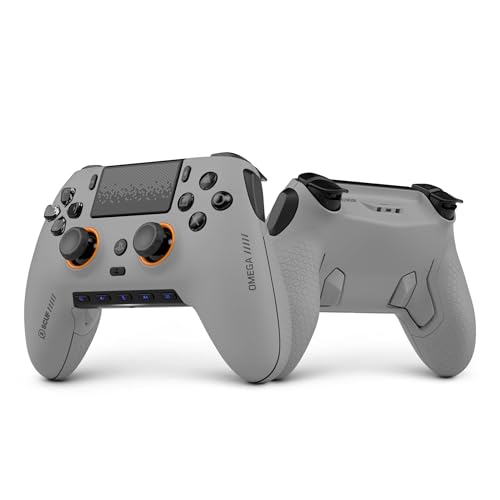
Four rear paddles, two side buttons and a magnetic faceplate — the deepest customisation here.
The headline is 11 additional inputs: four rear paddles, two side action buttons and G-Keys, all remappable. Add the 29-button count and this is the most heavily equipped pad on the list, built for players who want to keep their thumbs on the sticks and fire from the back of the controller.
The build details are where it earns its keep. Endurance TMR thumbsticks (magnetic sticks built to resist wear) are designed to hold off the drift and jitter that worn potentiometers cause. Omron mechanical switches sit across the Instant Triggers, Instant D-Pad and Instant Action Buttons for a mouse-like click. The magnetic faceplate pops off without tools, so you can swap thumbsticks, D-pad, action buttons and the touchpad in seconds. The SCUF Mobile App lets you tune response curves and set thumbstick deadzone (the dead zone where small stick moves are ignored) to zero from your phone.
Feature-for-feature it competes hard with the DualSense: 1K wireless and wired polling on PC, Bluetooth 5.0 for other devices, and a 0.25 kg body that is far lighter than the Raven above. But it gives up adaptive triggers, and owners are divided on value and on the USB dongle — a dongle failure is the specific complaint behind the mixed functionality score. The Omron clicks, meanwhile, are loved by some and called too clicky by others.
The performance brief: officially licensed, tuned for low-latency PS5 play, and the most adjustable layout in this lineup.
The question mark: no adaptive triggers, and a dongle that has a reported failure history — a pro pad, not a plug-and-play one.
Built for: competitive players who want paddles and instant triggers and are willing to tune the pad themselves.
Not the one: if adaptive triggers and haptic feedback are what you came for — the DualSense above keeps both.
Know the Specs
Haptic Feedback vs Traditional Rumble
Traditional rumble uses spinning motors that buzz the whole pad at once — a single motor strength for one sensation. Haptic feedback uses dual actuators to replace those motors, so directional vibration lands in the part of the pad where the event happens. That is why a gallop feels like it comes from beneath you and a clash feels like it lands in your hands. On a DualShock 4 there is no equivalent; the pad simply buzzes.
Adaptive Triggers Explained
Adaptive triggers change how much resistance you feel as you pull them. The pad can make a trigger feel loose at the start of a pull and heavy halfway through, which is how a bowstring or a jammed rifle is simulated. It is the single feature most likely to make you notice the generation gap, and it does not exist on a PS4 pad.
Button Count and What It Measures
Button quantity on these listings ranges from 6 to 29 and is not a fair comparison. Some sellers count the D-pad as a single input; others count every direction as separate. Read the feature list instead of the number if you want to know whether a pad adds paddles, extra bumpers or a touch pad.
Bluetooth vs USB Type-C vs Micro-USB
The DualSense family uses USB Type-C, and you can play and charge at the same time over it. Bluetooth adds lag on some setups and fewer on others, but it is what lets the pad float free of the console. The DualShock 4 uses micro-USB — an older connector, and a cable you may need to buy separately if yours has wandered off.
Common Questions
Will a PS5 DualSense controller work on a PS4 console?
What causes stick drift on these controllers?
Is the DualSense worth it if I only play PS4 games?
Do I need a separate cable to charge a DualShock 4?
What is the difference between haptic feedback and old rumble?
Can a Razer Wolverine V2 Pro or SCUF OMEGA replace my DualSense for PS5 games?
Are renewed DualSense controllers safe to buy?
How do I pair a DualSense with a Windows PC?
Is a heavier controller better for long sessions?
Does button quantity tell me which controller is better?
The Bottom Line
For most people the answer to the ps5 vs ps4 controller question is the PlayStation DualSense Wireless Controller. It is the pad the PS5’s games were built around, and it holds the strongest record on this list. If your gaming happens at a desk, the DualSense Midnight Black PC bundle gives you the same pad with the cable and the Steam setup already covered. And if you are still on a PS4 and see no reason to move, the DualShock 4 Jet Black is the pad your console shipped with. Just keep an eye on the sticks.
How we choose
We do not accept paid placement. Every pick is matched to a real buyer and a real use-case; we do not hands-on test units.
Sources
Specifications: manufacturer listings and product documentation. Review insights: verified customer reviews, as of November 2026. Pricing: not shown on this page (it changes often); check the current price via the retailer link.
As an Amazon Associate, Gamepad Test earns from qualifying purchases. This does not affect which products we feature.