
Specs are compiled from manufacturer listings and verified buyer reviews and can change over time — please confirm the key details on the product page before buying.
You know the routine: the fourth Joy-Con is flat, the Pro Controller is blinking, and somebody is digging through a drawer for a cable. A charging dock fixes that in one move by giving every controller its own slot and its own little light. The catch is that these docks are not interchangeable. Some only seat the newer Switch 2 Joy-Con, some only the original slide-on ones, and a few promise six bays but stumble on Pro Controllers. This guide sorts that out for you.
This guide is built by comparing the manufacturers’ published specifications and the patterns across verified customer reviews, so you get each pick’s real strengths and trade-offs instead of marketing spin.
Below you’ll find nine docks separated by what they actually hold — slide-in Joy-Con, magnetic Switch 2 Joy-Pads, Pro Controllers, or all of the above — so you buy the one that matches the pile on your shelf. Every pick here is a genuine switch controller charging dock.
Top Picks


How To Choose The Best Switch Controller Charging Dock
The first question is not how many slots you want. It is which controllers you actually own. Original Switch and OLED Joy-Con slide onto a rail, while Switch 2 Joy-Con snap on magnetically, and those two connections are not the same. Buy a magnetic-only dock and your old Joy-Con have nowhere to sit.
Match the dock to your Joy-Con generation
If your controllers are the original slide-on type, you need a dock with slide-in rails. If you have moved to Switch 2, look for a magnetic dock with reversible slots so the plus and minus sides do not matter. A hybrid dock with both rail types is the safe call for a household that owns both consoles.
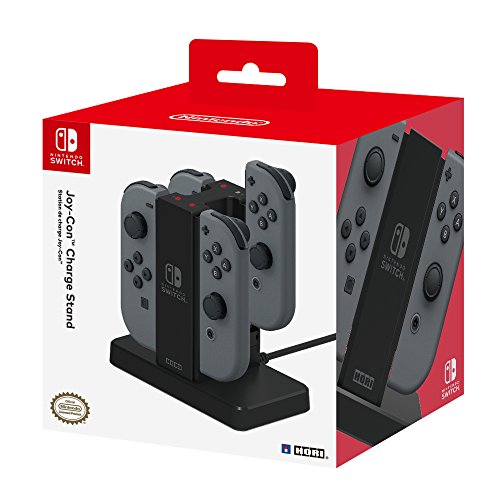
The HORI stand is the clearest example of a single-purpose design — it seats up to four Joy-Con on rails and nothing else. The FYOUNG dock takes the opposite approach, with four magnetic ports for Joy-Con 2 alongside four slide-in ports for original Joy-Con.
Decide if you need Pro Controller bays
A Joy-Con-only dock will not stand up a Pro Controller, and that matters if you play solo with a full-size pad. Multi-bay docks like the FANPL, NEWDERY and HEATFUN stations add two upright bays for Pro Controllers next to the Joy-Con slots.
Check the fine print on which Pro Controller fits. NEWDERY states plainly that its dock fits the Switch 2 Pro Controller but not Switch 2 Joy-Con, and HEATFUN warns that third-party Joy-Con and Pro Controllers are not supported.
Think about where the power comes from
Most of these docks take a USB-C cable and expect you to supply the wall plug, and several ship without an adapter at all. The HORI stand is the odd one out — it plugs into the Nintendo Switch dock itself, so it draws power from the console rather than the wall.
Before you buy, confirm you have a spare USB port or adapter free. Mumba’s station includes a 0.8m USB-A to Type-C cable but no adapter; the HEATFUN dock runs on 5V/2A USB input with the cable included and the wall power adapter not included.
Side-by-Side Comparison
| Model | Best For | Controller Slots | Input Rating | Lighting | Amazon |
|---|---|---|---|---|---|
| HORI Joy-Con Charge Stand★ Best Overall | Official Joy-Con only, dock-powered | Up to 4 Joy-Con | 240 volts | LED charge indicators | Amazon |
| FYOUNG Switch 2/1 ChargerBest For Both Consoles | Owning both console generations | 4 magnetic + 4 slide-in | 5 volts / 2 A | Charge status indicator | Amazon |
| NEWDERY 6-in-1 Charger DockMost Versatile | Mixed Joy-Con and Pro setups | 4 Joy-Con + 2 Pro | 1 A | Red/green LED per port | Amazon |
| FANPL 6-in-1 Charging Stand | Budget multi-controller storage | 4 Joy-Con + 2 Pro | 5 volts / 2 A | Per-port LED indicators | Amazon |
| Rysker Switch 2 Joycon Charger | RGB-first Switch 2 desks | 4 Switch 2 Joy-Con | 5 volts / 2 A | 9 RGB modes | Amazon |
| Mumba Magnetic Charging Station | Minimal footprint on a desk | 4 Switch 2 Joy-Con | 5 volts / 2 A | 9-color RGB | Amazon |
| HEATFUN 6-in-1 RGB Dock | Full multi-controller households | 4 Joy-Con + 2 Pro | 5 volts / 2 A | Multiple RGB modes | Amazon |
| SUPCASE Joy Con Charging Dock | Switch 2 Joy-Con with tough build | 4 Switch 2 Joy-Con | 5 volts | 9 RGB modes | Amazon |
| Nintendo Joy-Con Charging Stand | Official two-way charging plus NES pads | One pair, two-way | 120 volts | — | Amazon |
Detailed Reviews
1. HORI Joy-Con Charge Stand
Our pick — 4.5+★ from 7,500+ verified ratings; the strongest balance of quality and price.
The one that never needs its own wall plug — and never argues with an official Joy-Con.
This is the dock that earns its place by doing less, but doing it without a fuss. It holds up to four Joy-Con at once and lights an LED beside each one, so you can see at a glance which pad is still filling. It draws its power from the Nintendo Switch dock itself instead of a wall socket, with an input voltage of 240 volts.
What wins people over is the build and the reliability together. It accepts official Nintendo Joy-Con and keeps working, which is why it holds the top rating on this list at 4.5+ stars across 7,000+ ratings. It also sits at 0.15 kg, light enough that you can nudge it aside without unplugging anything.
The honest catch is the cable. A short lead is the recurring gripe, and it limits how far from the Switch dock the stand can actually sit — so plan its spot near the console rather than across the room. It also takes only Joy-Con; a Pro Controller has no bay here. Compare that with the FANPL below, which seats 2 Pro Controllers but runs on a 5-volt input against this stand’s 240 volts.
What earns the top spot
- Powers off the Switch dock, so no extra adapter or outlet is needed
- Four Joy-Con bays with individual LED status lights
- Officially licensed by Nintendo, so official pads seat cleanly
- Light at 0.15 kg — easy to move and store
What to plan around
- The bundled cable is short, which pins it near the console
- No slot for a Pro Controller
Reach for this if: you own only official Joy-Con and want them topped up straight from the Switch dock with no second plug.
Look elsewhere if: your setup includes a Pro Controller or your desk sits far from the television.
2. FYOUNG Charging Dock for JoyCon 2
Eight bays in one foldable slab for the household that never fully retired its first Switch.
Most docks pick a side in the Switch 1 versus Switch 2 split. This one refuses to. There are four magnetic charging ports for Joy-Con 2 and four slide-in ports for original Joy-Con on the same base, so both generations of controller stay topped up side by side.
It runs a 2 A input against the NEWDERY dock’s 1 A, and that headroom shows in seating — Joy-Con slide in and stay put rather than needing a shove. The body is ABS plastic with four anti-slip pads underneath, and the whole stand folds flat enough to drop in a backpack for a trip.
You get quick, consistent charging. The hardware itself is modest — no RGB lighting, no display, just status lights — so if you want your dock to be part of the room’s look, the Rysker and SUPCASE picks below put on more of a show.
The practical read: a hybrid rail system that solves the single most common mistake in this category — buying a dock that only fits one Joy-Con generation.
Worth knowing: the foldable design favors portability over heft, so it is a stand to set down and leave, not a weighted fixture for a shared living-room table.
Best fit for: a two-console household that wants one base handling old and new Joy-Con together.
Think twice if: you want a Pro Controller to stand upright next to them — this dock is Joy-Con only.
3. NEWDERY 6-in-1 Charger Dock
Six bays that tidy a messy shelf — provided every controller in the house is first-party.
Six positions is the pitch here: four Joy-Con slots plus two upright bays for Pro or Pro 2 Controllers, all on one stand so your desk stops looking like a cable drawer. Each port carries its own LED that glows red while charging and flips to green once the pad is full or standing by.
It handles 2 Pro Controllers and 4 Joy-Con at the same time, and the slide-in design means plug-and-play with no fiddling. A built-in chip watches for overheating, short circuits and over-power. The dock itself is ABS and lightweight, and it does not need to be plugged into the console — a USB port is enough.
Where this one asks for a little patience is fit. It is built for original Switch controllers, and NEWDERY says outright that third-party pads may not work, plus it fits the Switch 2 Pro Controller but not Switch 2 Joy-Con. Reports on the Pro Controller bays are split, and some find the stand less sturdy than they hoped. Read the compatibility note before you commit rather than after.
Where it shines: the six-bay layout keeps a mixed Joy-Con and Pro Controller collection in one place, and the separate red/green indicators mean you never have to guess which pad is still empty.
The trade-off to weigh: at 1 A it is the lower-amp input among the multi-bay docks here, and its fit is narrowest — official Switch 1 gear only, Switch 2 Joy-Con excluded.
Good match for: a Switch 1 owner with two Pro Controllers and a stack of Joy-Con to organize.
Not the one for: a Switch 2 Joy-Con owner, since those pads will not seat on this dock.
4. FANPL 6-in-1 Charging Stand for Switch & OLED Model & Lite

Six slots for the price of a cable — but check which controllers you are seating before you commit.
The layout is the same six-bay idea as the pricier docks: four Joy-Con slots plus room for 2 Pro Controllers or a Switch and Switch Lite, all in one footprint. A non-slip mat keeps the base planted, and every port has its own LED so you can watch each controller fill. It runs on a 5-volt, 2 A input over USB-C, with a built-in chip that cuts power on overcharge or a short.
The compatibility story is where you need to pay attention. This is the most mixed dock on the list, and the trouble clusters around one thing: Pro Controller support. Plenty of buyers charge Joy-Con without issue, while others report the Pro Controller bays misbehaving. Treat it as a Joy-Con-first dock that happens to have Pro slots, and you will be pleased.
On the upside, it keeps a pile of controllers off the desk, the cable is in the box, and setup takes seconds. If your main need is getting four Joy-Con off the floor and onto a stand, this does that job without drama — just do not expect it to be the thing your Pro Controller leans on every night.
What you get: a compact six-slot organizer with per-port lights, a USB-C cable in the box, and a 5-volt, 2 A input that suits a spare USB port.
The honest limit: Pro Controller compatibility is genuinely uneven here — if that pad is your daily driver, a dock that names that controller specifically will serve you better.
Pick it for: Joy-Con charging and desk tidying on a tight budget, with a cable already included.
Pass on it if: your Pro Controller needs a guaranteed home — that is the one job this dock is least reliable at.
5. Rysker Switch 2 Joycon Charger with 9 RGBs
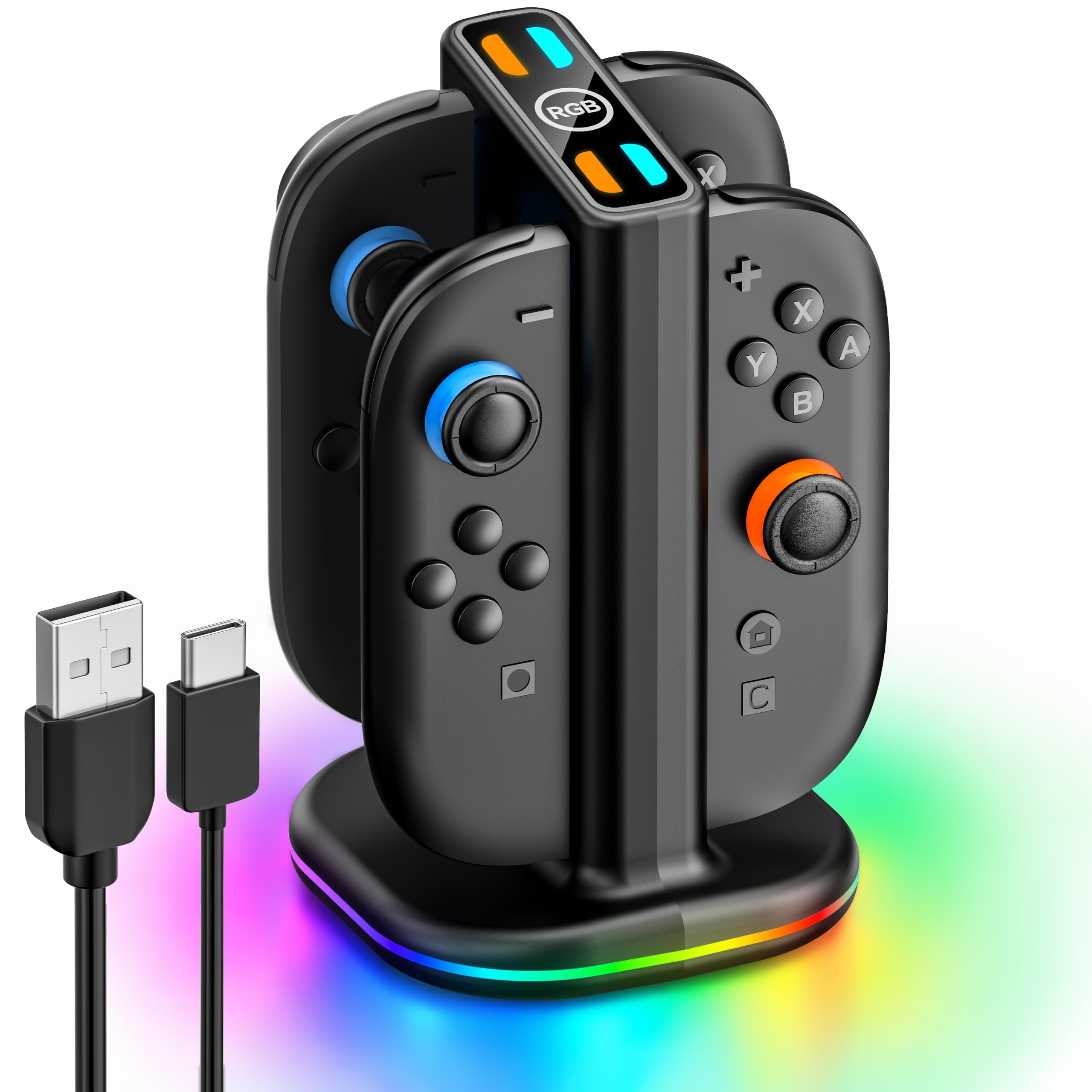
A Switch 2 dock that puts on a nine-mode light show while it fills four Joy-Pads.
Built specifically for Switch 2 Joy-Con, this dock uses magnetized slots that pull the pad into place instead of asking you to line up pins. The slots are bi-directional, so the plus and minus sides do not matter — you can drop a controller in either way and it seats. Four of them charge at once, and the maker claims all four Joy-Con fill in 2.5 hours when docked together.
Then there is the lighting: nine modes to cycle through, seven static colors plus two animations, with a button to tap for the next one and hold for three seconds to kill it. Top-mounted LEDs tell you orange for charging and blue for standby. It weighs 5.28 ounces, so it is a desk fixture, not a travel piece.
The rechargeable side is covered by multi-layer protection against overcharge, overcurrent, short circuit and overvoltage, and you can feed it from an AC adapter, the Switch 2 dock, or a PC hub. Owners consistently report fast charging and two full sets of Joy-Con charged at once. One thing to get straight before buying: this is for Switch 2 Joy-Con only, not the 2017 or 2021 originals.
Why it stands out
- Bi-directional magnetic slots mean no wrong-way insertion
- Nine lighting modes with a quick on/off button hold
- Top LEDs show orange charging, blue standby at a glance
- Feeds from an AC adapter, the Switch 2 dock, or a PC hub
Set your expectations
- Switch 2 Joy-Con only — older Joy-Con will not seat
- Joy-Con and Switch 2 dock are not included
Who it suits: Switch 2 owners who want their charging station to double as a lit-up centerpiece.
Who should scroll on: anyone still gaming on an original Switch with 2017 or 2021 Joy-Con.
6. Mumba Magnetic Charging Station
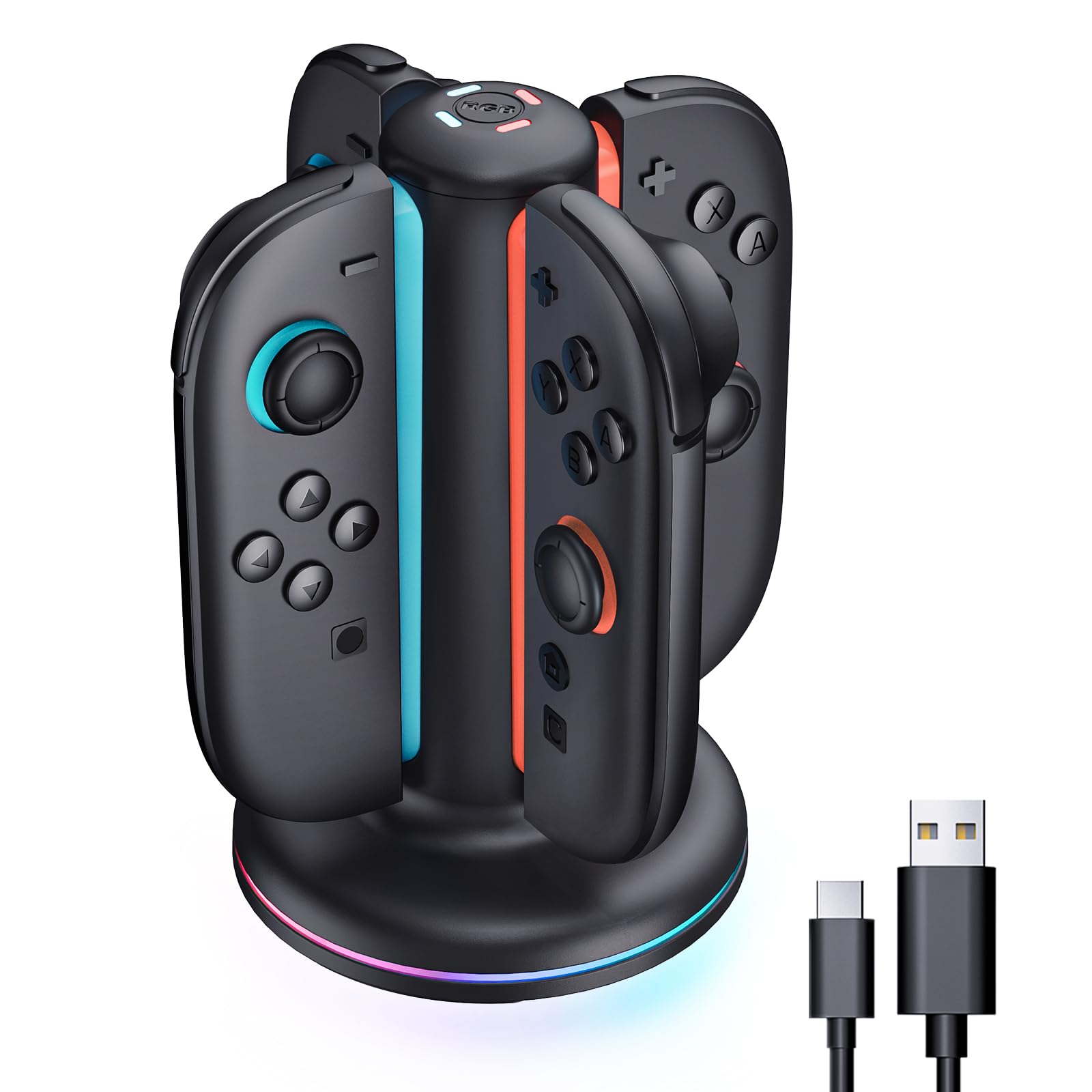
Four Switch 2 Joy-Con, magnetic seating, and a footprint small enough to forget about.
Mumba’s take on the Switch 2 dock is built around the magnet. Controllers snap down onto the surface and hold firm, which cuts the wear that comes from shoving a pad onto a rail every night. The slots are reversible, so the plus and minus alignment problem simply does not exist. Four Joy-Con 2 charge at once on a 5-volt, 2 A input.
The looks come from nine-color RGB ambient light with fast and slow cycling, plus per-port LEDs that glow orange while charging and blue when done. Hold the button and the whole thing goes dark for a quiet room. It weighs in at 0.02 kg, which makes it the lightest dock here, and a 0.8m USB-A to Type-C cable is included.
Inside, a smart chip handles overcharge, overheat and short-circuit protection and stops the power when the batteries top out. It connects to a Switch 2 dock, a hub, or an AC adapter — just know the adapter itself is not in the box, so you need a spare USB port or plug on hand.
The appeal: magnetic, reversible seats remove the two most annoying parts of nightly charging — alignment and wrong-way insertion — and the RGB can be switched off entirely.
Check before ordering: this is a Switch 2 Joy-Con dock, so original Switch Joy-Con have no home here, and the wall adapter is separate.
Made for: a Switch 2 owner with a spare USB port who wants magnetic seating and optional lighting.
Not for: mixed-generation controller piles or anyone expecting a plug in the box.
7. HEATFUN Switch 2 Controller Charging Dock
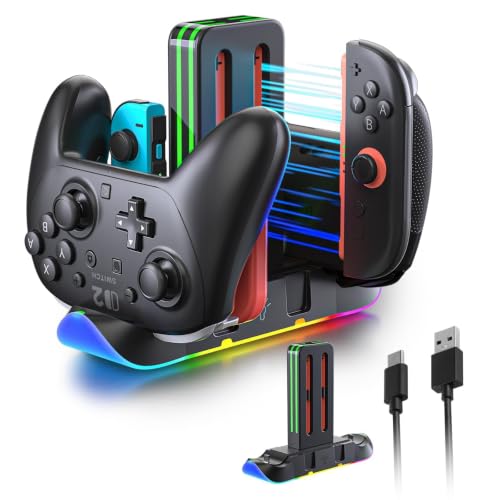
Six controllers, one tower, and RGB that remembers how you left it.
For a family game night with four Joy-Con and two Pro Controllers in play, this vertical dock is the one that swallows the whole set. It charges 4 Joy-Con and 2 Pro Controllers at the same time on a 5-volt, 2 A USB input, and stands them upright so the desk or TV stand stops collecting controllers in a heap.
The features are aimed at daily use. Each charging position has its own status light — red while charging, green when full or on standby — so a quick glance tells you who is ready for the next round. RGB modes include solid colors and breathing effects, changed with a short press, and a long press of about three seconds shuts the accent lighting off. Handy detail: the dock remembers your last RGB setting after it loses power.
It is built for Switch 2, Switch OLED and original Switch Joy-Con and Pro Controllers, but HEATFUN is clear that third-party Joy-Con and Pro Controllers are not supported. The cable is included and the wall adapter is not, and at 0.13 kg it is light enough to lift away when you want the surface back. Where the FYOUNG dock handles two Joy-Con generations with eight rails, this one trades rail count for two upright Pro bays.
The strongest arguments
- Charges 4 Joy-Con and 2 Pro Controllers on a single stand
- Individual red/green status light at every position
- RGB setting survives a power cycle, so you set it once
- Vertical design clears cable clutter from desk or TV stand
Worth checking first
- Third-party controllers are not supported
- Wall power adapter is not included
Choose this when: your household routinely has six controllers in rotation and you want them all charging and stored in one tower.
Look elsewhere if: you use third-party pads — this dock is built for first-party controllers only.
8. SUPCASE Charging Dock for Nintendo Switch 2 Joy Con

Four Switch 2 slots that hold either way round, with nine light modes for the shelf.
SUPCASE fits four Switch 2 Joy-Con on one base, and the a neat extra is dual-side charging: drop a pad in either direction and it still makes contact. That removes the alignment ritual entirely. Each of the four slots has its own LED showing charging or full, so you can track four pads at once without picking any of them up.
The magnetic rails do double duty — they align the controller and reduce the rubbing that wears out charging ports over time. Nine RGB modes let you pick the mood, and a smart chip cuts charging once a battery is full to guard against overcharging and overheating. It runs on a 5-volt input, weighs 138 g, and keeps the whole set sitting neatly in one spot.
Reviews back it up: reliable charging, a look owners like, and buyers who feel the price was fair. The one qualifier is scope — it is built for the 2025 Switch 2 Joy-Con and nothing older. If your controllers came with an original Switch, the FYOUNG hybrid or the HORI rail stand are the better fits.
What makes it feel considered: dual-side seating plus per-slot LEDs means four controllers go on and come off without a single wrong-way moment, and the magnetic mount is gentle on the ports.
The fine print: Switch 2 Joy-Con only, four slots only — no Pro Controller bay, and no original Joy-Con rail.
Right call for: a Switch 2 owner who wants four Joy-Con charging neatly and a dock that looks deliberate on the shelf.
Wrong call for: anyone needing Pro Controller storage or backward compatibility with Switch 1 pads.
9. Nintendo Switch – Joy-Con Charging Stand (two-way)
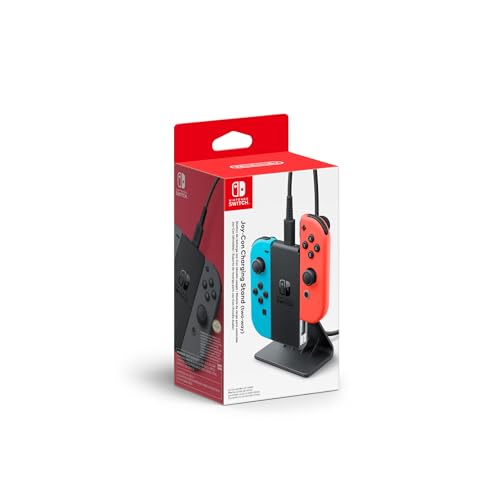
Nintendo’s own two-way stand — charge a pair on the side or straight through the console.
This is the official accessory, and its special trick is the two-way design. You can charge a pair of Joy-Con while they are detached and sitting on the stand, or leave them attached to the Switch and charge through it. For anyone with spare Joy-Con for multiplayer, it keeps the second pair topped up so a four-player round does not stall.
It does something the third-party docks mostly skip: it also charges the wireless full-size NES controllers made for Switch. It runs on a 120-volt input, weighs 6.4 ounces, and ships with the USB charging cable so there is nothing extra to hunt down. One USB port does the work.
What people value most is that compatibility — it charges both NES pads and Joy-Con, and owners say they would buy it again. Quality opinions split a little more evenly, so approach it as a purposeful official accessory rather than a tank. Its scope is narrower than the six-bay towers: it handles a pair at a time, not six.
The case for it: official Nintendo build, charges detached or while Joy-Con stay on the console, and it is one of the few docks that charges the NES Switch controllers too.
Who it leaves short: large households with four Joy-Con and two Pro Controllers will need a multi-bay station instead — this one is a pair-at-a-time solution.
Best for: one extra pair of Joy-Con, plus NES controller owners who want a single official stand to charge them.
Skip if: you need to charge four or more controllers in one go.
Know the Specs
Slot count and controller type
The number of slots is the easy part. The harder question is which connector each slot uses. Slide-in rails take original Switch and OLED Joy-Con, while magnetic pads take Switch 2 Joy-Con — and the two are not interchangeable. A dock that lists four bays is only useful if those four bays match the controllers in your drawer. Multi-bay stations add upright Pro Controller seats alongside the Joy-Con slots, which is worth having if a full-size pad is your main controller.
Input voltage and amps
Input voltage and amperage describe how much power the dock can pull. A 5-volt, 2 A input is the common spec across these docks and is enough to fill several controllers at once. Some docks run at 1 A, which is the leaner option. Others draw power straight from the Switch dock rather than a wall socket, which explains unusually high voltage figures on their spec sheets. A dock with a wall adapter in the box saves you digging out a spare USB plug, and several here do not include one.
Common Questions
Will a Switch 2 Joy-Con dock charge my original Switch Joy-Con?
Do these charging docks need a wall adapter?
Can a single dock charge Joy-Con and a Pro Controller at the same time?
Does a charging dock work with third-party controllers?
What do the little lights on the dock actually mean?
Is a five-volt two-amp input enough for four controllers?
Will a charging dock overcharge my Joy-Con if I leave them on overnight?
Can I charge Joy-Con while they are still attached to the Switch?
Can a Joy-Con charging stand also charge the NES Switch controllers?
Does the RGB lighting on these docks drain power from the controllers?
The Bottom Line
For most people, the switch controller charging dock that gets the job done without a second thought is the HORI Joy-Con Charge Stand. It powers straight from the Switch dock, so you skip a wall outlet, and it seats four official Joy-Con. It also carries the highest rating here: 4.5+ stars across 7,000+ ratings. If you split time between a Switch 1 and a Switch 2, grab the FYOUNG Switch 2/1 Charger. Its four magnetic and four slide-in ports cover both Joy-Con generations on one base, so you charge old and new controllers side by side. And for a household with six controllers in rotation, the HEATFUN 6-in-1 Dock is the one to reach for. It has four Joy-Con slots and two Pro Controller bays charging at once, so the whole pile tops up in one go.
How we choose
We do not accept paid placement. Every pick is matched to a real buyer and a real use-case; we do not hands-on test units.
Sources
Specifications: manufacturer listings and product documentation. Review insights: verified customer reviews, as of November 2026. Pricing: not shown on this page (it changes often); check the current price via the retailer link.
As an Amazon Associate, Gamepad Test earns from qualifying purchases. This does not affect which products we feature.