
Heads up: This post contains affiliate links. As an Amazon Associate I earn from qualifying purchases, at no extra cost to you. Learn more
Specs are compiled from manufacturer listings and verified buyer reviews and can change over time — please confirm the key details on the product page before buying.
Most gamepads assume two thumbs and a full grip, so one-hand play is harder than it should be. A small group of devices is built from the ground up for single-hand play: adaptive pads, half-controllers, and one-handed keypads. Which one fits depends on your working hand and your platform. Below are seven of them, with what each does well and the one thing that will make or break the purchase for you.
This guide is built by comparing the manufacturers’ published specifications and the patterns across verified customer reviews, so you get each pick’s real strengths and trade-offs instead of marketing spin.
A one-hand pad lives or dies on button reach and mountability, so check both before you commit to any pick on this list of the controller for one hand options below.
Top Picks
How To Choose The Best Controller for One Hand
Before you compare models, answer two questions about your own setup: which hand will do the work, and what will that hand rest on while you play? Most one-hand buyers get tripped up because they shop for the pad first and figure out the mounting later. Settling the hand and the mounting surface first is what saves you a return.
Start with the hand, not the hardware
A left-handed player and a right-handed player need completely different products. Devices like the Azeron keypads are built for righties — they sit under the left hand and leave the mouse hand free on the right. A Joy-Con (L) is a left-side half-controller by design. Check the hand orientation in the spec sheet before anything else, because no amount of remapping fixes a pad built for the wrong side.
Count the buttons you actually need
Thumb-only play means every action has to live under one thumb or on a short reach. A six-button half-controller covers movement and a couple of actions; a pad with 30 programmable inputs covers a full MMO hotbar. Be honest about your game: a fighting game needs fewer inputs than a raid. Button quantity is the number that decides whether a pad bottlenecks you.
Check where it sits during a session
A one-hand controller has to go somewhere — a lap, a table, a wheelchair tray, or a mount. Some pads are shaped to sit flat and stay put when you set them down; others are intended to be gripped in the air. If you are playing long sessions, a flat-resting pad with adjustable wrist support is far kinder than a hand-held one. Look at whether the maker publishes mounting or resting options, because that tells you what the pad was designed to do.
Side-by-Side Comparison
| Model | Best For | Buttons | Connection | Works With | Amazon |
|---|---|---|---|---|---|
| Nintendo Joy-Con (L) – Neon Blue Switch★ Best Overall | Switch players who want a thumb-only half pad | 6 | USB | Nintendo Switch | Amazon |
| 8BitDo Lite SE 2.4G WirelessBest Low-Effort Pick | Low-effort, low-resistance play on Xbox and PC | — | 2.4G wireless | Xbox Series X|S, Xbox One, Windows 10/11 | Amazon |
| PlayStation Access Controller 5 | Adaptive PS5 play with a mountable body | 10 | USB C | PlayStation 5 | Amazon |
| Razer Tartarus V2 Pro Left-Handed | Left-handed PC players who want an analog stick | 31 | USB-A | PC (Windows) | Amazon |
| ByoWave Proteus Controller Kit | Modular one-hand and tabletop builds | — | Wireless dongle | PC, Steam Deck, Xbox Series X|S | Amazon |
| AZERON Cyborg II (Galaxy Purple) | Righties replacing the keyboard hand | 30 | USB-C | PC (Windows) | Amazon |
| AZERON Cyborg II Bundle (Blue Raspberry) | Righties who want the full bundle up front | 30 | USB-C | PC (Windows) | Amazon |
Detailed Reviews
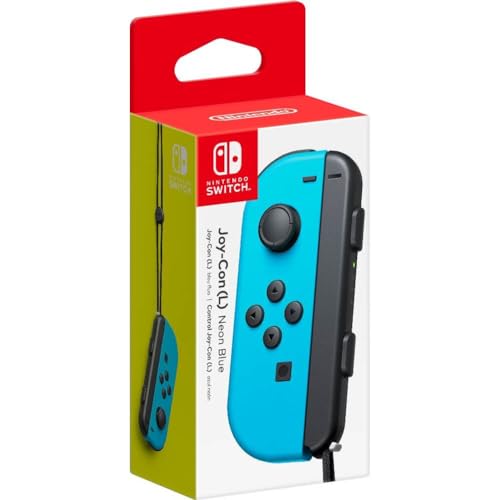
1. Nintendo Joy-Con (L) – Neon Blue Switch
Our pick — 4.5+★ from 83,000+ verified ratings; the strongest balance of quality and price.
A six-button half pad that fits a palm and asks nothing of your other hand.
If your one good hand is your left, this is the simplest path to playing on a Switch. The Joy-Con (L) is a left-side half-controller built to work as a stand-alone pad — six buttons on one shell, with the console able to read it on its own. It weighs 2.88 ounces, so it hangs off a thumb and fingers without dragging your wrist down over a long session.
What makes it genuinely one-hand friendly is the motion hardware inside. It carries an accelerometer (a sensor that reads tilt and movement) and a gyro sensor (which tracks rotation), so games that support motion control respond to a flick of the wrist instead of a second thumbstick. You can also play untethered from anywhere in the room, which matters if your one-hand setup means you are not sitting directly at the dock.
The trade-off is the button count. Six buttons is plenty for movement, jump, and a couple of actions, but it is a fraction of what a full pad offers. The Azeron keypads on this list run 30 programmable inputs, and the Razer Tartarus V2 Pro runs 31. On Switch that is rarely a problem, because the console is built around this exact shell. Outside Switch, it is not compatible at all.
Why this one earns the top spot
- Built to work as a stand-alone pad, not just half of a pair
- Motion sensing lets tilt and wrist flicks replace a second stick
- 2.88 ounces stays light in a single hand
- Rated 4.5+ stars across 83,000+ owners
Where it stops short
- Six buttons caps how complex a game you can run thumb-only
- Locked to Nintendo Switch hardware
Reach for this if: your working hand is the left one and your console is a Switch.
Look elsewhere if: you play on PC or Xbox, or your game needs more than six inputs under one thumb.
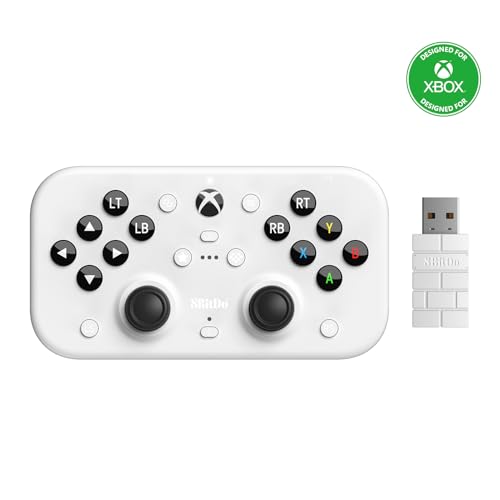
2. 8BitDo Lite SE 2.4G Wireless Controller
An officially licensed pad built around softer presses, so tired hands keep going.
The 8BitDo Lite SE is the pick for anyone whose main obstacle is effort rather than reach. Its whole design brief is accessibility: a unified face-button layout with lower-resistance buttons and highly sensitive joysticks, so a light touch registers where a firm press usually would. It is officially licensed by Xbox and works with Xbox Series X|S, Xbox One, and Windows 10 and above — and it sits flat enough to rest on a table or a leg without sliding.
Two features do the heavy lifting for one-hand play. The Dual Super Buttons are large, programmable keys you can map to any function instantly, with no software in the loop. And the Hall Effect joysticks use a magnetic sensor instead of the rubbing contacts that eventually cause drift, which is the slow failure that quietly ruins a controller. There is also a 3.5mm audio jack, a microphone mute button, and three profiles for quick layout swaps.
Be realistic about the button sensitivity, because it cuts both ways. Plenty of buyers find the light touch exactly right, but others find the sticks and buttons too lively and report drift or sticking over time. The pad is also a weighty one at 0.67 kg, so it is happier resting on a surface than being flown around in one hand. If you need the lightest possible thing to hold, the Joy-Con (L) is the better fit.
A softer press, on purpose: lower-resistance buttons and sensitive Hall Effect sticks mean less force per input — helpful if hand fatigue is the real enemy, fiddly if you prefer a firm, definite click under your thumb.
Worth knowing: no software is needed to remap the Super Buttons, so you can build a working layout the first evening, without a PC or an app.
Suits you if: a low-effort setup on Xbox or PC is the priority and the pad can live on a table or your lap.
Worth a second thought if: feather-light sticks frustrate you, since precision on a sensitive stick takes adjustment.
3. PlayStation Access Controller 5

Sony’s adaptive pad puts every button where your hand can actually reach it.
This is the one-hand controller built specifically for a PS5, and its defining idea is placement. You can set the controller down in any 360° orientation, on a flat surface, or on a wheelchair tray, or bolt it to an AMPS pattern mount — AMPS being an industry-standard screw pattern for attaching devices to equipment. That means the pad comes to your hand rather than your hand reaching for the pad.
Sony gives you ten buttons and a deep layer of adjustment on top. The button and stick caps swap out, the stick’s extension arm lengthens or shortens and locks at your chosen length, and you can map two commands onto a single button or disable buttons entirely to stop accidental presses. You get up to 30 individual control profiles from the PS5 console settings, with three stored on the controller and a dedicated button to switch between them mid-game.
No other pick on this list matches its size and expansion options. At 14.88 x 3.13 x 7.49 inches it is a broad, flat platform — roughly eight times the footprint of the Joy-Con (L) at 1.7 x 4.75 x 2.87 inches — so clear real desk or tray space before it arrives. You can also pair up to two Access controllers, or one or two of them with a DualSense or DualSense Edge, to add haptics, adaptive triggers, and touch pad swipes into the same setup.
The honest caveat is that this pad asks for some fiddling to pay off. The dual joystick arrangement does not suit every hand, and build quality gets a split reception — some find it solid, others find it light for the money. Treat it as a platform you tune, not a plug-in-and-go pad.
The layout-first approach: swappable caps, an adjustable stick arm, and 360° mounting add up to a pad you shape around your range of motion, which is exactly what one-hand play requires.
Built for: PS5 players who need the controller mounted or positioned rather than held.
Think twice if: you want a pad that works straight from the start with zero setup — this one rewards time spent tuning it.
4. Razer Tartarus V2 Pro Left-Handed Gaming Keypad
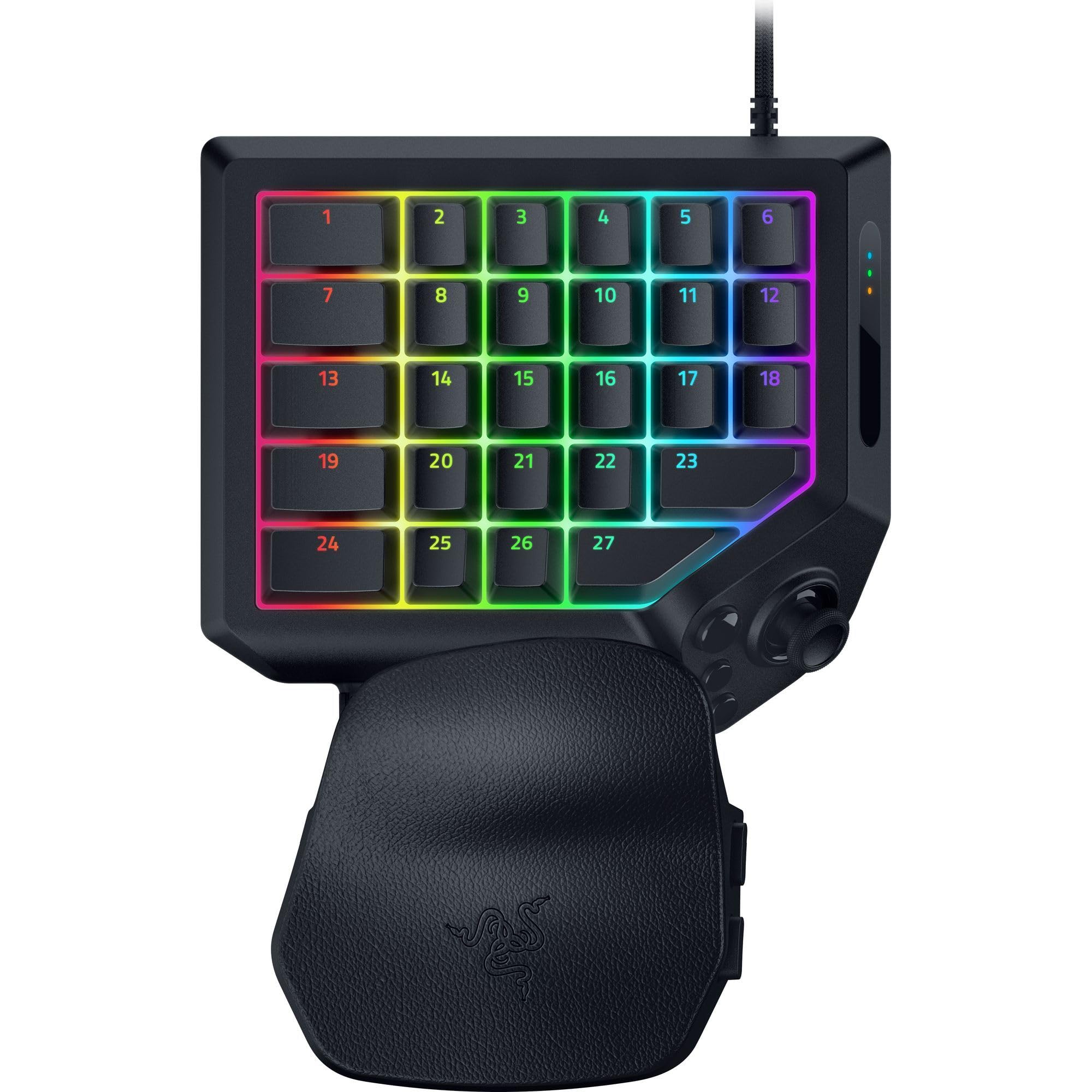
Thirty-one inputs under one left hand, with an analog stick for full-range movement.
Left-handed PC players get the richest control surface on this list here. The Tartarus V2 Pro packs 31 fully programmable controls into a single left-hand unit — five times the six buttons on the Joy-Con (L) — with a full-sized anti-drift TMR thumbstick covering movement. TMR is a magnetic sensing technology for the stick, chosen to resist the drift that wears into conventional sticks over time.
The switches are the headline engineering. Razer Analog Optical Switches Gen-2 support Rapid Trigger, adjustable 0.1-4.0 mm actuation, and are rated for up to 100 million keystrokes. In plain terms, you can set how far a key travels before it registers, from a hair-trigger tap to a deeper press — which matters when one thumb is doing the work of five fingers. True 8000 Hz HyperPolling (how often the pad reports to the PC) keeps input lag low, and Razer Snap Tap helps prioritise one direction over another when you switch direction fast.
Comfort gets real attention too. The wrist rest adjusts across multiple axes, so you can line your wrist up naturally for a long raid instead of holding an awkward angle. Keycaps are doubleshot PBT — a hard-wearing plastic that resists shine and fading — and there are 24 configurable keymaps spread across three profiles for swapping layouts between games.
The catch is software and setup. Some buyers find keybinds won’t change the way they expect inside Razer Synapse, and the thumbstick’s orientation and sensitivity take work to dial in. It is a specialist tool that rewards patience, not a pad that flatters you on night one.
The engineering case
- 31 programmable controls on one hand
- Adjustable 0.1-4.0 mm actuation lets you set press depth
- Multi-axis adjustable wrist rest for long sessions
- TMR thumbstick designed to resist drift
What to plan around
- Synapse software is where the tuning happens, and it takes time
- Stick orientation and sensitivity need dialling in before it feels right
- PC and Windows only
The right buyer: a left-handed PC player who wants keyboard-style depth plus an analog stick, and will invest the setup hours.
A different route: if you want an analog stick with a simpler layout, the Azeron picks below run the same one-hand idea with a different hand position.
5. ByoWave Proteus Controller Kit
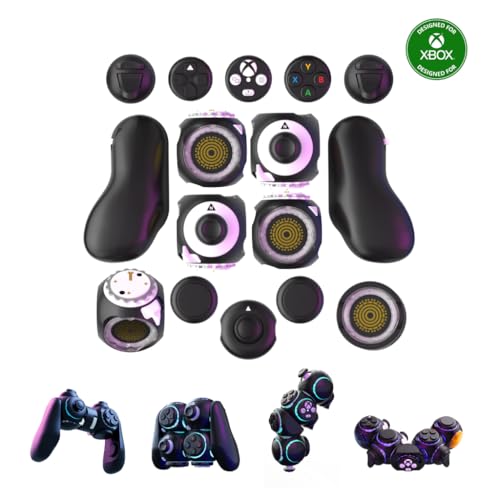
One kit that rebuilds itself from a two-hand pad into a single-hand setup.
If you do not yet know what shape your one-hand setup should take, the Proteus is the pick that lets you find out. It ships with 15+ modular, interchangeable parts and rebuilds from a two-handed pad into a one-handed build or a tabletop build, with no tools and no coding. That flexibility is the whole product: instead of one fixed layout, you get 15+ interchangeable parts you reconfigure as your grip, hand size, and game change.
Button and trigger placement adjust, and you can pair two power cubes to a single dongle to split the controller without buying extra parts. Remapping happens in real time through free web-based software, and you can set LED lighting per setup. Cross-platform support covers Windows 10/11, Steam Deck, and Xbox Series X|S, so the same kit travels across your devices.
Weigh the build in your hands before you commit. It runs 1.5 pounds, which is heftier than a half pad, and its modular shells are held together by swappable parts — so it is a kit to be cared for, not tossed in a bag loose. The limited Lithos Collection art caps (1,250 units) are a nice touch and cover unused mounts, but they are decoration, not function. The real draw is rebuilding the same kit into a one-hand, two-hand, or tabletop pad.
The honesty note: this is the newest and least-reviewed pick here, so you are buying into a modular concept more than a proven track record — which is fine if you value configurability over a known quantity.
Best for: gamers who want one kit that can become a one-hand pad, a tabletop pad, or a split controller across PC, Steam Deck, and Xbox.
Not for you if: you want a single fixed shape you never have to rebuild.
6. AZERON Cyborg II Gaming Keypad (Galaxy Purple)

A 3D-printed keypad that hands your whole left side over to a thumb and five fingers.
Righties who want to retire the keyboard hand should start here. The Cyborg II replaces the keyboard for left-hand use while the mouse stays on the right, and it packs 30 mappable inputs — each button individually wired, no connection matrices — that you can set as keyboard inputs, controller inputs, mouse inputs, or macros. It is USB-C, Windows-only, and shaped for medium hands: the maker sizes it for hand lengths of 6.3 to 7.5 inches.
The thumbstick is the part that matters for one-hand play. It is a Hall Effect stick, which uses magnetic sensing to eliminate stick drift, and it supports either WASD-style movement or 360° analog movement in compatible games. You can adjust dead zones, sensitivity, and cone angles, split the stick into eight directional zones, and enable analog smoothing for smoother turns. It can even act as a mouse, with a mid-click function built in.
What draws people in is the overall build and the fit. The adjustable parts let you tune the keypad to your hand, and the exclusive software covers RGB lighting per game profile, diagonal keybinds, and fine thumbstick settings. Six control layouts store directly on the keypad, with more managed in the Azeron app.
The thing to brace for is the learning curve. This is a 3D-printed keypad with a layout unlike anything you have used, and the button placement will have you pressing the wrong key for a while — several buyers find the ergonomics awkward at first. Give the 3D-printed layout a week of adjustment and it becomes second nature; expect instant comfort and you will be frustrated by day two.
What earns it the value label
- 30 individually wired inputs, each remappable to keys, mouse, or macros
- Hall Effect thumbstick with 360° analog and WASD modes
- Adjustable parts fitted for hand lengths of 6.3 to 7.5 inches
- Six layouts stored on the keypad itself
Set your expectations
- Steep learning curve — button placement feels odd at first
- Right-handed, PC, and Windows only
Pick this if: you are a right-handed PC player with medium hands who wants keyboard-level control from one hand.
Skip the fit risk if: your hands run well outside 6.3 to 7.5 inches, where the maker notes comfort may vary.
7. AZERON Cyborg II Keypad Bundle (Blue Raspberry)

The same Cyborg II hardware, boxed as a full bundle in Blue Raspberry.
This is the Cyborg II in a bundle, and it shares the hardware story of its Galaxy Purple sibling: a right-handed, 3D-printed keypad with 30 mappable inputs, a Hall Effect thumbstick that resists drift, and support for both WASD and 360° analog movement in compatible games. The thumbstick can double as a mouse, and the software handles RGB per profile, diagonal keybinds, and analog smoothing.
What sets this bundle apart in practice is how owners describe living with it. The sentiment is that it is 100% customizable and the money is well spent, with the keypad feeling solid and well-executed in the hand. The adjustable parts let you fit it to your grip, and six layouts store on the board for quick swaps between games. It is USB-C, Windows-only, and made for righties who keep the mouse in the right hand.
Two measured caveats to weigh against that. The first is adjustment time: some find it decently easy to use, others say it takes a while to get used to — same story as any ergonomic keypad with an unconventional layout. The second is hand fit, where responses split. If your hands fall inside the 6.3 to 7.5 inch range the maker targets, you are in the clear zone; outside it, try before you commit.
This versus its sibling: the hardware is the same 30-input, Hall Effect setup — what changes is the colorway and the bundle packaging. If the Galaxy Purple version is what your setup wants, it delivers identical one-hand control at a lower tier; pick the Blue Raspberry bundle if the color or the packaging matters to you.
The fit variable: hand size is the single biggest swing factor on any Azeron keypad, so measure your hand length before choosing a color.
Choose it for: the full one-hand keypad experience in Blue Raspberry, with 30 inputs and a drift-resistant stick.
The honest catch: it costs more than the standard Cyborg II for the same core hardware, so the color and bundle are what you are paying the difference for.
Know the Specs
Button Quantity
Button quantity is the count of physical inputs on the pad. On a one-hand controller it is the number that decides what game you can actually play, because everything has to fit under one thumb and a short reach. A pad with six buttons covers movement plus a couple of actions; a keypad with 30 or 31 inputs can host a full MMO hotbar. Match the count to your game before you buy.
Hall Effect Sticks
A Hall Effect joystick uses a magnetic sensor to read the stick’s position instead of physical wipers that rub and wear. That is how a pad avoids the drift that creeping contact wear causes over time. On a one-hand device, wear matters more than usual, because the thumbstick is doing all the movement work — a stick that resists drift protects the one input you cannot work around.
Connectivity
Connectivity is how the pad talks to your device: 2.4G wireless, USB, USB-C, or a dongle. One-hand players benefit most from a wireless or dongle setup, because the pad needs to sit where your hand is, not where a cable reaches. Check the connection type against your console or PC, and confirm whether the pad needs a dongle or connects natively.
Programmable Inputs
A programmable input is any button you can assign a custom function to — a keyboard key, a controller button, a macro, or a mouse click. For one-hand play, programming is how a few physical buttons cover many in-game actions. The more mappable inputs a pad offers, and the easier the software is to use, the more of your game you can bring within reach.
Common Questions
Will a left-hand Joy-Con work as a stand-alone one-hand controller?
Do I need a PC to remap the buttons on an 8BitDo Lite SE?
Can the PlayStation Access Controller mount to a wheelchair tray?
What hand size is the Azeron Cyborg II made for?
Is a Hall Effect thumbstick better than a standard joystick for one-hand play?
Does the ByoWave Proteus really switch from two hands to one?
How many control layouts can I store on an Azeron keypad?
Which one-hand controller works with both Xbox and PC?
Will the Razer Tartarus V2 Pro hold up over long gaming sessions?
The Bottom Line
For most one-hand buyers, the winner is the Nintendo Joy-Con (L) — it is the only pick here that is genuinely built to be a stand-alone pad, and its motion sensing lets tilt and wrist flicks replace the second stick, which is the trick that makes real one-hand play possible. If your obstacle is effort rather than reach, grab the 8BitDo Lite SE, where low-resistance buttons and Hall Effect sticks are designed for lighter presses. Match the hand orientation and platform to your setup, and one of these seven will fit.
How we choose
We do not accept paid placement. Every pick is matched to a real buyer and a real use-case; we do not hands-on test units.
Sources
Specifications: manufacturer listings and product documentation. Review insights: verified customer reviews, as of November 2026. Pricing: not shown on this page (it changes often); check the current price via the retailer link.
As an Amazon Associate, Gamepad Test earns from qualifying purchases. This does not affect which products we feature.