
Heads up: This post contains affiliate links. As an Amazon Associate I earn from qualifying purchases, at no extra cost to you. Learn more
Specs are compiled from manufacturer listings and verified buyer reviews and can change over time — please confirm the key details on the product page before buying.
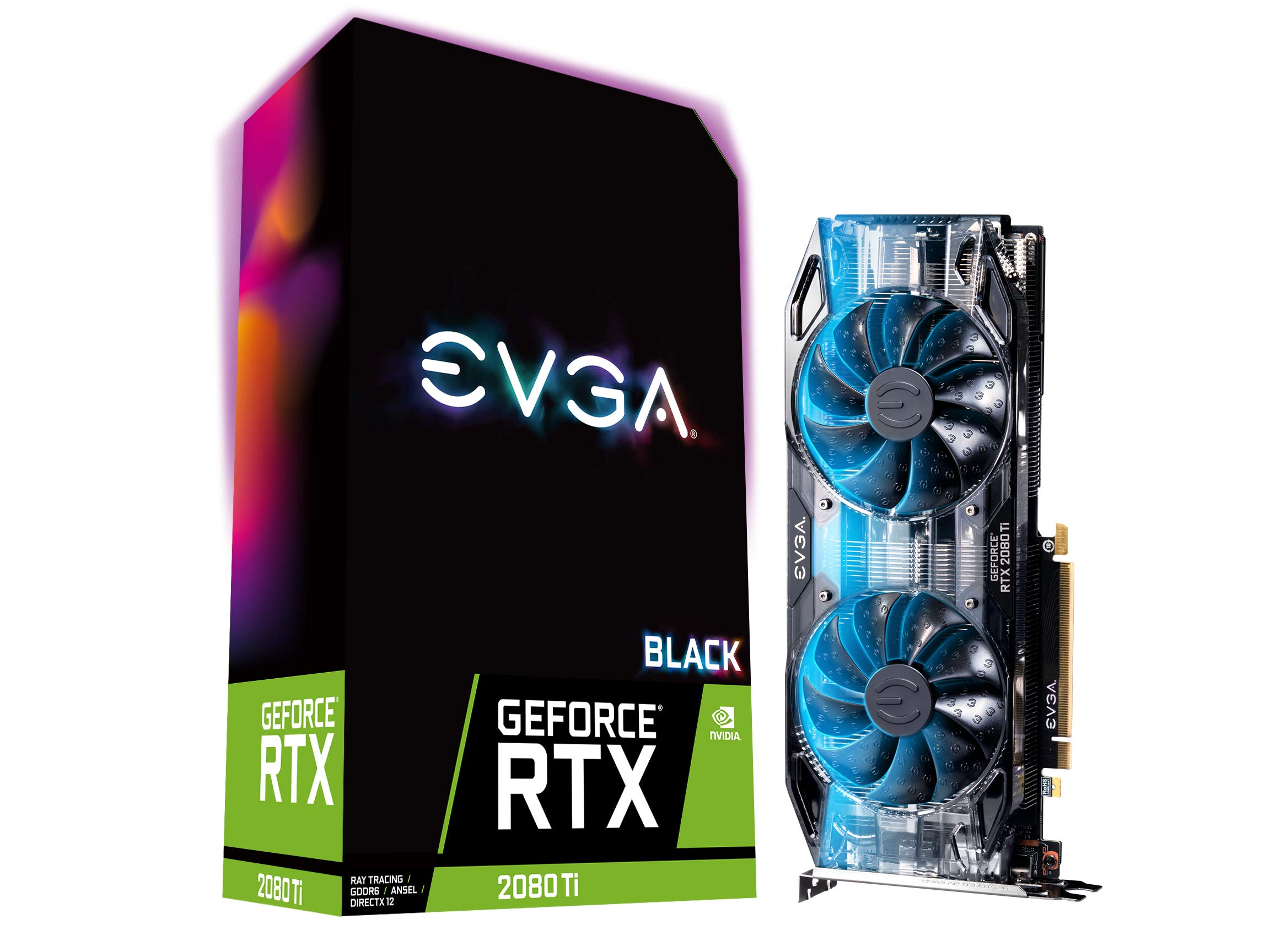
If you want Cyberpunk running smooth in Night City, the card that does it with the least fuss is the EVGA RTX 2080 Ti Black Edition. It gives you 11GB of GDDR6 memory (the card’s own fast video memory) and a real boost clock of 1545 MHz. That memory size is the whole reason this card still matters: Night City’s ray-traced reflections and dense crowds lean hard on video memory, and 11GB gives you headroom that smaller cards run out of. The rest of this list exists because every 2080 Ti is not built the same. The cooler, the factory clock, and the physical size vary wildly between brands, and those differences decide whether your case fits the card and whether your ears survive a two-hour session.
This guide is built by comparing the manufacturers’ published specifications and the patterns across verified customer reviews, so you get each pick’s real strengths and trade-offs instead of marketing spin.
Some cards here run cool and quiet, some run hot and loud, and a few need serious case airflow before they behave. Below you’ll find the honest differences between them, so you can pick the one that actually suits your build. This breakdown of the cyberpunk 2080 ti options covers boost clocks, cooler designs, and case fit in plain language.
Top Picks


How To Choose The Best Cyberpunk 2080 Ti
Every card on this list carries the same NVIDIA GeForce RTX 2080 Ti chip and the same 11GB of GDDR6 memory, so the raw performance ceiling is nearly identical. What separates them is everything around that chip: the cooler, the factory boost clock, the physical footprint, and how well the board holds up over long sessions. Pick on those, not on the name printed on the shroud.
Start with the cooler, not the clock speed
Night City keeps a GPU pinned near full load for long stretches, and ray tracing pushes temperatures higher than a standard game does. A beefy triple-fan cooler or a hybrid water loop keeps the card from throttling (slowing itself down to protect the chip) mid-mission. A single blower fan works, but it tends to run louder and is best for tight cases where airflow is limited.
Check your power supply before anything else
Cards on this list ask for a minimum of a 650 Watt power supply and two 8-pin PCIe power connectors, with a total power draw around 250 Watts on the higher-clocked models. A weak or older supply is the most common reason a new card refuses to boot or crashes under load. Confirm your supply’s wattage and connector count before you buy.
Measure your case for length and slot thickness
These boards are not small. Some are listed as 2.75 slot designs, which means they eat almost three expansion slots of space. Others run over 11 inches long. Measure the clearance from your case’s rear bracket to the front fan cage, and leave room for the power cables to bend without stress.
Decide how much noise you can live with
A quiet card matters more than most buyers expect once the fans spin up. Triple-fan coolers on the better-reviewed models keep acoustic noise low, while smaller or single-fan designs can get noticeably louder under sustained load. If you game with open-back headphones, prioritize the quieter designs.
Side-by-Side Comparison
| Model | Best For | Boost Clock | Memory | Cooling Design | Amazon |
|---|---|---|---|---|---|
| EVGA RTX 2080 Ti Black Edition★ Best Overall | Best overall balance | 1545 MHz | 11GB GDDR6 | Dual HDB fans | Amazon |
| EVGA RTX 2080 Ti FTW3 UltraTop Performer | Highest factory clock | 1755 MHz | 11GB GDDR6 | Triple HDB fans, 2.75 slot | Amazon |
| Gigabyte RTX 2080 Ti Gaming OC 11GQuiet Triple-Fan | Quiet triple-fan build | 1665 MHz (OC mode) | 11GB GDDR6 | Windforce 3X | Amazon |
| ASUS RTX 2080 Ti ROG Strix | Port variety | — | 11GB GDDR6 | ROG Strix cooling | Amazon |
| PNY RTX 2080 Ti Blower | Tight cases | 1545 MHz | 11GB GDDR6 | Blower | Amazon |
| Gigabyte AORUS RTX 2080 Ti Xtreme | Highest boost on this list | 1770 MHz | 11GB GDDR6 | 3X stacked Windforce | Amazon |
| MSI RTX 2080 Ti Ventus 11G OC | Cool temperatures under load | 1635 MHz | 11GB GDDR6 | Ventus thermal solution | Amazon |
Detailed Reviews
1. EVGA GeForce RTX 2080 Ti Black Edition Gaming, 11GB GDDR6
Our pick — 4.5+★ from 200+ verified ratings; the strongest balance of quality and price.
The quiet all-rounder that keeps Night City’s rays running without rattling your desk.
Here is the card to buy if you want the 2080 Ti experience with the fewest surprises. Its real boost clock is 1545 MHz — that is the speed it ramps up to on its own when you load Night City — and it carries 11264MB of GDDR6 video memory, which is the buffer that holds all those reflections and neon textures. In plain terms, you get the smooth ray-traced look without the card gasping for memory when the streets get crowded.
What wins owners over is raw performance. That performance comes from a dual HDB fan cooler (a pair of high-durability fans) that EVGA says keeps acoustic noise down while it cools. You also get an adjustable RGB LED you can set to any look you want, and EVGA’s Precision X1 utility, a tuning app that lets you overclock the card yourself if you want to push past the factory numbers. The card measures 10.62 inches long, which is short enough for most mid-size cases.
The honest catch is value. Owners are split on whether it is worth what it costs, and the biggest objection is paying premium money for a card this generation. That does not make it a bad buy — it makes it a card to buy only if the 11GB of memory and the ray-tracing performance are what you actually came for. Anyone shopping purely on future-proofing should weigh that against the next GPU generation.
What earns it the top spot
- 11GB of GDDR6 memory gives Night City’s ray-traced textures plenty of room to breathe.
- Real boost clock of 1545 MHz delivers strong frame rates without manual tuning.
- Dual HDB fans keep the noise low for a card this powerful.
- Adjustable RGB LED fits whatever look your build has.
Where it asks you to think
- Value is the loudest complaint — many owners feel the price is steep for this generation of hardware.
- Not the highest factory clock on this list — the FTW3 Ultra and AORUS both outpace it.
Go for this if: you want the most reliable, best-balanced 2080 Ti for Cyberpunk without chasing clocks or oversized coolers.
Look past it if: you want the absolute highest factory boost clock and don’t mind a bigger, heavier card to get it.
2. EVGA GeForce RTX 2080 Ti FTW3 Ultra, Overclocked, 2.75 Slot
The clock-speed leader — 1755 MHz from the start and a cooler the size of a paperback.
If your build has the room, this is the fastest-clocked EVGA card on the list. Its real boost clock is 1755 MHz, which is 210 MHz above the EVGA Black Edition’s 1545 MHz — that gap is the difference you feel when Night City’s crowd AI and traffic load the GPU at once. It also supports refresh rates up to 240 Hz with HDR, so if you have a high-refresh monitor this card can actually feed it.
Cooling is the other headline. Triple HDB fans with iCX2 (EVGA’s second-generation cooler design) sit on a 2.75 slot body, which means it takes up almost three expansion slots in your case. Owners love the performance and note it runs cool throughout long sessions. The all-metal backplate gives the board structural rigidity. One thing that jumps out is the weight: 5.7 pounds. That is 3.8 times heavier than the Gigabyte Gaming OC 11G at 1.5 pounds, so make sure your motherboard’s PCIe slot is reinforced or that you’re using a support bracket.
The trade-offs are real but manageable. It needs a minimum 650 Watt power supply, two 8-pin or 6+2-pin PCIe connectors, and draws around 250 Watts total. Owners are split on noise — some find it surprisingly quiet, others say the fans get loud under load. Stability also draws mixed reports, with a small number describing crashes alongside a larger group reporting solid durability over the year. And at 5.7 pounds, it is the heaviest card here.
The “worth it” case: 1755 MHz is the high-water mark for this list’s EVGA cards, and the triple-fan iCX2 cooler holds it there. Owners chasing frame rates in ray-traced Night City consistently recommend this card.
What to brace for: the 2.75 slot body and 5.7-pound weight mean you need clearance and structural support. If your case is tight or your motherboard slot is unreinforced, look at the Gigabyte Gaming OC or the PNY Blower instead.
Reach for this if: your case has room for a 2.75 slot card and you want the highest EVGA clock speed plus a cooled, overclock-friendly design.
skip it if: you’re building in a small case or your motherboard lacks a reinforced PCIe slot — the weight and bulk will work against you.
3. Gigabyte GeForce RTX 2080 Ti Gaming OC 11G
A triple-fan board that runs noticeably quieter than its power would suggest.
This is the card for the noise-sensitive Cyberpunk player. Its Windforce 3X cooling system uses alternate-spinning fans — the middle fan spins opposite the outer two to reduce turbulence — and quiet is the thing owners talk about first. In a case with decent airflow, this card’s fans stay low and unobtrusive through long sessions.
The numbers are solid: 1665 MHz in OC mode and 1650 MHz in Gaming mode, with 11GB of 352-bit GDDR6 memory. A 352-bit memory bus (the width of the data path between the GPU and memory) is wide enough to keep Night City’s textures flowing without bottleneck. You also get Gigabyte’s AORUS engine tuning software and a 4-year warranty with online registration — double the usual coverage. The card carries a Wccf Tech editor’s choice award as well.
Here is the honest hit: performance and cooling draw mixed feedback. Most owners are happy, but a vocal minority report that without proper case airflow the card runs very hot. That is a case-airflow issue, not an engineering flaw — if you have intake fans pulling fresh air past the card, it behaves. Also worth knowing: this card is 1.5 pounds, which is 3.8 times lighter than the EVGA FTW3 Ultra’s 5.7 pounds, so it places far less stress on your PCIe slot.
Best for quiet builds: alternate-spinning Windforce 3X fans keep acoustic noise down, and the 4-year warranty beats most of the field. The lighter 1.5-pound body is easier on your motherboard.
The catch: cooling is only as good as your case airflow. Without intake fans feeding it fresh air, this card can run hot — put it in a well-ventilated case and it behaves.
This one’s for you if: you game at night with open-back headphones and want a triple-fan card that runs quietly with a long warranty.
Reconsider if: your case is short on airflow — this is a card that needs fresh air moving past it to stay cool.
4. Gigabyte GeForce RTX 2080 Ti WINDFORCE OC 11G, Triple Fan

The original reference card — NVIDIA’s own design, unmodified and uncompromised.
This is the baseline every other 2080 Ti on this list is measured against. NVIDIA builds it with a 1350 MHz base frequency and 11GB of GDDR6 on a 352-bit memory bus, with a maximum resolution of 7680 x 4320 pixels. That resolution figure is twice the 3840×2160 ceiling the ASUS ROG Strix lists, which matters if you’re driving a high-resolution display or a multi-monitor rig. DirectX 12.0 and OpenGL 4.5 support cover the full modern game library.
The two-fan active cooler stays relatively compact — the card measures 10.5 inches long — so it fits in more cases than the 2.75 slot behemoths. Owners are happy with the performance it delivers in Night City. NVIDIA designed the chip and the board together, so fit and behavior are predictable.
What you give up is tuning headroom. The 1350 MHz base frequency is the lowest on this list, and there’s no factory overclock to fall back on. Value is the other sticking point — owners are divided on whether the reference card justifies its cost once third-party cards with higher clocks exist. Buy it for clean design and reliable fit, not for chasing frame rates.
Why the reference card still earns fans
- NVIDIA’s own board layout with a two-fan active cooler.
- 7680 x 4320 maximum resolution — double the ASUS ROG Strix’s 3840×2160 ceiling.
- 10.5-inch length fits more cases than the 2.75 slot cards.
What you sacrifice
- 1350 MHz base frequency is the lowest here — no factory overclock to lean on.
- Value draws split opinions once higher-clocked third-party cards are on the table.
The right call for: builders who want the reference board’s predictable design and smaller footprint.
Not your card if: you want a high factory clock — the AORUS Xtreme’s 1770 MHz is 435 MHz further up the dial.
5. ASUS GeForce RTX 2080 Ti ROG Strix 11GB GDDR6

Five ports and a 14000 MHz memory clock — built for multi-display Night City setups.
Cyberpunk looks best on a big screen, and this card is built to feed more than one. The ASUS ROG Strix gives you 2 HDMI, 2 DisplayPort, and 1 USB Type-C port — that’s five outputs, so you can run a main display plus a second screen for a stream readout or a second monitor. The 14000 MHz memory clock (the speed the GDDR6 memory runs at) keeps texture streaming snappy in dense city scenes.
What stands out for builders is the size. It measures 5.13 inches long and 2.13 inches wide, making it among the most compact boards here. That is a big deal if your case is tight or your motherboard is crowded by a large CPU cooler. The PCIe 3.0 x16 interface is the standard fit for any modern desktop.
One caveat to know before you buy: the listing’s maximum resolution is quoted as 4K, which maps to 3840×2160 — that’s half the 7680 x 4320 ceiling the NVIDIA Founders Edition and most other picks list. For 4K Cyberpunk that’s fine, but if you’re driving a 5K or 8K display, look at the Founders Edition or PNY instead. Otherwise, the port spread and small footprint make this a strong choice for a multi-monitor Night City setup.
Where it shines: five output ports (2 HDMI, 2 DP, 1 USB-C) plus a compact 5.13-inch length make it ideal for multi-monitor rigs and tight cases. The 14000 MHz memory clock keeps textures loading fast.
What to note: its stated maximum resolution tops out at 3840×2160 — enough for 4K Cyberpunk but not for an 8K display.
Reach for this if: you run two or three displays and need the extra HDMI and DisplayPort outputs, or you’re building in a compact case.
Look elsewhere if: you’re planning an 8K display — the Founders Edition’s 7680 x 4320 ceiling is the better match.
6. PNY GeForce RTX 2080 Ti 11GB Blower Graphics Card

The single-fan exhaust solution for small cases where hot air has nowhere to go.
Blower cards exist for one reason: they push heat out the back of your case instead of swirling it around inside. If your case is cramped or your GPU sits right against a side panel, this PNY card’s blower design keeps your CPU and memory cooler than a triple-fan card would. It runs 4352 CUDA cores (the parallel processors that do the graphics work) at 1350 MHz core and 1545 MHz boost — the same 1545 MHz boost as the EVGA Black Edition.
It supports resolutions up to 7680 × 4320 at 60Hz through its digital output, matching the ceiling on the Founders Edition and most of the list. 11GB of GDDR6 memory handles the game’s ray-traced textures. PNY also throws in 24/7 U.S.-based technical support, a detail that rarely matters until something goes wrong and then matters a lot. The card is 1.9 pounds — light enough to sit in a PCIe slot without sagging.
Be aware the blower fan has to work harder than multi-fan coolers, so expect it to run louder under sustained load. This is a card for someone with a specific case constraint, not for someone chasing quiet. If your case has room for a triple-fan design, the Gigabyte Gaming OC will treat your ears better.
Built for tight spaces: the blower exhausts hot air out the back, which is what you want in a small or edge-mounted case. 4352 CUDA cores and a 1545 MHz boost are respectable, and 1.9 pounds won’t stress the slot.
Play it with a headset: the single blower fan runs louder than multi-fan designs — that’s the trade-off for keeping your case cooler.
This is your card if: you’re building in a compact or airflow-constrained case where a triple-fan card would struggle.
Don’t choose it if: quiet operation matters most — a multi-fan cooler like the Gigabyte Gaming OC runs noticeably softer.
7. EVGA GeForce RTX 2080 Ti XC Gaming, 11GB GDDR6

1770 MHz, six video outputs, and a 4-year warranty — the AORUS flagship.
On the spec sheet, this is the fastest card on the list. Its core clock is 1770 MHz — above the EVGA FTW3 Ultra’s 1755 MHz — and it pairs that with 11GB of 352-bit GDDR6 memory and the same NVIDIA Turing architecture and real-time ray tracing as every other 2080 Ti here. For Cyberpunk, that extra clock speed shows up in the busiest scenes: market crowds, rain-slicked streets, and the light bloom off every reflective surface.
The triple stacked Windforce cooling system uses fans layered on top of each other, which increases static pressure and pushes air more aggressively across the heatsink. The metal backplate carries an illuminated AORUS logo you can match to your build’s theme. Gigabyte covers it with a 4-year warranty with online registration — a long tail of coverage for a card this expensive. The port cluster is the most generous here — 3 HDMI, 3 DisplayPort, and 1 USB Type-C, so you can drive multiple displays without adapters.
The 890-gram weight puts it in the mid-range for this list — lighter than the FTW3 Ultra’s 5.7 pounds but heavier than the Gigabyte Gaming OC’s 1.5 pounds. No customer review data is available for this specific listing, so compare it on paper against the FTW3 Ultra: if you want the absolute highest clock and the extra warranty, the AORUS wins. If you want a broader track record, the FTW3 Ultra has more owner experience behind it.
Why it tops the clock charts
- 1770 MHz core clock — the highest on this list.
- 3 HDMI + 3 DisplayPort + 1 USB Type-C gives you the most ports per card.
- 4-year warranty with online registration.
- 890g weight is manageable for the performance it delivers.
Points to weigh
- Higher clock speed means higher heat — the stacked Windforce cooler needs good case airflow to keep up.
- No owner-review history on that listing, so you’re buying on spec and warranty alone.
Yes, if: you’re chasing the highest clock speed available and want a 4-year warranty backing it.
Not quite, if: you’d rather buy a card with a proven owner track record — the FTW3 Ultra has more experience behind it.
8. MSI GeForce RTX 2080 Ti Ventus 11G OC

Temperatures stay under 72 degrees Celsius in the games owners actually play.
This is the one to buy if temperature control is what keeps you up at night. The Ventus thermal solution keeps the GPU running cool, and owners mention it runs well in every game they play. The number that matters: GPU temperatures stay below 72 degrees Celsius, which is the safe zone where the card stays at full clocks instead of throttling down. The board runs 1635 MHz boost and 1350 MHz base with 11GB of GDDR6 and a 352-bit memory interface.
What stands out is the cooling consistency. Where some cards rely on case airflow to stay cool, this MSI board does the work itself. Owners who’ve tracked temperatures say it holds steady through long sessions. You also get G-Sync Compatible frame synchronization — a feature that smooths out screen tearing when your frame rate and monitor refresh rate don’t match — plus three DisplayPort 1.4, one HDMI 2.0b, and a USB Type-C port.
Overclocking draws mixed reports. Some owners push it past stock speeds happily; others find it doesn’t leave much headroom. Treat it as a card designed to run at its factory clocks reliably, not as a project for squeezing out extra frames. The card measures 10.55 inches long — short enough for most mid-size cases.
Cold and steady: the Ventus cooler keeps GPU temperatures under 72 degrees Celsius, and it runs smoothly through every game owners throw at it. G-Sync Compatible support smooths frame pacing.
Leave the dial alone: overclockers report limited headroom — this card is happiest at its factory clocks.
Pick it for: a card that runs cool without extra case fans and delivers steady frame rates at its stock clock.
Don’t expect: a big overclocking project — the headroom is limited compared to the FTW3 Ultra or AORUS cards.
Know the Specs
Boost Clock (MHz)
Boost clock is the speed the card ramps up to on its own when a game loads it — you don’t set it manually. On this list the range runs from the NVIDIA Founders Edition’s 1350 MHz base frequency up to the AORUS Xtreme’s 1770 MHz core clock. A higher number generally means more frames per second in Night City’s busiest scenes, but the cooler has to be able to hold that speed. A card with a high clock and a weak cooler will sag back down once temperatures climb, which is why the FTW3 Ultra’s 1755 MHz and its triple-fan iCX2 cooler belong together.
Video Memory (GB and Bus Width)
Video memory is the card’s own scratchpad for textures, shadows, and ray-traced reflections — it is separate from your PC’s system memory. Every card here carries 11GB of GDDR6, and several list a 352-bit memory bus, which is the width of the data path between the GPU and that memory. A wider bus moves more data per tick. For Cyberpunk with ray tracing on, 11GB is the reason these cards still hold up: reflective surfaces and dense crowds eat memory, and running out causes stutter no clock speed can fix.
Cooler Type: Blower, Multi-Fan, and Hybrid
A blower card uses one fan that pushes hot air out the back of your case — great for tight builds, louder under load. A multi-fan card (two or three fans) spreads the heat across a larger heatsink and usually runs quieter, but it dumps warm air inside the case, so your intake and exhaust fans need to keep up. A hybrid card runs a small water loop to a radiator, which pulls heat off the GPU most effectively, but adds a pump that can introduce its own noise.
Power Supply and Physical Fit
The higher-clocked models here ask for a minimum of a 650 Watt power supply and two 8-pin or 6+2-pin PCIe power connectors, with total draw around 250 Watts. Check your supply’s wattage and connector count before the card arrives. Physical fit matters just as much: a 2.75 slot card takes almost three expansion slots, and some boards run past 11 inches long. Measure from your case’s rear bracket to the front fan cage, and leave room for the power cables to bend without strain.
Common Questions
Will an RTX 2080 Ti actually run Cyberpunk smoothly?
What power supply do I need for a 2080 Ti?
Is a blower card or a triple-fan card better for Cyberpunk?
Does the 11GB of memory make a difference with ray tracing on?
Will a 2.75 slot card fit in my case?
Is a water-cooled 2080 Ti quieter than an air-cooled one?
What is the difference between OC mode and Gaming mode on these cards?
Do I need a reinforced PCIe slot for these cards?
Can I run multiple monitors off a single 2080 Ti?
How do I know which card will run coolest?
The Bottom Line
For most builds, the safest pick is the EVGA RTX 2080 Ti Black Edition: 1545 MHz boost, dual HDB fans, and a 10.62-inch body that fits most mid-size cases. It pairs 11GB of GDDR6 with a 1545 MHz boost clock and dual HDB fans that keep noise down — the balance most Cyberpunk players actually want. It also has the most consistent owner feedback of the group.
If raw clock speed is what you chase, the EVGA FTW3 Ultra at 1755 MHz and the AORUS Xtreme at 1770 MHz lead the pack. For a tight case, the PNY Blower pushes heat out the back where three-fan cards can’t. And if you game with open-back headphones, the Gigabyte Gaming OC 11G is the quieter triple-fan option.
One honest note before you commit: the Black Edition’s value draws split opinions, since some owners feel a card this generation should cost less. Weigh that against the fact that these are the cards still built around 11GB of memory — and that is what keeps Night City running.
How we choose
We do not accept paid placement. Every pick is matched to a real buyer and a real use-case; we do not hands-on test units.
Sources
Specifications: manufacturer listings and product documentation. Review insights: verified customer reviews, as of November 2026. Pricing: not shown on this page (it changes often); check the current price via the retailer link.
As an Amazon Associate, Gamepad Test earns from qualifying purchases. This does not affect which products we feature.