
Heads up: This post contains affiliate links. As an Amazon Associate I earn from qualifying purchases, at no extra cost to you. Learn more
Specs are compiled from manufacturer listings and verified buyer reviews and can change over time — please confirm the key details on the product page before buying.
You want a GameCube pad that plugs in, pairs up, and drops straight into Super Smash Bros. Ultimate on your Switch without a wobbly stick ruining your neutral game. That narrowing is what this whole page does. The short answer: the official Smash Bros. Ultimate Edition pad is the safest bet for stick accuracy and Smash muscle memory, while the HORI Battle Pad is the one to grab if you have a wired setup and want the classic octagon under your thumb every single session. Everything below explains why, and where each pad genuinely falls short.
This guide is built by comparing the manufacturers’ published specifications and the patterns across verified customer reviews, so you get each pick’s real strengths and trade-offs instead of marketing spin.
The GameCube layout only works on a Switch if the firmware and the adapter or receiver cooperate, so compatibility is the first thing worth checking before you commit to any one of these pads. That single fact shapes this entire breakdown of the best GameCube NSO Controller.
Top Picks

How To Choose The Best GameCube NSO Controller
The GameCube pad is not shaped like a modern controller and it is not supposed to be. The octagonal gate (the eight-sided ring around the main stick) gives you a physical stop for each of the eight directions. That gate is the reason Smash players keep coming back to the shape even when they could use a Pro Controller. Your first decision is if you need that exact gate or whether a more modern stick with a round gate is fine for the games you actually play.
The stick gate is the whole ballgame
An octagonal gate is a notched ring that the stick shaft rides inside. Those little notches tell your thumb where the corner directions sit without you looking down. On a Smash down-air or a precise diagonal recovery, that physical feedback is the difference between landing the input and whiffing it. Round-gate pads drift off-axis more easily on corners. If you main a character with tight aerial control, favor the notched gate.
Wired into the port, or wireless to your Switch
The official Nintendo pad and the HORI Battle Pad feed through a USB or GameCube-style connection, which means zero pairing to think about and zero battery to charge. A 2.4 GHz wireless pad instead pairs through a bundled USB receiver that mimics the original GameCube receiver. That receiver is what sells it as a Wavebird-style option. Wireless models trade that convenience for a battery, and the battery is where reliability complaints usually start.
Button count is not a quality signal
You will see button quantities ranging from 11 to 16 across these controllers. More buttons mostly means extra shortcuts for PC use or something like Turbo rather than a better Smash pad. The core is always the A, B, X, Y face cluster, a C-stick, the triggers and Z. A higher button number means the pad was built to work on PC and Switch, not that its quality is better.
What buyers keep returning to
The pattern across these pads is consistent. Texture and grip earn the warmest words, and stick drift is the gripe that shows up again and again. Drift is not a defect you can avoid entirely on any analog stick. But the brand-to-brand range is real, so it is worth paying attention to how a pad’s sticks age rather than how its packaging reads. Smash compatibility follows the Switch Online service and Smash Ultimate closely. Value is the loudest split: some players feel these are worth every cent, others feel they are paying an official-brand mark-up.
Side-by-Side Comparison
| Model | Best For | Connection | Weight | Notable Spec | Amazon |
|---|---|---|---|---|---|
| Nintendo Smash Bros. Ultimate Edition GameCube★ Best Overall | Smash purists who want the official pad | Wired (GameCube port) | 14.1 ounces | Official Nintendo edition | Amazon |
| 2.4 GHz Wireless GameCube Controller (Black)Most Versatile | Wireless flexibility across Switch and PC | 2.4 GHz wireless + receiver | 0.32 kg | 16 buttons, 10-hour battery | Amazon |
| Retro Fighters BattlerGC Pro Series | Hall-effect sticks and back buttons | Bluetooth + 2.4 GHz | 10 ounces | Hall effect sticks, 11 buttons | Amazon |
| HORI Battle Pad (Pikachu) | Wired Smash with extra tuning options | USB wired (10 ft cable) | 80 g | Anti-snapback sticks, Turbo | Amazon |
| 2.4 GHz Wireless GameCube Controller (Clear Yellow) | Color-matched wireless backup | 2.4 GHz wireless + receiver | — | 10-hour battery, 12 buttons | Amazon |
Detailed Reviews
1. Nintendo GameCube Controller
Our pick — 4.5+★ from 2,000+ verified ratings; the strongest balance of quality and price.
Official Nintendo parts and the classic notched gate, built for one game only.
If you want the pad that a Smash player hands you across the setup table without a second thought, this is it. It is the Super Smash Bros. Ultimate Edition of the original GameCube controller, and it carries the same button feel and stick shape that made the original the standard for Melee. That devoted-loyalty angle is exactly why Nintendo keeps reissuing the shape. Owners describe the texture as the standout — every button feels firm under the thumb rather than mushy, and that firmness is what makes rapid Smash mashing feel clean.
The biggest structural fact to understand: it needs a GameCube controller port, so the controller can only be used when the Switch console is in TV mode. In handheld mode that port is not available. For a Smash player at a desk or couch setup that is a non-issue, but if you split your time between handheld and docked, this pad will sit in a drawer on the days you play on the go. It runs on two AA batteries according to the listing, even though the pad itself is wired through the GameCube port.
The honest friction sits in the sticks and the buttons over the long haul. A portion of the feedback about button response mentions they are not as clicky as some players expect, and the analog sticks get reports of drift, mostly on the left stick pulling upward. That is a known aging path for GameCube-style stickboxes rather than a design failure, but it is worth knowing. At 14.1 ounces it is noticeably heavier in hand than the purple Retro Fighters at 10 ounces. If hand fatigue during a long bracket is your worry, that weight gap is real.
The genuine upsides
- Official Nintendo build with the correct octagonal gate and the true GameCube face-button feel.
- Every button feels firm and consistent, which is what makes Smash chording feel natural.
- Runs off two AA batteries with no receiver to pair and no USB handshake to fight.
What to go in knowing
- Only works when the Switch is docked in TV mode, so it is useless in handheld play.
- Left-stick drift shows up for some owners over time, and buttons are less clicky than some expect.
- Heavier in the hand than the lighter third-party options for long sessions.
Reach for this if: you play Smash Ultimate docked and want the official stickbox under your thumb.
Pass if: your Switch lives in handheld mode more than the dock, since there is no port to plug into.
2. 2.4 GHz Wireless GameCube Controller
A Wavebird-style wireless pad that fixes the cable, not the drift.
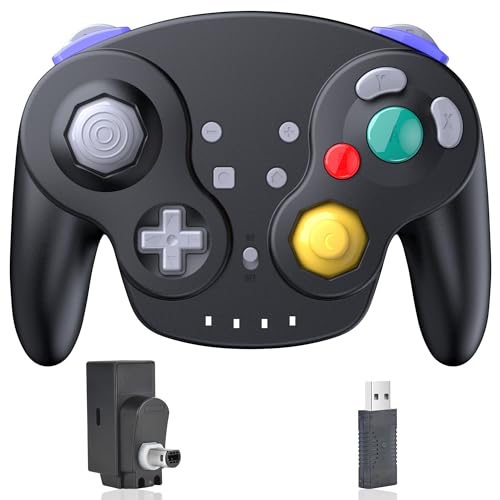
Here is the pad for the player who wants a GameCube feel on Switch, PC, and even a Raspberry Pi, without a wire tangling across the room. It is a 2.4 GHz wireless controller with a bundled USB receiver and an NGC-style receiver, so it effectively mimics a real Wavebird. The range hits 10m/33ft, so you can sit back on the couch and still register inputs. Owners tend to describe it as a solid Wavebird clone, and the shape is the reason — all the muscles you built on a real GameCube pad still work here. The octagonal gate and analog triggers carry over from the original layout, and that is the whole point.
It is a big pad by measurement — 8 x 6 x 0.72 inches — though it does not weigh much. Those extras help on PC games and emulators, where you want more shortcut mapping than Smash needs. The stick and button feel is where it wins. Owners roundly call the sticks and buttons fantastic and almost identical to the original GameCube feel.
The honest limit is the right trigger. There are recurring reports of the right trigger eventually not working properly, and connectivity hiccups where the pad disconnects too readily. Neither is universal — plenty of buyers report clean setup and no trouble at all — but where a wireless pad lives, wireless problems live. The rechargeable battery holds around 10 hours per charge (built-in, USB-C recharging), which is fine for a gaming evening and short of a full tournament day without a top-up. If the pad is your only input for a long session, keep the charging cable nearby.
Cable-free freedom: The 10m/33ft wireless range and USB receiver make this the pad for a couch setup. You never worry about the wire catching on a chair leg mid-match, and the Wavebird-style ergonomics feel familiar within the first minute.
Where it gives ground: The right trigger and the connection are the two things to keep an eye on over time. Treat it as a great value pick for casual Smash and emulators, not a guaranteed tournament-warrior.
Pick this one when: you want a Wavebird-style wireless pad that covers Switch, PC, and Mac from one controller.
Think carefully if: you need a faultless wired connection for competitive play — the right trigger is the known weak point.
3. Retro Fighters BattlerGC Pro Series GameCube Controller

Hall-effect sticks aimed at killing drift, with two extra back buttons.
Drift is the one problem that sends a GameCube pad to the donation box, and this pad is the direct answer to that. It uses Hall effect analog sticks, which sense position magnetically instead of through a physical wiper that wears down. The maker claims that design delivers more accuracy and no drift. That alone justifies the price if drift has already killed one of your sticks. It is also more compact than the black iNNEXT pad on the shelf above — 5 x 3 x 1 inches against 8 x 6 x 0.72 inches. It is the smaller, denser controller of the two.
The build is dense and ready for serious play. It adds P1/P2 back buttons so you can map extra actions without moving your thumb off the face cluster, and the triggers are full analog with an integrated click and micro switches. That click is a throwback feel players either love or find too loud, but it does give clean feedback on trigger presses. It is wireless over both Bluetooth and 2.4 GHz, with a 30 foot range, so it is both cable-free and console-flexible.
The real sticking point is durability over the long term. Some owners mention the replacement units peeling, and the L and R triggers stop working for a share of buyers while others report it works great. It is a young product line next to the official Nintendo pad, so its long-term record is short. The upside: owners describe it as one of the best built GameCube-style pads they have used. That is not an empty compliment — the button feel and the D-pad get singled out as the strongest part of the whole package.
Where it earns its place
- Hall effect analog sticks designed to resist drift over the long haul.
- Full analog triggers with a click plus P1/P2 back buttons for extra mapping.
- Smaller footprint — 5 x 3 x 1 inches vs 8 x 6 x 0.72 inches on the black pad above.
- 30 foot wireless range over Bluetooth or 2.4 GHz.
The honest caveats
- Durability complaints exist — peeling units and L/R triggers stopping for some buyers.
- Reports of constant disconnects put the wireless link among the weaker aspects.
- Only 11 buttons, which is fewer shortcuts than the 16-button alternative.
Best fit for: the player who has already burned through a stickbox and wants magnetic sensing to prevent the next drift.
Skip the purple if: you prize a long, proven track record over a newer stick technology.
4. HORI Battle Pad

Ten feet of cable, anti-snapback sticks, and a Turbo button for the money-minded.
If your gaming setup is a desk right in front of the TV, a wire is not a problem — it is a guarantee. The Battle Pad runs 10 ft of USB cable, so there is slack to sit back a little and no pairing to think about. It is officially licensed by Nintendo and Pokemon, so it carries the Pikachu art and the real GameCube-style layout in one package. At 80 g it is the lightest thing on this whole list, which matters during long sessions when you want the pad to disappear in your hands.
Two features stand out for serious Smash play. The first is anti-snapback analog sticks, which are built to stop the stick from springing back past center when you release it. That snapback can send an unintended directional input at the moment of release, which is exactly when a Smash player wants a clean stop. The second is the added turbo settings and toggle shoulder button functions. Turbo can help on games where rapid repeated inputs are a chore. On Smash, the tuning mostly matters for how the pad feels in hand, and the ergonomic shape and textured grip earn warm words here.
The trade-off has two faces. The first is the button layout: reports describe the L/Lz and R/Rz buttons being switched and trigger feel that seems odd to some players. That is a muscle-memory trap if you have been on a real GameCube pad for years, so spend your first session re-learning those. The second is durability — a portion of buyers find it breaking after a few uses or failing over time, though plenty report it holding up for years. Value is where opinions split hardest: some consider it a fair deal as a licensed wired pad, others feel it is not worth the cost of upgrading from a stock controller.
Why it makes sense: The 10 ft cable and 80 g weight make it a genuinely lightweight wired setup with no battery to worry about. Anti-snapback sticks are the feature you notice most on precise diagonal inputs.
The thing to check first: The swapped shoulder buttons and odd trigger feel mean it is not the pad to trust blind for competitive Smash. Test the L and R layout before you commit.
Choose this for: a desktop or wired couch setup where you want the lightest pad here and no battery to charge.
Look past it if: you rely on muscle memory for the shoulder layout and cannot afford a relearning session.
5. 2.4 GHz Wireless GameCube Controller Clear Yellow

A clear-shell wireless pad for players who want a color-matched second controller.
Think of this as the clear-shell sibling of the black iNNEXT above — same body, same receivers, same 10-hour rechargeable battery, same 2.4 GHz wireless link with a 10m/33ft range. The reason you would pick this one is aesthetic: the clear yellow shell pairs with a certain custom setup or a Switch dock. That is a legitimate reason. There is a 4 color lineup to swap between, so you can coordinate a pair of pads to match. It carries the same octagonal gated stick and analog triggers that make GameCube-style play feel right.
What it offers is the complete wireless package: GameCube receiver plus USB receiver, charging cable, and user manual. It is compatible with Switch Online, Windows PC, and macOS, so it crosses over to PC retro emulation without a second purchase. It also handles Switch 1 and Switch 2 and the original GameCube console, so the pad does not become obsolete if you spread play across systems. The 12 buttons is a lighter mapping set than the black version’s 16, though for Smash play both are more than enough.
The real caveat is the track record. This specific clear-yellow model is newer with far less owner history to draw on than the older pads here, so its long-term reliability picture is thinner. The underlying design is shared with the black version, which has a decent reputation for Wavebird-clone feel, so the risk is more about sample size than about any known defect. Buyers here should treat it as a color-matched second pad, not the single competitive primary you pin a whole season on. For a bright, fun-looking controller, though, it is hard to argue with clear yellow.
What you are buying: The same wireless internals and 10-hour battery as the black iNNEXT, wrapped in a transparent yellow shell that looks the part on a themed setup.
Keep it in context: Less real-world history than the older pads here, so it is a smart buy for a secondary or aesthetic pad rather than your one tournament controller.
Good call if: you want a clear-shell wireless GameCube pad and already like what the black iNNEXT delivers.
Not the one if: you want proven reliability you can lean on — this shell is newer with less history behind it.
Know the Specs
Octagonal Gate vs Round Gate
The gate is the ring the stick shaft rides in. An octagonal gate has eight flat notches, one for each direction, so your thumb feels where the corners are. That is the GameCube signature. A round gate has no corners to feel and lets the stick glide in a smooth circle. For Smash tilts and aerials, the notched feel is the reason players tolerate the shape. If a pad is described as a clone but has a round gate, you will feel the difference in the first ten minutes.
Hall Effect Sticks and Drift
A standard analog stick uses a mechanical wiper (a contact that rubs as the stick moves) and it wears out. Hall effect sticks (magnetic sensors that read position without touching) have no wiper to wear. That is why Hall effect pads get marketed as “no drift.” Drift is the slow creep of an idle stick reporting movement when you are not touching it, and it is the most common reason a pad gets replaced. If drift has already killed a stick, pay for the magnetic option.
Wired vs 2.4 GHz Wireless
A wired GameCube pad goes through a USB cable or the original GameCube port, and it never needs charging. A 2.4 GHz wireless pad ships with a USB receiver and an NGC-style receiver, and it needs a charge or fresh batteries. The upside is no cable snag and a typical range measured in feet or meters — the iNNEXT and SAFFUN pads both claim 10m/33ft, and the Retro Fighters claims 30 feet. The trade-off is that batteries age, receivers lag occasionally, and disconnects enter the picture.
Analog Triggers and the Z Button
GameCube triggers pull through a long travel and register how far you press, which matters for games that use analog acceleration or pressure. Smash mostly cares about the digital trigger click, but emulated games and racing titles care about analog read. The Z button is a single shoulder button unique to the GameCube layout, and third-party pads often remap shoulder functions to compensate. If a pad’s listing mentions toggle shoulder functions, that is the option letting you reassign what each shoulder does.
Common Questions
Will a third-party GameCube pad work with Nintendo Switch Online?
Do I need an adapter to use a GameCube controller on Switch?
How long does the battery last on a wireless GameCube pad?
What does anti-snapback mean on the HORI Battle Pad?
Are Hall effect sticks really drift-proof?
Can I use these GameCube pads on PC or Mac?
Why are the L and R buttons switched on some GameCube pads?
Do wireless GameCube pads work with the original GameCube console?
How much does stick feel really affect Smash play?
The Bottom Line
If you want the pad that just works docked in Smash Ultimate, the Nintendo Super Smash Bros. Ultimate Edition GameCube Controller is the one to buy — official parts, the firm button feel that made the original a classic, and the notched gate your thumb already knows. If hand fatigue during long sessions is your worry, reach for the 2.4 GHz Wireless GameCube Controller at 0.32 kg with its 10-hour rechargeable battery and 33ft range. And if stick drift has burned you before, the Retro Fighters BattlerGC Pro is the smart upgrade for the Hall effect sticks and the added P1/P2 back buttons. One honest nudge: drift is the single most common reason these pads get replaced, so if you already know that pain, paying for the magnetic-stick option is money well spent.
How we choose
We do not accept paid placement. Every pick is matched to a real buyer and a real use-case; we do not hands-on test units.
Sources
Specifications: manufacturer listings and product documentation. Review insights: verified customer reviews, as of November 2026. Pricing: not shown on this page (it changes often); check the current price via the retailer link.
As an Amazon Associate, Gamepad Test earns from qualifying purchases. This does not affect which products we feature.