
Heads up: This post contains affiliate links. As an Amazon Associate I earn from qualifying purchases, at no extra cost to you. Learn more
Specs are compiled from manufacturer listings and verified buyer reviews and can change over time — please confirm the key details on the product page before buying.
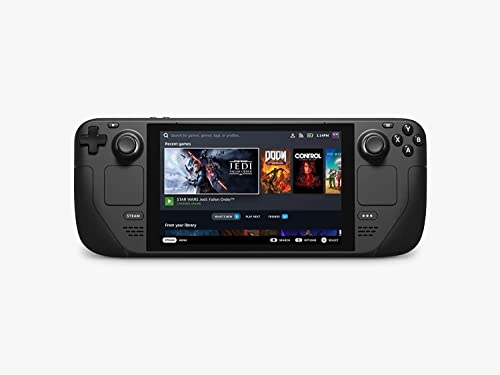
You want a handheld PC that fits your hands and your bag, so skip the screen-size chase and focus on storage, panel type, and battery instead. The Valve Steam Deck family sets the standard for this whole shape of device. The four options below break down into a base LCD model, a renewed 512GB unit, and two OLED machines that differ mostly in how much space they carry from the start.
This guide is built by comparing the manufacturers’ published specifications and the patterns across verified customer reviews, so you get each pick’s real strengths and trade-offs instead of marketing spin.
You will see where each deck’s screen, storage, and battery land, which bundle extras actually matter, and how to avoid paying for capacity you will never fill. The short version: pick your storage tier first, because that choice locks in everything else on a small steam deck.
Top Picks
How To Choose The Best Small Steam Deck
A Steam Deck is a full PC squeezed into something you hold in two hands, so the spec sheet reads differently from a laptop’s. The parts that change your daily experience are the display panel, the storage you start with, and the battery rating. Everything else is comfort and accessories.
Storage is the decision you cannot undo cheaply
Every model here accepts a microSD card, which is the low-effort way to add space for game installs. But the built-in drive is what your system files and updates live on. A 64GB deck leaves you a modest slice after the operating system takes its share, so budget buyers lean on that card slot early. The 512GB, 1TB, and 2TB decks all give you room to install several large titles before you think about expansion.
LCD versus HDR OLED, in plain terms
An LCD panel lights the whole screen evenly. An OLED panel switches individual pixels on and off, so blacks go truly dark and contrast jumps. The OLED decks here also list a 90Hz refresh rate, which means the screen can redraw up to 90 times a second for smoother motion. The 7-inch LCD deck tops out lower and shows a standard, non-HDR image.
Battery and Wi-Fi decide how portable it really is
A bigger battery rating in watt-hours (Whr) means more play time away from a wall outlet. Wi-Fi 6E is a newer wireless standard that uses a wider band, which helps download speed and online stability if your router supports it. If you mostly play at home near a charger, these matter less than they do on a long flight.
Side-by-Side Comparison
| Model | Best For | Storage | Display | Connectivity | Amazon |
|---|---|---|---|---|---|
| Valve Steam Deck, HDMI, 64 GB, Black★ Best Overall | First-time buyers on a tighter budget | 64 GB | 7″ LCD, 16:10 | HDMI | Amazon |
| Valve Steam Deck 512GB 7″ LCD (Renewed) | Buyers who want more room for less | 512 GB | 7″ LCD, 1280 x 800 | microSD expansion | Amazon |
| Valve Steam Deck OLED 1TB | Long sessions and a big library | 1 TB | 7.4″ HDR OLED, 90Hz | Wi-Fi 6E | Amazon |
Detailed Reviews
1. Valve Steam Deck, HDMI, 64 GB, Black
Our pick — 4.5+★ from 1,500+ verified ratings; the strongest balance of quality and price.
The entry ticket into handheld PC gaming, case already in the box.
Spend the least and still get the full Steam library in your hands — that is what this deck does. Its 64GB of built-in storage is the tightest of the four, and the system software claims a chunk of it. The listed usable figure for this configuration sits at 46.5 GB, enough for only a few large installs. A microSD card (a small memory card that slots into the side) fixes that fast, and plenty of buyers treat the card slot as the real storage plan from day one.
The 7-inch LCD screen runs a 16:10 aspect ratio, which is a wider-than-square shape that suits most PC titles and leaves less wasted black bar at the edges. It is a plain LCD, not an HDR OLED, so bright scenes hold up fine while dark scenes stay greyish rather than pitch black. Where this deck earns its keep is raw performance: it runs the games people actually bought it for, and that is the note that comes through loudest from the people who own one.
Two honest catches. Battery life is the weakest thread in the whole package — expect to keep a charger within reach on anything demanding. Value also splits opinion; some buyers feel the capacity-to-cost math is hard to justify next to the bigger-storage models. Reliability leans positive overall with a minority reporting an early failure, so buy somewhere with a clean return window.
What holds up well
- Runs demanding PC titles without the buyer needing a gaming rig
- Carrying case comes included, so there is no extra purchase to protect it
- 16:10 LCD aspect ratio fits most PC game layouts cleanly
- microSD-compatible, so storage can grow later
Where it asks for patience
- 64GB built-in storage is the smallest tier here, leaving 46.5 GB usable
- Battery is the most-discussed weak point across owner feedback
- LCD only — no HDR and no 90Hz motion
Grab this one when: you want the cheapest way into Steam Deck gaming and are fine adding a microSD card yourself.
Think twice if: you hate managing free space or plan to play away from a charger for hours.
2. Valve Steam Deck 512GB 7″ LCD Handheld Console (Renewed)

512GB of built-in storage versus the base deck’s 64GB, and a carrying case in the box.
Storage is where this one makes its case: 512GB against the base model’s 64GB, and that is the whole pitch in a single line. You get roughly the same 7-inch LCD experience at 1280 x 800 resolution, plus the freedom to install a real library before you ever touch a microSD card. Two trackpads sit under the control sticks, which is how you play games that were designed for a mouse and keyboard.
The 1280 x 800 resolution works out to a 16:10 shape, so PC games fill the panel rather than letterboxing. It is not an anti-glare screen, which means a window behind you becomes a mirror on bright scenes. Docking to a monitor or TV turns it into a small desktop PC, and that flexibility is a big part of why the renewed format appeals — someone else has already taken the depreciation hit.
The honest caveat with any renewed unit is that you are inheriting a used device, even if it arrives clean. Functionality is the most-discussed topic in owner feedback and it splits: most say it works well, a minority flag control problems or Wi-Fi connectivity dropouts. Performance itself reviews well. Do a full controller and Wi-Fi check in the first week while your return window is open.
The storage argument: against the base 64GB deck, this carries 512GB of built-in space — the difference between “add a card immediately” and “install and play”.
Fair warning on condition: renewed means pre-owned. The savings are real, but so is the lottery of inheriting someone else’s device.
Reach for it if: 512GB of room at a renewed-tier cost is exactly the trade you want.
Look elsewhere if: you want factory-fresh condition and full confidence on day one — this is a renewed unit, not a new one.
3. Valve Steam Deck OLED 1TB Handheld Gaming Console
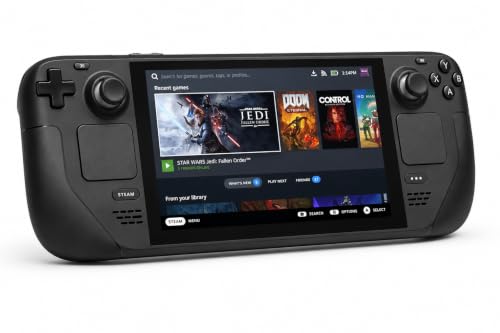
The OLED panel upgrade that gives the whole library deeper blacks and richer color.
Start with the screen, because it is the reason this deck exists. The 7.4-inch HDR OLED panel is larger than the LCD models’ 7-inch screens, supports HDR for brighter highlights and deeper shadows, and refreshes at up to 90Hz for smoother motion. It is finished with anti-glare etched glass, so overhead lights smear less across the picture. On dark, moody games the difference is not subtle.
Battery life is where this deck pulls ahead. The listed 50Whr battery is rated for 3-12 hours of gameplay depending on the title. That is the widest spread in the group, and the first time a Steam Deck answers the “will it last the flight” question with a yes. Wi-Fi 6E (a newer, faster wireless standard) adds a wider band for downloads and online play. Storage lands at 1TB of NVMe SSD (fast flash storage), versus the 512GB renewed model above — the difference between a full library and a rotation of three or four big titles.
Owner sentiment here is close to unanimous: this is a machine people describe as the best thing they own, with all their games running without fuss and setup that takes minutes. The strengths that come up most are build quality first and performance second. Ergonomics get their own nod too — it stays comfortable in hand over long sessions. The one number that gives pause is weight: 3.7 pounds is a real load to hold up in bed.
Why owners keep it
- 7.4″ HDR OLED at 90Hz — the best-looking panel of the four
- 3-12 hours of gameplay on the 50Whr battery, depending on the title
- 1TB NVMe SSD built in, versus the renewed 512GB deck
- Wi-Fi 6E for faster downloads and steadier online matches
- Included carrying case with a removable liner
The honest counterweight
- 3.7 pounds gets heavy when you hold it overhead for long
- Premium-tier cost for the panel and capacity upgrade
- Still a handheld — demanding titles will drain it faster than the top figure
The short verdict: this is the deck to buy if the screen is what sold you on handheld PC gaming in the first place.
Sizing it up: the 1TB drive swallows a full library, so you will not be juggling installs mid-week.
Know the Specs
Resolution and Refresh Rate
Resolution (1280 x 800 here) is the number of pixels across the screen, and a 16:10 shape means PC games fill the panel with little wasted edge. Refresh rate is how many times per second the image redraws — 90Hz means smoother motion than a lower-rate panel. Neither number tells you how a game runs; they tell you how it looks while it runs.
Storage and microSD Expansion
Built-in storage decides how many large installs fit before you start deleting. A 64GB drive leaves a modest amount of usable space after system files, while 512GB, 1TB, and 2TB tiers give you real breathing room. Every model here accepts a microSD card, which is the cheaper way to add space for games without opening the device.
Battery in Watt-Hours
A watt-hour (Whr) rating measures the energy a battery holds, so a higher figure generally means longer play. Real session length also depends on the game and the panel — a demanding title on an OLED screen can land far from the top of a listed range. Treat any “hours of gameplay” figure as a spread, not a promise.
Wi-Fi 6E and Docking
Wi-Fi 6E is a newer wireless standard that opens a wider band for faster downloads and steadier online play, provided your router supports it. Docking over HDMI or a USB-C hub lets the same handheld drive a monitor or TV, turning it into a compact desktop PC when you are not holding it.
Common Questions
How small is a Steam Deck to actually hold?
Is 64GB enough storage, or should I buy a bigger model?
Can I expand storage with a microSD card on any of these?
Is the OLED screen worth choosing over the LCD model?
How long can I play on the OLED battery?
What does the 2TB model’s professional upgrade mean for me?
Is a renewed Steam Deck a safe buy?
Do I need Wi-Fi 6E for online play?
Can I dock a Steam Deck to a TV or monitor?
Which model makes the most sense for a first Steam Deck?
The Bottom Line
For most people taking the plunge, the small steam deck to start with is the 64GB Valve Steam Deck. It puts the full library in your hands with a carrying case included and leaves storage as a later, card-based upgrade. If you want the panel that makes games look their best, the OLED 1TB earns its keep over long sessions on that 50Whr battery. And for maximum capacity plus the hub, controller, and cases in one order, the 2TB 7-in-1 kit is built for exactly that buyer.
One last nudge: the OLED 1TB carries the strongest owner track record of the group, so if you can stretch to it, that is where the confidence lies.
How we choose
We do not accept paid placement. Every pick is matched to a real buyer and a real use-case; we do not hands-on test units.
Sources
Specifications: manufacturer listings and product documentation. Review insights: verified customer reviews, as of November 2026. Pricing: not shown on this page (it changes often); check the current price via the retailer link.
As an Amazon Associate, Gamepad Test earns from qualifying purchases. This does not affect which products we feature.