
Heads up: This post contains affiliate links. As an Amazon Associate I earn from qualifying purchases, at no extra cost to you. Learn more
Specs are compiled from manufacturer listings and verified buyer reviews and can change over time — please confirm the key details on the product page before buying.
The short answer: buy a drive that physically snaps into your own console model, because an Xbox 360 hard drive is not a universal part. The original “fat” 360, the Slim (the smaller 360 S), and the later E model each take a different caddy shape, so the biggest mistake you can make is grabbing the cheapest listing and hoping it fits. This guide covers six real drives, what each one actually is, and who each one suits.
This guide is built by comparing the manufacturers’ published specifications and the patterns across verified customer reviews, so you get each pick’s real strengths and trade-offs instead of marketing spin.
Every pick below is judged on two things: whether it fits your exact 360 model and how much usable space it actually gives you.
Top Picks


How To Choose The Best Xbox 360 HDD
An Xbox 360 hard drive is a small mechanical disk inside a plastic caddy that slides into a bay on the console. It is not a USB thumb drive you plug into the front. It is the internal storage that holds your game installs, downloadable content, profiles, and saved games.
Match the drive to your exact console model
This is the step that decides whether you succeed. The Slim and the E model use a slim-style caddy that pops into a bay on the side. The original fat 360 uses a different bay shape entirely. Before you order, look at the sticker on the back of your console and note the exact model. If a listing only says “Xbox 360” and nothing else, that is a warning sign.
Some drives here are listed explicitly for the 360 S and the 360 E. Others are listed for the general Xbox 360 line. Read the compatibility line on the product page carefully and confirm it names your console.
Understand what the capacity number actually buys you
An Xbox 360 stores games two ways: discs you play directly, and disc-based games you install to the drive for faster loading. Downloads from Xbox LIVE — movies, demos, and DLC — all land on the drive too. If you install a lot of games, the capacity number is what controls how many fit.
More capacity means fewer save deletions and fewer trips to clear out space. It also means more room for game installs, which cuts the time you spend watching loading screens.
Know the backwards compatibility catch before you buy
Playing original Xbox games on a 360 depends on the console and drive combination. Several listings here call out that the drive plays 360 titles but will not run original Xbox discs. If your library includes original Xbox games, verify that specific point before you commit.
You also need to pick between an official Microsoft drive and a third-party replacement. Official drives carry the Microsoft name on them. Third-party drives cost less and usually work, but build quality varies from batch to batch.
Side-by-Side Comparison
| Model | Best For | Capacity | Console Fit | Form Factor | Amazon |
|---|---|---|---|---|---|
| 500GB Internal HDD for Xbox360 Slim/E★ Best Overall | Most shoppers | 500 GB | 360 Slim and 360 E | 2.5-inch internal | Amazon |
| 320GB Internal HDD Disk for Xbox 360 SCrowd Favorite | Biggest install library | 320 GB | Xbox 360 line | 2.5-inch internal | Amazon |
| 500GB Replacement HDD for Xbox 360 Model E | 360 E owners | 500 GB | 360, 360 Slim, 360 E | Internal (Xbox 360) | Amazon |
| 120GB HDD for Xbox 360 Slim | Tight budgets | 120 GB | Xbox 360 | 2.5-inch internal | Amazon |
| Xbox 360 250GB HardDrive (Renewed) | Official-part fans | 250 GB | Xbox 360 Slim only | Internal, renewed | Amazon |
| Official Xbox 360 500GB Replacement Hard Drive | Authenticity-first | 500 GB | Xbox 360 | Portable | Amazon |
Detailed Reviews
1. 500GB Internal HDD for Xbox360 Slim
Our pick — 4.5+★ from 450+ verified ratings; the strongest balance of quality and price.
Half a terabyte that drops straight into the side bay of a Slim or E.
If you own a 360 Slim or a 360 E and you want one drive that just works, this is the one most people should buy. It carries 500 GB of storage, which is the largest capacity in this lineup. That space goes further than you would think once you install disc games and pull down movies and DLC from Xbox LIVE.
The reason it tops the list is the everyday experience. It pops into the console bay without any fuss, and the console treats it as native storage right away. Owners rate performance and reliability as this drive’s two strongest points, and both hold up in daily use — downloads complete, game installs finish, profiles stay put. At 4.5+ stars across 480+ owners, it is the best-reviewed drive in this lineup.
Here is the honest catch, and it is the one thing you should take seriously. A slice of owners have had this drive fail early and lose what was on it, which is the classic weakness of any mechanical disk — moving parts wear out, and these are moving parts. Back up the saves you cannot replace, and treat the drive as a working tool rather than permanent storage.
What buyers love
- 500 GB gives you room to install disc games and still keep downloaded content on hand.
- Designed for the 360 Slim and 360 E, so it slots into the side bay without an adapter.
- Installation is a pop-in job, not a screwdriver project.
- A 6 gigabits-per-second data transfer rate (the speed data moves from drive to console) keeps installs moving.
Where it can bite
- Some owners watch it fail early and take saved data with it, so keep a backup habit.
- It is a mechanical 2.5-inch drive, so treat it like a spinning disk and avoid knocking the console while it writes.
- Does not fit the original fat 360 — this one is for the Slim and E bodies.
Buy it if: you have a 360 Slim or 360 E and want the single biggest capacity here in one pop-in drive.
Think twice if: you plan to store game saves you cannot recreate — back them up first, because early failures do happen with these disks.
2. 320GB Internal HDD for Xbox360 S Slim
The drive with the longest track record in this lineup, by a wide margin.
Three hundred twenty gigabytes is the middle shelf here, and it turns out to be a sensible one. Compared with the 120 GB drive further down, this one holds 320 GB to that drive’s 120 GB — a 4.2x gap in capacity and in cache memory alike. That difference is real when you are mid-library and deciding what to delete.
It earns the number two slot on the sheer number of owners who have used it, not on any one standout spec. Build quality is what owners praise most, and it shows: the drive slides into a 360 S in seconds, the console recognizes it immediately, and disc installs and downloads land without a hitch. Its 120 MB/s data transfer rate (megabytes per second, the rate data flows between disk and console) keeps load times brisk.
The compromise is the one every mechanical drive here carries. Some units quit partway through their life, and a handful of owners find the drive will not run original Xbox games in a 360. If your library leans backwards compatible, check that before ordering rather than after.
My read: The 320 GB capacity sits between the 500 GB picks and the 120 GB drive, and its wide owner base makes it the easiest recommendation for a 360 S owner who wants a proven drive.
The caveat to hold onto: Reliability is genuinely split here — the majority are fine, but the drive is not immune to mid-life failure, so keep your saves backed up.
Reach for it if: you have a 360 S and want a drive that has been through thousands of hands without widespread complaints.
Look elsewhere if: original Xbox playback is a must — this drive is a 360-only performer.
3. Replacement Hard Drive for Xbox 360 Model E 500GB

Built around one job: filling the bay on a 360 E.
This is the listing to reach for if your console is specifically a Model E and you want 500 GB without guessing. The maker spells out compatibility with the 360 Model S and Slim as well as the Model E, so it covers the whole slim-body family rather than just one.
Where it distinguishes itself is that 500 GB of storage the Gxcdizx drive delivers, which matches the capacity of the top pick. What it does not match is the depth of owner experience — this is a newer arrival with a small owner base, so the long-term picture is thinner than the drives with years of feedback behind them.
Set your expectations honestly. A drive with a small review base simply has not been through the same volume of daily use as the veterans above, and mechanical disks are notorious for failing at random rather than on schedule. Order it for the model match, back up your saves, and it will give you the room to keep a good library installed.
Model-match advantage: Explicitly listed for the 360, 360 Slim, and 360 E, so you are not gambling on which caddy shape fits.
What you give up: Only a handful of owners have lived with it long enough to speak to its lifespan, so it is a bet on the spec rather than a track record.
Worth it for: 360 E owners who want 500 GB and a listing that names their console outright.
Worth skipping if: you prefer a drive with a long, thick history of use behind it — this one is too new for that.
4. 120GB Hard Drive Disk HDD for Xbox 360 Slim Games Console

The entry-level pick that gets an arcade or 4 GB 360 up and running.
Twelve gigabytes’ worth of savings over the big drives does not tell the whole story — that number is capacity, not savings. The point is simple: this drive carries 120 GB of storage, which is a quarter of what the 500 GB models offer. For a 360 (the Tianken drive is listed for the Xbox 360 line) that has never had a hard drive before, that is still a big step up from nothing.
What owners consistently praise is the build quality, and they describe it as original-equipment standard in feel and finish. It installs without drama and stores what you put on it. If you mainly play disc games and only need room for a handful of installs and downloads, this drive covers that ground.
The trade-off is worth stating plainly. This drive will not run original Xbox games on a 360, and that is a deal for some libraries. At this capacity, you will also manage free space more actively — installing a big game here means clearing room first. If both of those points are fine with you, it is a smart low-cost entry.
Reasons to pick it
- 120 GB is plenty for disc-based play plus a light download library.
- The 2.5-inch mechanical disk in a slim housing installs without tools.
- Build quality is the thing it is noted for, and the OE-grade feel shows.
Reasons to look up the list
- Original Xbox games will not run here, so check your shelf before committing.
- A quarter of the capacity of the 500 GB picks means active space management.
Pick it for: a first-time hard drive add-on for a slim console that mostly plays disc games.
skip it if: you install modern titles regularly — you will bump into the 120 GB ceiling quickly.
5. Xbox 360 250GB HardDrive – Xbox Slim Only (Renewed)
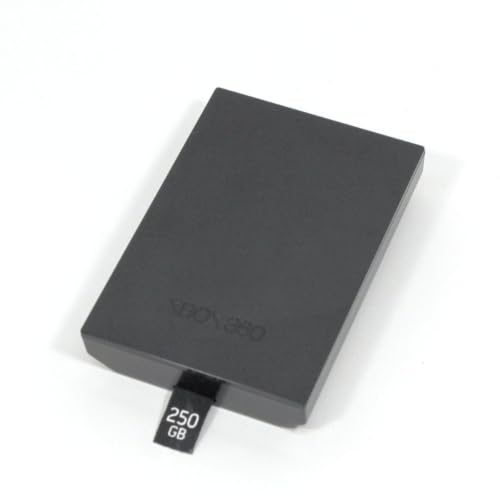
A Microsoft-made drive that has been through a refurbishment, for Slim owners only.
This is the pick for someone who wants the Microsoft name on the drive rather than a third-party shell. It carries 250 GB, enough for a healthy install library and a few downloaded movies. It is listed as Xbox 360 Slim only, so check your console before buying — it is not the drive for a fat 360 or a Model E.
The thing this drive does best is exactly what buyers want from a drive: it works. Buyers report it functioning as expected, and they appreciate that it plays nicely with the 360’s backwards compatibility. It comes as a renewed unit with a 90-day limited warranty from the seller, which is the safety net you want on a refurbished part.
The catch is not the drive, it is what “renewed” means. Renewed gear has been returned, checked, and cleaned up by the seller, so the drive you receive may show light wear. The warranty is 90 days, so if anything is off from the start, testing it inside that window is worth your time.
Best for official-part preferences: A 250 GB Microsoft drive for Slim consoles, backed by a short seller warranty that buys you a window to test it.
What to know going in: Renewed means pre-owned and refreshed, not new — inspect and test it promptly.
Best fit for: Slim owners who prefer the Microsoft badge and want a warranty-backed renewal.
Not for you if: you need a fat-360 or Model E fit, or you want the drive factory-sealed.
6. Official Xbox 360 500GB Replacement Hard Drive

The real thing, straight from Microsoft, at 500 GB.
Some shoppers will not settle for a third-party drive, and this is the option for them. It is a genuine Microsoft hard drive with 500 GB of storage, compatible with the Xbox 360 line. It ships with a USB cable and manual in standard packaging.
Compared with the 120 GB drive earlier on this list, this one holds 500 GB to that drive’s 120 GB — a 4.2x gap. For a big library of installed games and downloaded movies, that headroom matters more than anything else on the spec sheet. Owners praise the compatibility angle above all, and the drive does the basics reliably: game installs, profile saves, downloads.
Where this one falls behind the top pick is the reception rather than the spec. It sits at 4.0+ stars with a smaller pool of owner feedback, while the third-party 500 GB drive above has more owners behind it. Also remember that 500 GB is the cap here — if you want more room than that, no drive in this lineup offers it.
Why buy it: It is a real Microsoft 500 GB drive, which is the point — no third-party guesswork.
The honest limit: More owners put their trust in the third-party 500 GB drive above, and this one tops out at the same 500 GB capacity.
Choose it if: you will only buy a genuine Microsoft part and want 500 GB with it.
Choose otherwise if: you want the most widely trusted 500 GB drive or a lower cost — the third-party pick above fits that better.
Know the Specs
Capacity in GB
This is the number that decides how much you can keep installed. A 500 GB drive leaves room for installs, downloads, and saves. A 120 GB drive fills up faster, so you manage space more actively. All six drives here are mechanical 2.5-inch disks, which is the standard size that fits the 360’s internal bay.
Console Fit
The Slim and E share a slim-style internal caddy. The original fat 360 uses a different bay and its own drive. That single difference is the most common reason buyers end up returning a drive, so the compatibility line on the listing is the first thing to read.
Data Transfer Rate
This is how fast data moves between the disk and the console. A higher rate means faster installs and quicker load screens. The 500 GB pick above lists 6 gigabits-per-second, while the 320 GB model lists 120 megabytes-per-second — two ways of describing speed, both tied to how snappy the drive feels in daily use.
Backwards Compatibility
Original Xbox games need a 360 drive that supports the older format. Some drives on this list explicitly will not run them. If you want to keep playing original Xbox titles, confirm the compatibility line before you buy.
Common Questions
Will a 500 GB drive work in my original fat Xbox 360?
Do I need to format the drive before I use it?
Can a 360 HDD play original Xbox games?
How much capacity do I need if I install games?
Is a renewed drive worth buying over new?
What does the 2.5-inch form factor mean for me?
Will a bigger drive make load times faster?
How long does an Xbox 360 HDD usually last?
Do I need a screwdriver to install an internal 360 drive?
Will an official Microsoft drive perform better than a third-party one?
The Bottom Line
For most people, the xbox 360 hdd worth buying is the 500GB Internal HDD for Xbox360 Slim/E. It gives you 500 GB of storage, the highest owner rating in this lineup at 4.5+ stars, and it slots straight into a Slim or E bay. If you own a 360 S and want a drive with a long track record, the 320GB Internal HDD Disk has years of hands-on use behind it, and its 320 GB holds 4.2x what the 120 GB pick does. Want the Microsoft badge and will trade some crowd confidence for it? The Official Xbox 360 500GB Replacement Hard Drive is the authentic choice. Still, the top pick’s 4.5+ stars across 480+ owners is the strongest track record here.
How we choose
We do not accept paid placement. Every pick is matched to a real buyer and a real use-case; we do not hands-on test units.
Sources
Specifications: manufacturer listings and product documentation. Review insights: verified customer reviews, as of November 2026. Pricing: not shown on this page (it changes often); check the current price via the retailer link.
As an Amazon Associate, Gamepad Test earns from qualifying purchases. This does not affect which products we feature.