Tired of stick drift ruining your perfect shot? You’re not alone.
The culprit is often the type of joystick inside your controller.
This guide breaks down the difference between traditional potentiometers and game-changing Hall effect sensors.
We’ll explain why one is prone to drift and the other isn’t, so you can make the best choice for your next controller.
Let’s level up your hardware knowledge and get you back in the game, drift-free.
TL;DR
- Joystick drift is primarily caused by the mechanical wear and tear of potentiometer-based analog sticks, which rely on physical contact.
- Potentiometer joysticks use a wiper on a resistive track, a design prone to failure from friction, debris, and component fatigue over time.
- Hall effect joysticks utilize magnets and sensors, eliminating physical contact and friction, making them significantly more durable and immune to the common causes of drift.
- For gamers seeking a long-term solution to stick drift, controllers with Hall effect joysticks offer superior reliability and longevity.
Understanding Joystick Drift: Causes and Impact
Ever had your character move on their own or the game camera pan without you touching the controls?
That’s joystick drift. It’s when your controller sends movement signals to your console or PC even when the analog stick is in a neutral, centered position.
This frustrating issue can ruin a gaming session.
It turns precise aiming into a nightmare and makes navigating menus a chore.
But what actually causes it?
Let’s break down the common culprits.
The Root Causes of Stick Drift
Most joystick drift issues boil down to the internal mechanics of the analog stick, particularly in controllers that use potentiometers.
For a deeper dive into the mechanics, you can learn more about how joystick controllers work in our simple guide.
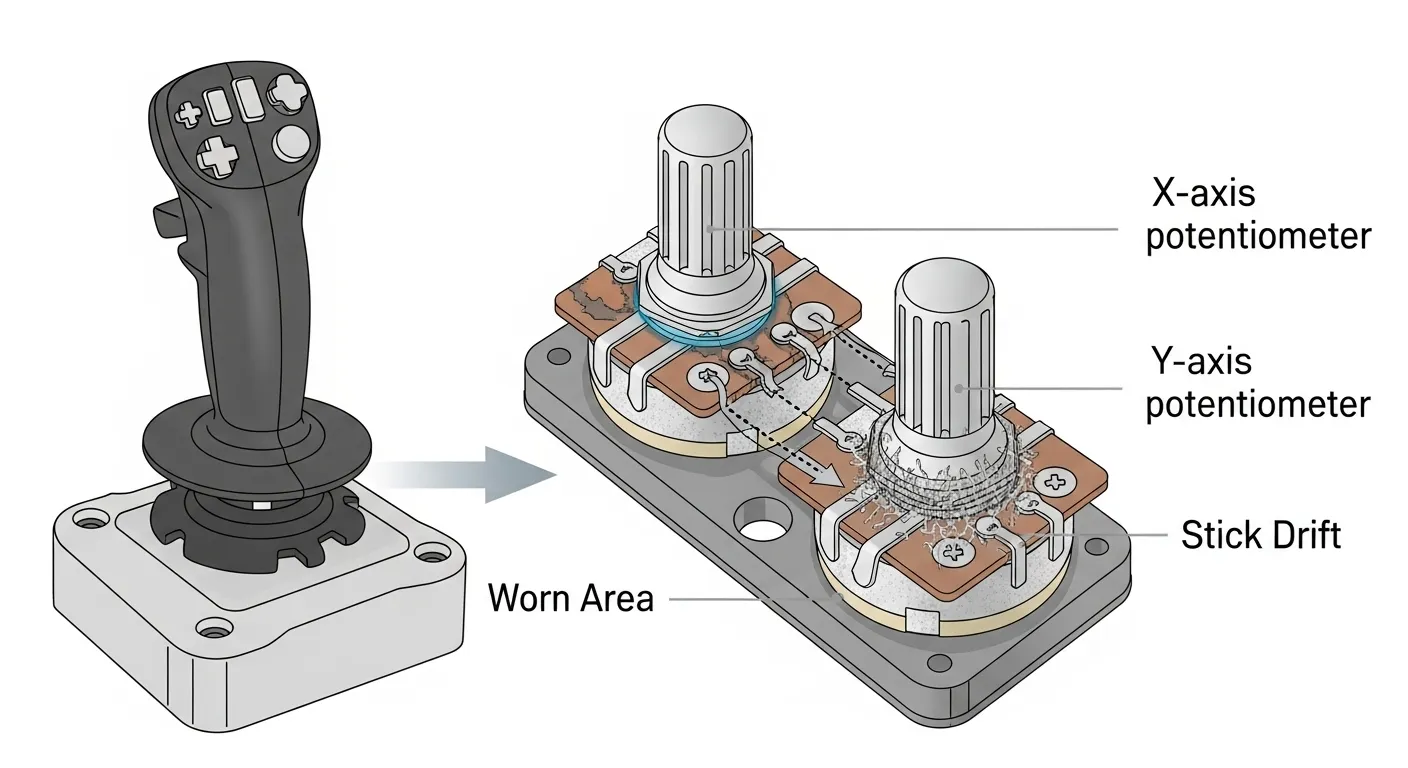
- Mechanical Wear and Tear: This is the number one cause. Potentiometers rely on a small wiper brushing against a resistive pad. Over thousands of movements, this physical contact wears down the pad, creating inconsistencies that the controller interprets as movement.
- Debris and Contamination: Dust, skin cells, and other tiny particles can work their way into the joystick mechanism. This debris can interfere with the sensors, causing them to send incorrect position data.
- Internal Component Fatigue: Over time, other parts like the springs that return the stick to center can weaken. The plastic components can also deform or break, preventing the stick from resting perfectly in its neutral position.
“The resistive pads aren’t terribly durable. Every swipe of the wiper wears them down a tiny bit… a worn-out spot can create a ‘dead zone’ where the wiper briefly loses contact.”– iFixit, What Causes Joy-Con Drift?
How Drift Sabotages Your Gameplay
Joystick drift isn’t just a minor annoyance; it can make games unplayable.
In a competitive shooter, unwanted camera movement means missed shots.
In a platformer, your character might walk off a cliff.
Even simple menu navigation becomes a battle against your own controller.
This problem is surprisingly common among gamers.
It affects controllers across all major platforms, from PlayStation and Xbox to the Nintendo Switch.
The constant, unintended input disrupts immersion and can cost you a critical in-game moment.
A pie chart showing that 41% of UK gamers have experienced controller drift, while 59% have not.
Think your controller might be a victim of drift?
Don’t guess the best way to know for sure is to test it.
A precise test can reveal even the slightest unwanted movement, helping you diagnose the problem right away.
Head over to our Gamepad Drift Test to get an instant and accurate reading of your analog sticks.
This tool will help you see exactly how much your joystick is drifting, which is the first step toward a solution.
Fast Facts
- Joystick drift occurs when a controller sends unintended movement signals, often due to mechanical wear and tear on internal components like potentiometers, or contamination from debris.
- The issue significantly impacts gameplay by causing unwanted character movement or camera panning, making precise actions difficult and affecting all major gaming platforms.
- Common causes include the wearing down of resistive pads from repeated use, accumulation of dust and other particles within the mechanism, and fatigue or deformation of internal springs and plastic parts.
Potentiometer Joysticks: Vulnerabilities and Life Extension
For decades, potentiometer-based joysticks have been the standard in most gamepads.
They operate using a simple mechanical design where a wiper moves across a resistive track to register movement.
This technology is cost-effective and well-understood.
However, the core vulnerability of a potentiometer is physical contact.
Every flick of the thumbstick grinds the internal wiper against a carbon film track.
Over time, this constant friction inevitably wears down the components, leading to stick drift.
What Causes Potentiometer Joysticks to Fail?
Several factors contribute to the eventual failure of traditional analog sticks. Understanding them can help you spot the early signs of wear.
- Friction Wear: The resistive material on the track erodes from constant use, creating dead spots or causing the sensor to send incorrect position data.
- Debris Intrusion: Dust, skin cells, and other particles can get inside the joystick module. This debris can block the wiper from making clean contact.
- Oxidation: The conductive surfaces can oxidize over time, which increases electrical resistance and can lead to erratic joystick behavior.
- Spring Fatigue: The spring that returns the stick to its neutral position can weaken, preventing it from centering perfectly after being moved.
“Drift is caused when the resistor on the potentiometer is worn away… The problem is, after a lot of use, that resistive material will get worn down. It’s a mechanical problem. It’s an inevitability.”– ALPS Alpine spokesperson, Ars Technica
How to Extend the Life of Your Potentiometer Joystick
While you can’t completely stop mechanical wear, you can definitely slow it down.
Proper maintenance and smart software tweaks can help you get more mileage out of your controller and delay the onset of stick drift.
- Keep It Clean: Use compressed air to carefully blow dust out of the joystick seams. Regularly wipe your controller with a dry cloth to prevent buildup.
- Store It Safely: When you’re not playing, keep your gamepad in a case or on a stand to protect it from dust and accidental damage.
- Adjust Software Deadzones: Most modern games and platforms let you set a controller deadzone. This creates a small neutral area where minor drift won’t register.
If you’re worried your controller is already drifting, our tools can help you find out for sure.
A quick diagnostic can confirm the issue.
We highly recommend using the Gamepad Drift Test to see a real-time visualization of your joystick’s accuracy.
| Vulnerability | Status | Impact on Drift |
|---|---|---|
| Mechanical Contact | ✅ (Present) | High |
| Inevitable Wear & Tear | ✅ (High) | High |
| Debris Sensitivity | ✅ (Sensitive) | Medium |
| Long-Term Durability | ❌ (Low) | Primary Cause |
How Potentiometers Deteriorate and Cause Drift
Most gamepads, from older classics to many modern controllers, use potentiometers in their analog sticks.
Think of them as small dials that measure position by changing electrical resistance.
It’s a proven, cost-effective technology.
The core issue with potentiometers is their reliance on physical contact.
Inside the joystick mechanism, a small conductive piece called a wiper physically slides across a resistive carbon track every time you move the stick.
Over thousands of hours of intense gaming, this constant mechanical action leads to inevitable wear and tear.
This deterioration is the primary cause of stick drift.
Here’s how it breaks down:
- Frictional Wear: The wiper gradually scrapes away the carbon material on the track. This creates worn-out spots where the electrical resistance is no longer consistent, leading to inaccurate position readings.
- Debris Accumulation: Tiny particles of carbon and plastic from this wear can build up inside the sensor. This debris interferes with the clean contact between the wiper and the track, causing erratic signals.
- Spring Fatigue: The spring that centers the joystick can lose its tension over time. This makes it harder for the stick to return perfectly to the neutral position, contributing to a “lazy” stick that drifts.
“The problem with traditional joysticks is that they use carbon film potentiometers, which wear down over time due to the friction of use. As the carbon film wears off, it results in an inaccurate reading that becomes stick drift.”– GuliKit, IGN
When the gamepad’s firmware receives these flawed electrical signals, it misinterprets them as intentional movement.
This is what you experience as stick drift.
You aren’t touching the joystick, but your character or camera moves on its own.
This physical degradation is why a controller that worked perfectly out of the box can develop issues over time.
Understanding the reasons why a controller starts drifting is the first step toward finding a lasting solution.
Practical Maintenance and Repair for Potentiometer Drift
Potentiometer drift can be a major headache, but it doesn’t always mean your controller is done for.
Often, you can fix it with a bit of maintenance.
Let’s get you back in the game with some practical repair tips.
Start with Software Solutions
Before you reach for a screwdriver, try fixing drift with software.
The easiest solution is to recalibrate your controller through your PC or console’s system settings.
This resets the joystick’s neutral position.
You can also adjust the analog stick deadzone in many games.
Increasing the deadzone tells the game to ignore small inputs around the center, which can effectively hide minor drift and keep your aim steady.
A Step-by-Step Cleaning Guide
If software tweaks don’t work, dust and grime are the likely culprits.
While physical wear is the root cause, the resulting dust and debris are often the immediate problem.
A good cleaning can often restore proper contact and function.
- Compressed Air First: Use short bursts of compressed air around the base of the analog stick. This can dislodge surface-level dust without opening the controller.
- Gather Your Tools: For a deep clean, you will need a small screwdriver set, a plastic pry tool, isopropyl alcohol (90% or higher), and cotton swabs.
- Open the Controller: Carefully remove the screws and gently pry open the controller’s shell. Be mindful of fragile ribbon cables connecting the two halves.
- Clean the Potentiometer: Locate the joystick module. Gently open the small plastic housing on its side to expose the circular carbon pad. Use a cotton swab with a drop of isopropyl alcohol to clean it.
- Reassemble and Test: After the alcohol evaporates, close everything up. You can confirm if your repair was successful with our main Gamepad Controller Test tool.
“It’s a design flaw…The more you use it, the more it’s going to wear out. The pieces of plastic are just rubbing on the carbon. It’s like a brake pad.”– Shane, Wired
When Cleaning Isn’t Enough
Sometimes, the carbon track inside the potentiometer is simply worn out.
No amount of cleaning can fix a component that has reached the end of its physical lifespan.
This is a common failure point for many gamepads.
Many players find that their DualShock 4 starts drifting precisely because of this wear and tear.
At this stage, your only option is to replace the entire analog stick module, a task that typically requires soldering skills.
Fast Facts
- Potentiometer joysticks, common in gamepads, are inherently vulnerable to stick drift due to constant physical contact between internal components (wiper and resistive track) which causes inevitable mechanical wear, debris accumulation, and oxidation over time.
- The primary cause of failure and stick drift in these joysticks is frictional wear of the resistive material, making it an unavoidable consequence of their design and usage.
- While stick drift is inevitable, users can extend the life of potentiometer joysticks and delay drift by maintaining cleanliness, storing the controller safely, and adjusting software deadzones.
Hall Effect Joysticks: The Magnetic Advantage Against Drift
Tired of stick drift ruining your gameplay?
Hall effect joysticks are the next-gen solution, swapping out old tech for the power of magnets to deliver a drift-free experience.
Unlike traditional potentiometers that rely on physical parts rubbing together, Hall effect joysticks use a contactless system.
A magnet is attached to the base of the stick, and a sensor measures its magnetic field as you move it.
This clever design is the ultimate weapon against stick drift.
Since there are no mechanical parts grinding against each other, the sensor doesn’t wear down over time.
This eliminates the main cause of analog stick degradation and failure.
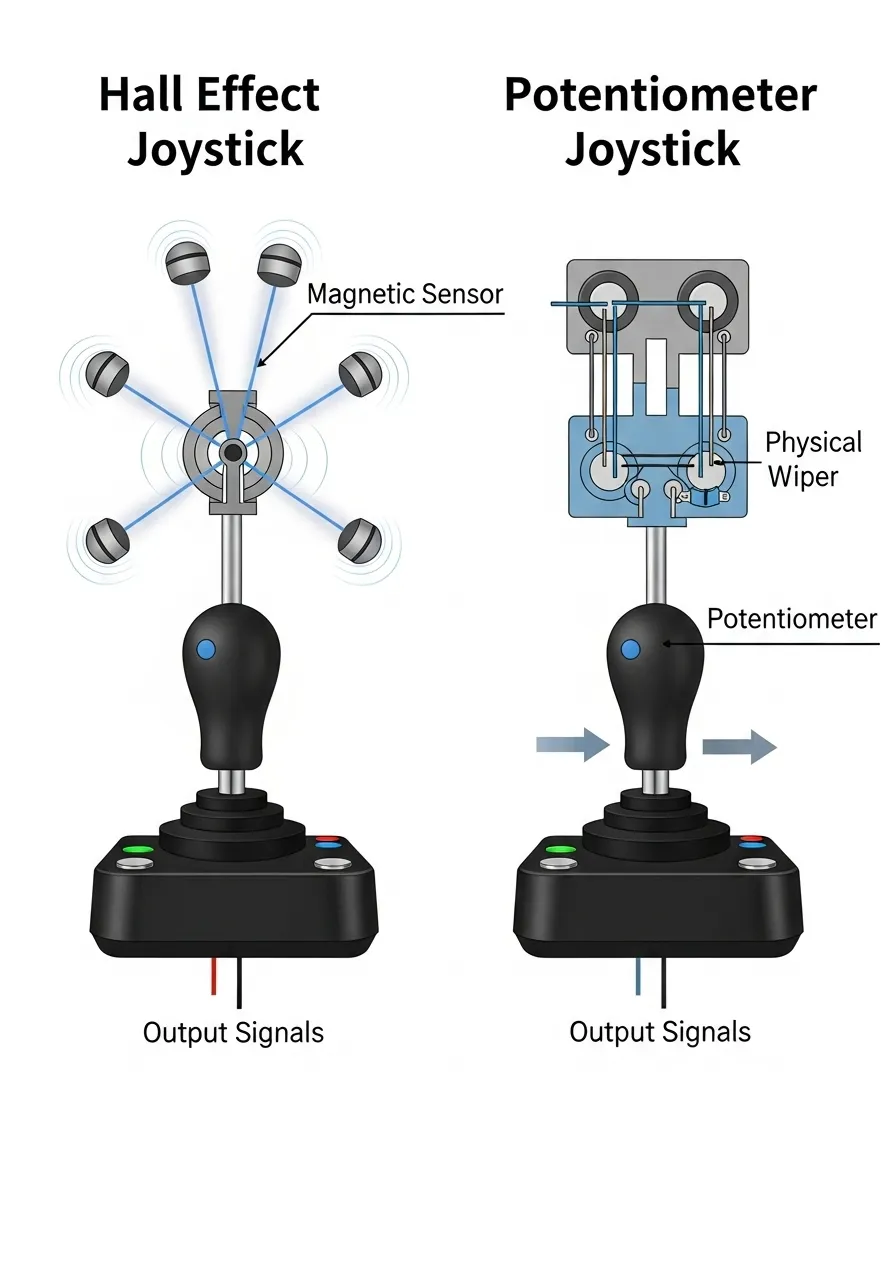
The core of this technology is brilliantly simple and effective.
To get a deeper understanding of the basics, you can learn more about how joystick controllers work and the components involved.
This magnetic approach ensures your inputs remain precise for years.
“The principle of a Hall joystick is to use magnetic induction to obtain position information. There is no physical contact during operation, so there is no wear and tear problem, and there will be no drift.”– Fanta, Product Director at GameSir, PC Gamer
Key Advantages of Hall Effect Joysticks
The benefits of this magnetic technology go beyond just preventing drift. They offer a significant upgrade for any serious gamer.
- No Physical Wear: The contactless design means the parts responsible for reading your movements won’t degrade from use.
- Enhanced Durability: These joysticks are rated for millions more input cycles than their potentiometer counterparts, offering a much longer lifespan.
- Consistent Performance: They maintain pinpoint accuracy over time, preventing the gradual development of deadzones and inaccuracies.
- Improved Precision: The magnetic sensors provide exceptionally smooth and responsive control on every axis, giving you a competitive edge.
If you suspect your current controller is already showing signs of wear, don’t guess.
Use a comprehensive gamepad controller test to see exactly how your analog sticks, buttons, and triggers are performing.
Fast Facts
- Hall effect joysticks use a contactless magnetic sensing system to measure stick position, unlike traditional potentiometers that rely on physical contact.
- This magnetic design eliminates physical wear and tear, directly preventing common issues like stick drift and ensuring the sensor doesn’t degrade over time.
- The technology provides enhanced durability, consistent precision, and a significantly longer lifespan, maintaining accurate performance for millions more input cycles.
Making the Right Choice: Potentiometer Maintenance vs. Hall Effect Upgrade
Deciding whether to stick with traditional potentiometers or upgrade to Hall effect joysticks comes down to a classic trade-off: short-term effort versus long-term investment.
Let’s break down your options to find the best path for you.
The Potentiometer Maintenance Route
If you’re on a budget or enjoy tinkering with your gear, maintaining your current potentiometer joysticks is a viable option.
Often, issues can be temporarily solved with a bit of care.
Common fixes include cleaning the internal components with isopropyl alcohol or using compressed air to clear debris.
You can also adjust the joystick’s deadzone in-game or via software.
This creates a small neutral area where minor drift is ignored.
However, these are temporary solutions.
Since potentiometers rely on physical contact, the internal tracks will continue to wear down.
The drift will almost certainly return over time, requiring repeated maintenance.
The Hall Effect Upgrade Path
Choosing a Hall effect joystick is about investing in a permanent fix for wear-related drift.
This technology uses magnets and sensors, eliminating the physical contact that causes potentiometers to fail.
It is the ultimate “set it and forget it” solution.
The main consideration here is cost.
You’ll either need to buy a new controller equipped with Hall effect sticks or purchase a DIY upgrade kit for your existing gamepad.
While the initial expense is higher, it saves you future headaches and repair time.
“The potentiometer joystick will still wear and tear after a long time…but the Hall joystick is non-contact, so it won’t have this problem.”– Jack He, GuliKit engineer, The Verge
Comparing Your Options Head-to-Head
Still on the fence? Let’s simplify the decision. Consider these key factors before you commit to either cleaning your current joypad or upgrading to a new one.
- Cost: Potentiometer maintenance is very cheap, often just the cost of cleaning supplies. A Hall effect upgrade involves buying new hardware, which is a larger upfront investment.
- Longevity: Maintenance is a temporary fix for potentiometers. Hall effect sensors are designed to last significantly longer, offering a near-permanent solution to physical wear.
- Effort: Maintaining a potentiometer requires regular disassembly and cleaning. Upgrading to Hall effect is a one-time installation that provides lasting peace of mind.
- Effectiveness: While cleaning helps, it doesn’t stop eventual failure. Hall effect technology fundamentally prevents the most common cause of stick drift.
For more general upkeep advice, check out our comprehensive guide filled with gamepad controllers tips and tricks to keep your gear in top shape.
Fast Facts
- Potentiometer maintenance is a temporary, budget-friendly solution for stick drift, requiring regular cleaning, but issues will recur due to inherent physical wear.
- Hall effect joysticks offer a permanent, ‘set it and forget it’ solution to stick drift by eliminating physical contact, though they involve a higher initial cost.
- The decision between potentiometer maintenance and a Hall effect upgrade boils down to trading off short-term cost and recurring effort against a higher upfront investment for long-term reliability.
Conclusion
Joystick drift is a frustrating but solvable problem. It almost always comes down to the physical wear and tear of your analog stick’s internal parts.
Now you know it’s not some digital curse, just mechanics. Wear and tear, dust, and component fatigue are the real enemies you’re fighting.
Armed with this info, you can choose your next move. Will it be a quick clean, a software recalibration, or a full joystick replacement?
Don’t let a drifting stick be game over for your controller. It’s time to level up your controller knowledge and fight back against faulty hardware.
Take action, apply these fixes, and get your aim back. Now, go get back in the game, completely drift-free.
Frequently Asked Questions
What exactly is joystick drift?
Joystick drift is the frustrating issue where your character or camera moves on screen even when you’re not touching the analog sticks.
It means your controller is sending movement signals when the stick is in a neutral position, which can make precise gameplay nearly impossible.
What are the main causes of controller drift?
The number one cause is simple mechanical wear and tear. The internal sensors, called potentiometers, wear down over thousands of movements.
Dust, crumbs, and other debris getting inside the stick mechanism can also interfere with the sensors. Less commonly, internal springs or plastic parts can weaken over time.
Why is stick drift such a big problem for gaming?
It can totally sabotage your game. In a shooter, a drifting camera means missed shots. In a platformer, your character might just walk right off a cliff on their own.
Drift ruins your immersion and can cost you that crucial, match-winning moment. It turns a fun session into a constant battle against your own gear.
How can I know for sure if my controller has drift?
Don’t just guess, test it! The most reliable way to know is to use a gamepad testing tool that can visualize the analog stick’s output in real-time.
Our own Gamepad Drift Test is perfect for this. It gives you a precise, instant reading so you can see exactly what’s going on and diagnose the problem right away.
Technical Glossary
- Joystick Drift
- A controller malfunction where movement signals are sent to a console or PC even when the analog stick is in a neutral, centered position.
- Analog Stick
- The physical input on a controller that detects directional movement and is prone to drift due to mechanical wear or debris.
- Potentiometer
- An internal component in many analog sticks that measures the stick’s position. It relies on a wiper brushing against a resistive pad.
- Resistive Pad
- A component within a potentiometer that a wiper moves across. Over time, physical wear on this pad can create inconsistencies that are interpreted as movement, causing drift.
- Wiper
- A small part inside a potentiometer that makes physical contact with a resistive pad to read the analog stick’s position. Its movement is a primary cause of component wear.