
Heads up: This post contains affiliate links. As an Amazon Associate I earn from qualifying purchases, at no extra cost to you. Learn more
Specs are compiled from manufacturer listings and verified buyer reviews and can change over time — please confirm the key details on the product page before buying.
A 32 GB gaming kit only delivers its rated speed if your motherboard can boot it there. A fast kit stuck at a slower default speed feels worse than a modest kit that runs clean, so match the kit to your board’s validated list instead of chasing the biggest number on the box. One note before you read on: this list counts 2x16GB kits as 32 GB total, even when they are not the single-stick figure you pictured — the same amount of memory, in the shape boards actually want. What follows is nine real kits, sorted by how well they suit different builds.
This guide is built by comparing the manufacturers’ published specifications and the patterns across verified customer reviews, so you get each pick’s real strengths and trade-offs instead of marketing spin.
Speed and latency figures look impressive on a listing, but your CPU and motherboard decide whether you ever see them. Below you’ll find which kits boot cleanly, which ones fight back, and how to pick the right one for your socket — plus the full breakdown of 32 gb ram for gaming so your next upgrade actually lands.
Top Picks


How To Choose The Best 32 GB RAM for Gaming
The first thing to settle is which memory generation your motherboard takes, because a DDR4 board will not accept a DDR5 stick and the reverse is just as true. Everything else — speed, latency, height — only matters after that gate.
Match the generation first, then the speed
DDR4 kits in this list top out at 3600MT/s (megatransfers per second, the rate at which the memory shuffles data), while the DDR5 kits sit at 6000MHz. Those numbers are not comparable across generations in a simple way, so compare like with like. A DDR5 board is the only place a 6000MHz kit pays off.
Switch on XMP or EXPO or you lose the speed
A kit rated at 6000MHz will usually boot at a lower default speed until you enable its overclock profile in the BIOS. Intel boards call it XMP; AMD boards call it EXPO. Both profiles are a preset the manufacturer tested, so switching one on is not the same as manual overclocking. Skip this step and you paid for speed you are not getting.
Latency is what keeps frames smooth
CAS latency (the waiting time before memory responds) is the number after “CL” in a kit’s name. Lower is snappier at the same speed — a CL30 DDR5 kit answers quicker than a CL38 one running at the same 6000MHz. For games that stream assets constantly, that gap shows up as steadier frametimes.
Check your cooler clearance
Tall heatspreaders and RGB light bars can collide with a big air cooler hanging over the slots. A low-profile kit solves that — the Corsair LPX here sits at just 34mm tall, which is short enough to slip under most overhanging coolers in small-form-factor builds.
Side-by-Side Comparison
| Model | Best For | Generation | Rated Speed | CAS Latency | Amazon |
|---|---|---|---|---|---|
| CORSAIR Vengeance LPX 32GB (2x16GB) DDR4★ Best Overall | DDR4 builds and tight clearances | DDR4 | 3200MHz | 16 | Amazon |
| G.SKILL RipjawsV 32GB (2x16GB) DDR4Faster DDR4 | Higher DDR4 speed on a budget board | DDR4 | 3600MT/s | 18 | Amazon |
| PNY Epic-X RGB DDR4 32GB (2x16GB)Best RGB DDR4 | Visible RGB inside a DDR4 case | DDR4 | 3200MHz | 16 | Amazon |
| Acer Predator Vesta II RGB DDR5 32GB | DDR5 with a heavy metal heatspreader | DDR5 | 6000MHz | CL36 | Amazon |
| TEAMGROUP T-Create Expert DDR5 32GB | Tight timings and low profile | DDR5 | 6000MHz | 30 | Amazon |
| Patriot Viper Venom DDR5 32GB | Fast DDR5 with a lifetime warranty | DDR5 | 6000MHz | 30 | Amazon |
| G.SKILL Flare X5 DDR5 32GB | AMD Ryzen builds with EXPO | DDR5 | 6000MT/s | 36 | Amazon |
| TEAMGROUP T-Force Vulcan DDR5 32GB | 600/700-series Intel boards | DDR5 | 6000MHz | 38 | Amazon |
| Crucial Pro 32GB DDR5 Kit (2x16GB) | Plug-in-and-play DDR5 reliability | DDR5 | 6000MHz | 36 | Amazon |
Detailed Reviews
1. CORSAIR Vengeance LPX DDR4 RAM 32GB (2x16GB) 3200MHz CL16
Our pick — 4.5+★ from 20,000+ verified ratings; the strongest balance of quality and price.
The quiet workhorse that fits under almost any cooler and just boots
This kit earns its spot on consistency: 4.5+ stars across 20,000+ ratings, a figure that says more than any spec sheet. If your board is a DDR4 model and you want 32 GB that simply works, this is the kit the gaming crowd keeps coming back to. The reason is boring in the best way — reliability is what wins people over most, well ahead of anything else in the review pages. Hand-sorted chips plus a solid aluminum heatspreader (a metal shell that pulls heat off the sticks) hold its rated 3200MHz clock under sustained gaming load.
Hand-sorted chips plus a solid aluminum heatspreader (a metal shell that pulls heat off the sticks) keep it running at its rated clock without drama. You set the 3200MHz profile in the BIOS once via Intel XMP or AMD EXPO, and from then on it is plug-and-play — buyers describe installation as exactly that, with no fuss. It works with both AMD and Intel DDR4 builds, including the Dell XPS 8940 crowd who need a kit that respects a locked-down board.
Here is the honest catch you need to plan for: some builders find their kit will not climb all the way to 3200MHz, and that is the one split in the feedback. It is usually a motherboard or CPU limitation rather than a bad stick, and it is why Corsair itself notes maximum speed depends on the rest of your system. At 34mm tall it also slips under overhanging air coolers where taller RGB kits cannot go. Each stick weighs 17.87 g, against 140.6 g for the Acer Vesta II DDR5 kit further down — that is how much lighter a plain DDR4 design really is.
tight CL16 timings
- 34mm height clears most overhanging CPU coolers and fits small-form-factor builds
- Runs on both Intel XMP and AMD EXPO, so it suits either DDR4 platform
- Reliability is the quality buyers bring up most often when describing their experience
- Aluminum heatspreader holds a steady clock under sustained gaming load
no RGB lighting
- Some boards hold it below the rated 3200MHz — check your CPU’s memory support first
- DDR4 only, so it will not go into a newer DDR5 motherboard
- No RGB lighting on this version
low-profile builds: you are building or upgrading a DDR4 gaming PC and want the least fussy 32 GB kit available.
overclocking dreams: your motherboard is DDR5, or you specifically want lighting inside the case.
2. G.SKILL RipjawsV Series DDR4 RAM 32GB (2x16GB) 3600MT/s CL18
The DDR4 kit that pushes the speed ceiling without going DDR5
For a DDR4 board that still has headroom, this RipjawsV kit asks for more from the platform than the Corsair LPX does — 3600MT/s versus 3200MHz, with the same 2x16GB shape and a slightly looser CL18 latency. It is a matched 288-pin U-DIMM set (the standard desktop memory shape) with a JEDEC default profile and an Intel XMP 2.0 profile you switch on in the BIOS. Buyers praise the memory quality first and the 3600MT/s speed second.
The firmware side asks more of you than the LPX. G.SKILL is blunt that these sticks boot at the slower JEDEC default until you enable XMP, and that mixing them with a different kit causes instability or a system that will not start. Some AMD owners get XMP running cleanly and some find their board caps the kit at 2667 MHz — that split is real, and it is a fit issue with the board rather than a bad stick. Match the kit to your board’s validated list before you buy.
Think of this as the DDR4 pick for someone who already knows their way around a BIOS and wants the extra transfer rate. If you would rather not tinker, the Corsair LPX above is the calmer choice at a lower rated speed. If you want the faster DDR4 number and have a board that supports it, this is the one to take.
speed on a budget: DDR4 builders chasing the highest transfer rate the platform allows, with a BIOS habit already in place.
clearance worries: you have an AMD DDR4 board with tight XMP support — verify your board’s validated list, since some systems only reach 2667 MHz.
3. PNY Epic-X RGB DDR4 RAM 32GB (2x16GB) 3200MHz CL16
A DDR4 kit that lights up the case without extra cables
If your DDR4 build has a tempered-glass side panel and you want 32 GB that actually looks like something, the Epic-X RGB is the pick here. The lighting runs through your existing motherboard software — Asus Aura Sync, Gigabyte RGB Fusion, MSI Mystic Light Sync or ASRock Polychrome Sync — so there is no separate RGB cable to route. Owners praise build quality first and the RGB lighting second, which fits a kit that sells on looks as much as specs.
The core spec is a familiar one: 3200MHz at CL16 and 1.35 volts, with Intel XMP 2.0 support. Backwards compatibility with 3000MHz, 2933MHz, 2800MHz, 2666MHz, 2400MHz and 2133MHz means an older board can still take it and fall back gracefully. The heatspreader is a capped design at 136 g per stick, so plan clearance for a tall cooler.
The lighting is described as bright and clean, and appearance draws consistent praise. The trade-off worth knowing: a small group run into games crashing or a kit that only behaved for a couple of weeks, which is the kind of mixed reliability signal you see across any RGB line. Size that as a check-your-kit-when-it-arrives caution rather than a reason to skip the brand. For a clean-looking DDR4 build, this kit earns its place.
lighting-first builds: the glass panel is part of the build and you want 32 GB of DDR4 that glows to match.
timing purists: your DDR4 board is a locked-down OEM unit with no RGB header and no tight-clearance cooler room to spare.
4. Acer Predator Vesta II RGB DDR5 RAM 32GB
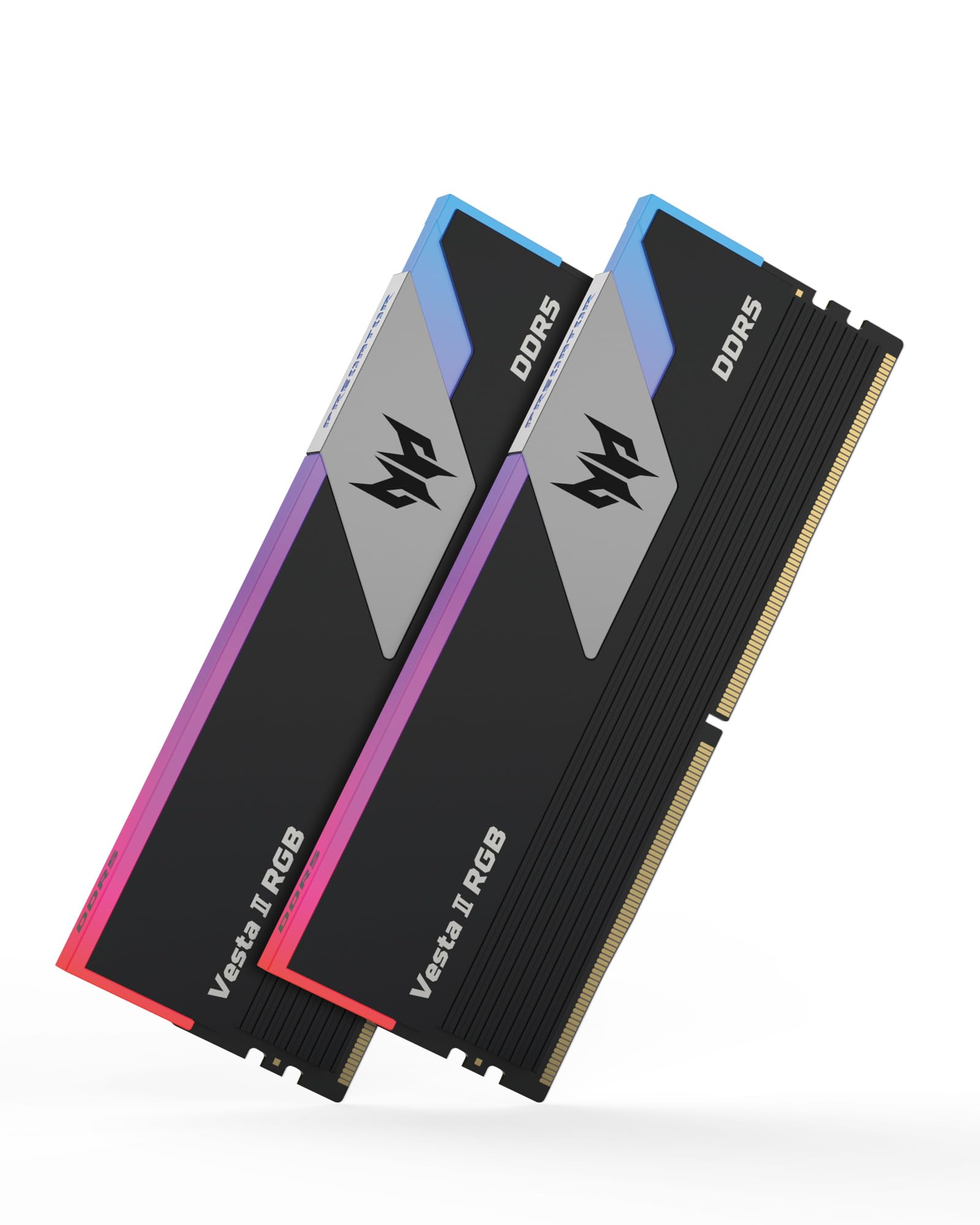
The metal-clad DDR5 kit with a heatspreader you can feel
The Vesta II is the heaviest kit in this whole list at 140.6 g per module, and that is down to an aluminum alloy heatspreader that doubles as the light bar housing. Compare it with the 17.87 g of the Corsair LPX above and you get a sense of just how much metal you are bolting between the slots. That mass is there for heat dissipation on a 6000MHz DDR5 kit, and DDR5 runs faster by splitting into two independent 32-bit subchannels (each stick acts like two narrower lanes working in parallel).
Both overclock profiles are on board here — Intel XMP 3.0 and AMD EXPO — so you can enable the 6000MHz setting on either a current Intel or AMD DDR5 platform. CL36 latency is the number to note. The RGB is addressable through Asus, Gigabyte, ASRock and MSI motherboard software, with a claimed 16.8 million colors to choose from.
One honest note before you commit: this is a listing where we could not pull a meaningful customer review set to balance the spec sheet, so our read here is built on the published hardware details alone. That means no confirmed pattern on real-world boot behaviour and no long-run reliability picture. Take the thermal and RGB story on the metal and the numbers, and check that your cooler still has clearance.
metal heatspreader design
- 140.6 g aluminum alloy heatspreader to push heat off the module under load
- 6000MHz at CL36 with both Intel XMP 3.0 and AMD EXPO profiles on the module
- Addressable RGB through the four main motherboard ecosystems
DDR5 price premium
- Heaviest kit in the list — check cooler clearance and case room carefully
- No reliable customer review base to confirm real-world boot behaviour
new platform builds: you want a DDR5 kit with a heavy aluminum heatspreader and addressable lighting.
DDR4 holdouts: your air cooler sits close over the memory slots, since the added metal is the whole point of the design.
5. TEAMGROUP T-Create Expert DDR5 32GB Kit

Tight CL30 timings in a low-profile shell — no oversized heatsink to fight
Here is a DDR5 kit where the number after the CL really counts. At 6000MHz with CL30, the T-Create Expert answers quicker than the Acer Vesta II’s CL36 and the T-Force Vulcan’s CL38 at the same rated speed — a real head-to-head advantage for games that pull data constantly. In a straight speed-and-latency conversation with the Corsair Vengeance LPX DDR4 kit, this kit also moves more data per second and answers with a lower latency figure against that kit’s CL16 at 3200MHz.
Owners say it performs well across Ryzen 7000 series CPUs and runs without errors, and the capacity itself earns praise for being a clean, honest 32 GB. It works on boards like the B650M Aorus Elite with a 7800X3D, and it suits small-form-factor builds thanks to the low-profile heatspreader. That low profile earns its own positive thread — nobody complains about a heatspreader that stays out of a cooler’s way.
The honest limit: some buyers report the kit is unstable at the advertised EXPO setting or at 6000MHz, which is the one split in the feedback. That is the usual EXPO-and-silicon lottery — a board or chip that will not hold the profile. Enable it, test it, and if it wobbles drop to the next profile down. For a neat, tight-timing DDR5 pick with clearance-friendly height, this one is hard to argue with.
quiet workstation builds: you want CL30 at 6000MHz and a low-profile shell for a small-form-factor or cooler-crowded build.
showcase rigs: EXPO stability depends on your CPU and board — test the profile rather than assuming it holds.
6. Patriot Viper Venom DDR5 RAM 32GB (2X16GB) 6000MHz CL30

A tight-timing DDR5 kit that lives and dies on your board
Patriot’s Viper Venom is built for the gamer who wants big DDR5 numbers without a huge heatsink. The spec headline is 32 GB in a 2x16GB set, 6000MHz, CL30 with tested timings of 30-40-40-76, and both XMP 3.0 and EXPO overclock profiles to switch on. The 1.35 volts and UDIMM module type put it firmly in the standard desktop lane, and it carries a limited lifetime warranty.
Owners praise the memory quality first and the 6000MHz speed second — this kit feels fast when your board cooperates. The 104 g per module keeps it comfortably under a cooler that overhangs the slots. That is the easy part of the story.
Where this kit splits is compatibility. Some owners get it into an Asus board and running at full speed without a blink, while others find it will not take the AMD EXPO profile at all or only behaves on a native DDR5 board. The best read here is to treat it as a board-match pick: check your specific motherboard’s memory list before you commit, and do not assume the EXPO profile will hold. Used as the right piece in the right system, it delivers; used across the wrong socket, it will disappoint.
gaming-focused builds: a board whose compatibility list confirms this exact kit, where the CL30 speed can shine.
tight clearance cases: you have not checked your motherboard’s memory list — EXPO support here is inconsistent.
7. G.SKILL Flare X5 DDR5 RAM 32GB (2x16GB) 6000MT/s CL36

Built with AMD Ryzen boards in mind, and ready for Intel too
This kit sits at the AMD-first end of the list because G.SKILL built the Flare X5 for AMD’s AM5 platform, and the compatibility list shows it — AMD X870, X670, B850, B840, B650 and A620 boards are named right alongside the Intel Z890, Z790, Z690, B860, B760 and B660 platforms. The 2x16GB, 288-pin DDR5 U-DIMM set carries both AMD EXPO and Intel XMP 3.0 profiles (one-click speed presets for each brand), so you are not tied to one vendor.
Spec-wise you get 6000MT/s at CL36-36-36-96 and 1.35 volts. G.SKILL’s own stepping is plain: the kit boots at the JEDEC default speed at default BIOS settings, and you must enable the overclock profile to reach 6000MT/s. It also warns against mixing memory kits, because these are matched sets designed to run together. Nobody wants to hear it, but leaving it on defaults is leaving the money on the table.
One honest limitation: this listing has no reliable customer review data behind it, so our read is built on the published spec sheet and the broad platform support list rather than a proven real-world pattern. Use the 120 g weight and the low-profile matte black shell as clearance guidance. If you are building on AM5, this is a spec-sensible match — just confirm your board is on the list.
AMD Expo tuned
- Rated for a huge span of AMD and Intel DDR5 platforms, including AM5 chipsets
- Both AMD EXPO and Intel XMP 3.0 profiles on the module
- CL36 timings at 6000MT/s, 1.35 volts, in a matte black low-profile shell
looser CL36 timing
- Boots at default speed until you enable the profile in the BIOS
- No useful customer review base yet to confirm long-term behaviour
Ryzen upgrades: AM5 and Intel DDR5 builders who want a kit with a wide confirmed platform list and a low-profile footprint.
Intel-only plans: you plan on mixing it with a different kit — G.SKILL says matched sets only.
8. TEAMGROUP T-Force Vulcan DDR5 32GB (2x16GB) 6000MHz CL38

A straightforward DDR5 kit chock-full of practical stability details
The T-Force Vulcan is the pick in this list for someone who wants 6000MHz DDR5 without paying extra for RGB or a heavy heatsink. What it does bring is power management ICs (small chips on the module that regulate its own voltage) for stable power use, and a reinforced structure for better cooling. The CL38 latency is looser than the CL30 of the Patriot Viper Venom, so it will not answer quite as quickly, but the 600MHz figure holds steady in practice.
Owners say it performs flawlessly at 6,000MHz with no gaming delays, and the capacity earns genuine praise — a clean 32 GB set that gets recognised straight away by the PC. Design and installation both come away clean, with the easy physical install being one of the things owners mention most often. The XMP 3.0 profile is tuned for 600 and 700 series Intel chipsets, so check your board before you commit.
This is the sensible pick on a tighter budget: no lighting, no aluminum tower, no fuss. The catch is simple — the CL38 timings leave a little latency on the table versus the tighter-timing kits here, and it is best matched to the chipset line TEAMGROUP names rather than older boards. For a working DDR5 kit that runs at its rating out of the gate, it holds its place.
first DDR5 builds: budget-minded Intel DDR5 builders who value stable power and a clean install over fancy heatsinks.
latency chasers: you want the lowest latency the platform can deliver, or you are on a chipset older than the 600-series line TEAMGROUP lists.
9. Crucial Pro 32GB DDR5 Kit (2x16GB) 6000MHz CL36

The DDR5 kit most likely to just go in and work
Crucial Pro earns the polished pick at the top of the DDR5 pile for one reason: it is the kit most owners describe as doing exactly what the box says. Across thousands of reviews, memory quality and reliability trade first place, and the pattern is consistent — it boots, it runs, and it stays running. At 4.5+ stars across thousands of ratings, this is the safest spec-blind DDR5 purchase in the list.
The numbers are a clean 6000MHz at extended timings of 36-38-38-80, with both Intel XMP 3.0 and AMD EXPO support. Crucial notes compatibility with 13th gen Intel Core CPUs or newer over to the AMD Ryzen 9000 series directly, so this is the natural pick for current DDR5 platforms. It backs that with a build that goes back to Crucial’s 42 years of memory manufacturing. Skinnier than the Acer Vesta II too, at 33 g per module under that heavy metal shell.
The recurring owner note is faster game load times than their older RAM — a gain they feel as soon as the kit is in. The catch: this is more of a value-built choice than the heaviest thermal build in the list, so buyers on the hottest-running setups may lean on the heavier kits. For most gaming builds the balance is right, and the clean black look fits any case.
trouble-free setups: you want DDR5 that boots, runs at 6000MHz, and rarely gives you a fight.
tuning enthusiasts: your board is older than a 13th gen Intel or Ryzen 9000 build, where Crucial does not list this kit for compatibility.
Know the Specs
DDR4 vs DDR5 speed figures
DDR4 and DDR5 rate their speeds with different labels and different meanings, so a 3200MHz DDR4 kit and a 6000MHz DDR5 kit are not measured on the same ruler. A DDR5 board is the only place a 6000MHz kit makes sense, while a DDR4 board caps out around the 3600MT/s mark. Ignoring this and buying the wrong generation is the single most common mistake in this category.
CAS latency (the CL number)
The CL figure is the waiting time before memory responds to a request. At the same speed, a lower CL is snappier — CL30 beats CL36 beats CL38 in the DDR5 kits here. It shows up as steadier frametimes rather than a higher average frame rate, so check a kit’s CL as carefully as its speed.
XMP and EXPO profiles
These are factory-tested preset profiles the manufacturer stores on the memory module. You switch the profile on in the BIOS and the kit runs at its rated speed and timings. Leave them off and the kit boots at a slower default, so speed claims only count if you flip that switch. Crucial lists 13th gen Intel or newer and Ryzen 9000 series as compatible — check yours.
Module height and cooler clearance
A big air cooler hangs over the memory slots, so tall RGB heatspreaders can block it. Low-profile kits around the 34mm line, like the Corsair LPX or the TEAMGROUP T-Create Expert, fit where taller kits do not. Measure the gap between your cooler and the slots before you pick a tall kit.
Common Questions
Will a 32 GB DDR5 kit work in my DDR4 motherboard?
Do I have to turn on XMP or EXPO to get the rated speed?
Is CL30 really better than CL38?
Can I mix two different memory kits of the same size?
Will a tall RGB kit fit under my CPU cooler?
Is 32 GB worth it for gaming over 16 GB?
What’s the difference between XMP 3.0 and EXPO?
Why does my board cap my rated 3200MHz DDR4 kit lower?
The Bottom Line
For most DDR4 builders, the 32 gb ram for gaming winner is the CORSAIR Vengeance LPX — the 34mm low profile, the dual XMP/EXPO support, and the consistency that thousands of owners keep coming back to. If your board is DDR5 and you want the kit that boots cleanly, grab the Crucial Pro, with the tight-timing spec and a cleaner install story. And for a small-form-factor DDR5 build where cooler clearance is the worry, the TEAMGROUP T-Create Expert with CL30 and a low-profile shell is the one to reach for. Pick by board generations first, profile support second, latency third — that order keeps the upgrade from sitting on defaults.
How we choose
We do not accept paid placement. Every pick is matched to a real buyer and a real use-case; we do not hands-on test units.
Sources
Specifications: manufacturer listings and product documentation. Review insights: verified customer reviews, as of November 2026. Pricing: not shown on this page (it changes often); check the current price via the retailer link.
As an Amazon Associate, Gamepad Test earns from qualifying purchases. This does not affect which products we feature.