
Heads up: This post contains affiliate links. As an Amazon Associate I earn from qualifying purchases, at no extra cost to you. Learn more
Specs are compiled from manufacturer listings and verified buyer reviews and can change over time — please confirm the key details on the product page before buying.
You buy a capture card expecting your stream to match your TV screen, then find the footage is soft, the audio drifts out of sync, or the passthrough adds a visible delay that ruins fast games. You need the card that matches the resolution and frame rate you actually record at. Below are seven top rated capture cards, with plain answers on which one fits a PS5 stream, which one suits a dual-PC setup, and which one quietly handles a camera feed.
This guide is built by comparing the manufacturers’ published specifications and the patterns across verified customer reviews, so you get each pick’s real strengths and trade-offs instead of marketing spin.
The cards below split into internal PCIe models and external USB boxes, and that choice alone decides how easy the install is. Here are the top rated capture cards, matched to the way you actually play and record.
Top Picks

How To Choose The Best Top Rated Capture Cards
Start with the resolution you record at, not the resolution on your TV box. A card that passes 4K60 through to your screen but only records 1080p is normal — that split keeps the price down and keeps your gameplay smooth. The trouble comes from mixing the two numbers up and expecting more than the card records.
Passthrough is not the same as capture
Passthrough is the signal that goes to your monitor or TV while you play. Capture is the file that ends up in OBS. Many cards pass 4K60 through while recording at 1080p60, and a few go further with a 4K30 or 1080p120 recording mode. Read both numbers before you commit, because the recording spec is the one that ends up on your stream.
Internal slot or USB plug
A PCIe card sits inside your desktop and needs a free slot — the AVerMedia GC571 lists compatibility with PCIe x1, x4, x8, or x16 slots. A USB card plugs into a laptop or desktop with no case opening at all. If you stream from a laptop or a console setup away from a desk, the USB route removes a whole step.
Audio ports decide your mixer needs
A 3.5mm mic input lets you plug a microphone straight into the card, and a headphone jack lets you monitor audio in real time. Cards with a line-in jack can also take a mixer. If you only need game audio and one commentary mic, two audio jacks cover the job without an extra box on the desk.
Side-by-Side Comparison
| Model | Best For | Connection | Max Capture | Passthrough | Amazon |
|---|---|---|---|---|---|
| Magewell USB Capture HDMI Gen 2★ Best Overall | low-maintenance every-day use | USB 3.1 Gen 1 | 1080p60 | — | Amazon |
| Elgato HD60 S+Most Trusted | Console streaming | USB 3.0 | 1080p60 HDR10 | 4K60 HDR10 | Amazon |
| AVerMedia Live Gamer Ultra GC553 | HDR gameplay recording | USB 3.1 Type C | 4Kp30 / 1080p120 | 4Kp60 HDR | Amazon |
| AVerMedia GC571 Live Streamer Ultra HD | Desktop builds | PCIe x4 | 4K30 | 4K60 | Amazon |
| NearStream CCD30 | Dual-PC and camera work | USB-C 3.1 | 4K60 MJPG | 4K60 / 1440p120 / 1080p240 | Amazon |
| OREI VC-8KTUSB3 | Audio mixing | USB 3.2 Gen 1 | 4K60 | 4K144 | Amazon |
| UGREEN 4K@60Hz Capture Card | Budget 240Hz capture | USB 3.0 Type C | 4K60 / 1080p240 | 4K60 loop-out | Amazon |
Detailed Reviews
1. Magewell USB Capture HDMI Gen 2
Our pick — 4.5+★ from 600+ verified ratings; the strongest balance of quality and price.
The card that simply works the moment you plug it in, on whatever system you own.
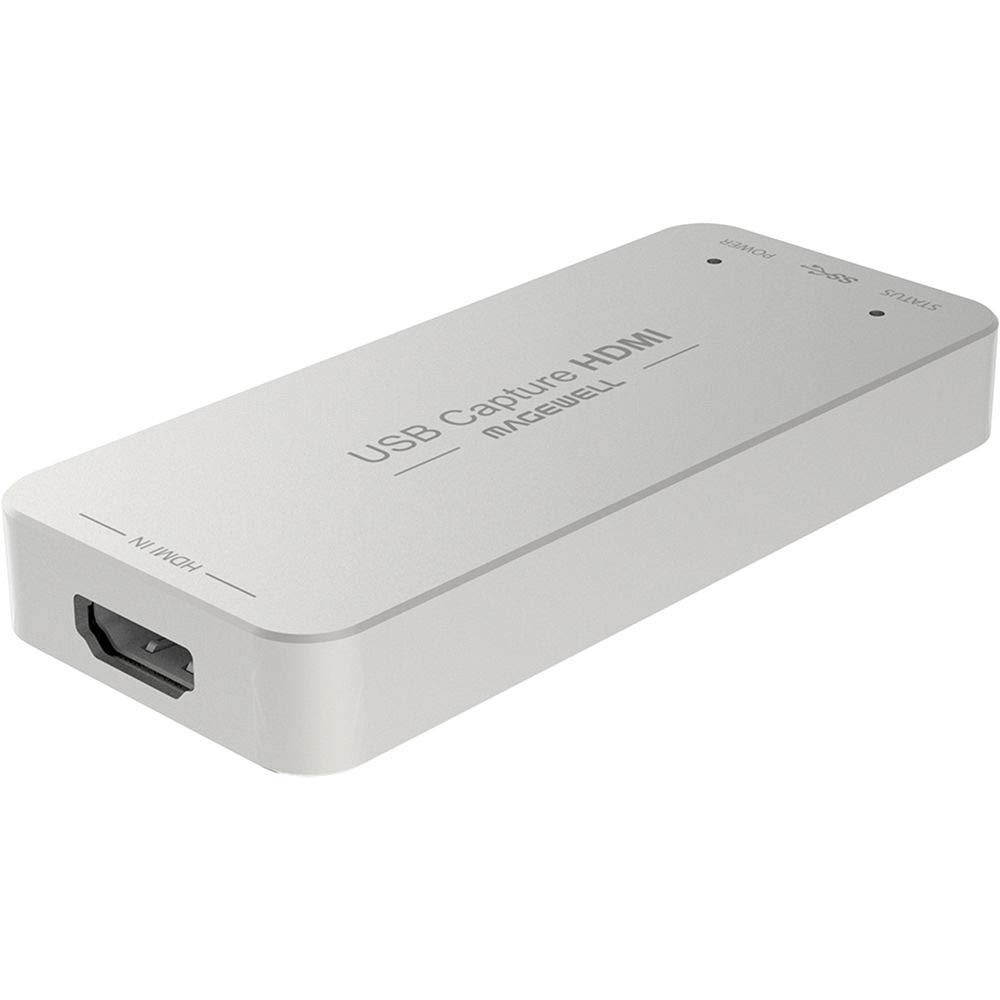
The first thing to understand about the Magewell is that it does its heavy lifting on the device itself. Cropping, scaling, de-interlacing, colour conversion and flip or mirror are all handled inside the card by its FPGA-based video processing, so your computer is not asked to do that work. The result is a card you plug in and forget about, and owners reward that: functionality is the most-praised aspect in reviews, with plug-and-play second.
What it captures is HDMI input up to 2048×1080 at 60fps in 4:4:4, which lands at a crisp 1080p60 in your recording software. Compatibility is unusually wide: Windows, macOS, Linux and Chrome OS all run it without a driver download, and it still works on an older USB 2.0 port if that is all you have. The reputation holds up — 4.5+ stars across 600+ owners — and the pitch is simple: no install, no software, just picture.
Weigh it against the Elgato HD60 S+ and the trade-off is clear. The Elgato captures the same 1080p60 limit but passes 4K60 HDR10 through to your TV, while the Magewell tops out at 1080p and offers no loop-out at all. If your monitor is 1080p and you record for a 1080p stream, this card loses nothing. If you play in 4K on the TV and want that sharpness back on the big screen, the Elgato is the one to take instead.
Where it earns its keep
- Handles scaling and de-interlacing inside the card, so your CPU stays free for the stream
- Runs on Windows, macOS, Linux and Chrome OS with no driver to install
- Built for 24/7 operation, with thermal protection, status LEDs and a 3-year limited warranty
- USB Capture Utility lets you set EDID, resolution and frame rate, and pull diagnostic logs
What to weigh first
- Recording stops at 1080p60 — there is no 4K capture option here
- No HDMI loop-out, so you watch the signal on your PC rather than passing it to a TV
- Two conflicting buyer themes come up: heat during long sessions and a reported lag around 0.5 seconds in some setups
Buy it for stability: a desktop or laptop streamer on Linux, Mac or Windows who records at 1080p60 and wants zero setup friction.
Not the pick for: anyone who wants 4K recording or a loop-out to a TV — that job belongs to the Elgato below.
2. Elgato HD60 S+
Play your PS5 in full 4K while the recording quietly runs at 1080p60.
This is the console card that separates what you see from what you save. Your Xbox Series X/S, PS5, PS4 Pro or Xbox One X feeds 4K60 HDR10 through to your television untouched, and the card writes a 1080p60 HDR10 file to your hard drive at the same time. That zero-lag passthrough is the whole reason people pick it — you play on the screen you already own, at the quality you already get, with nothing added to the input path.
Two features do the quiet work. Instant Gameview keeps the preview in OBS close to live, and Flashback Recording lets you slide backwards in time to save a moment you missed. Unlimited capture means the recording length is capped by your drive, not the card. The install is a USB 3.0 cable and an HDMI 2.0 cable, and the minimum system is modest — a dual-core Intel or AMD processor, 4GB of RAM and integrated graphics or better, with 500MB of free space.
Set against the AVerMedia Live Gamer Ultra GC553, the Elgato wins on reliability of experience rather than raw recording numbers. The GC553 records at 4Kp30 and 1080p120 HDR, so it goes further up the recording ladder. But quality is the trait owners are happiest with here, and that is the trade you are making: a rock-solid 1080p60 console stream versus more recording modes with a noisier track record.
Who this is built for: the PS5 or Xbox owner who wants the TV picture left alone and a clean 1080p60 file for YouTube or Twitch, on either PC or Mac.
The honest catch: functionality is the single most-discussed topic and it splits both ways — some units run for years without a hiccup, while others reportedly cut out after a few minutes at a time. Check your return window rather than assuming a plug-and-play experience on day one.
Reach for this if: you play on a 4K TV and refuse to give up HDR while recording.
Look elsewhere if: 4K recording is a hard requirement — this one records at 1080p60.
3. AVerMedia Live Gamer Ultra GC553

Four recording modes in one box, from cinematic 4Kp30 down to fast 1080p120.
The GC553 sells itself on flexibility. Max recording reaches 4Kp30, 1440p60, 1080p120 or 1080p60 HDR, and the passthrough carries 4Kp60 HDR so your monitor keeps the full picture while you play. That spread matters most in fast games — 1080p120 keeps a racing or fighting game legible frame to frame, while 4Kp30 suits a slower title you want to publish at full detail.
One requirement is not negotiable: for 4K, HDR or high frame rate recording, the maker states that NVIDIA graphics cards are supported. If your machine runs AMD graphics, plan around 1080p recording or pick a different card. The minimum system is listed as Windows 10 x64, an Intel Core i5-4440 at 3.10GHz or above, an NVIDIA GTX 660 and 4GB of RAM with 8GB recommended. A laptop needs an Intel Core i7-4810MQ and a GeForce GTX 870M or above.
Performance is the highest-rated trait in buyer reviews, with owners repeatedly noting consistent quality on every recording. The honest counterweight sits in reliability and audio, which come up as mixed and negative respectively — a high-pitched fan whine and audio dropouts appear in the record. Compare it to the Elgato HD60 S+ and the GC553 wins on recording range: 4Kp30 and 1080p120 against the Elgato’s 1080p60 ceiling.
Why it stands out: four recording resolutions from one external box, with 4Kp60 HDR passthrough keeping the monitor picture intact.
Set against the field: it records higher than the Elgato HD60 S+ but demands an NVIDIA card and carries a rougher reliability record than the Magewell.
The right owner: an NVIDIA-equipped streamer who wants 1080p120 for fast games and 4Kp30 for showcase clips from a single device.
Think twice if: you run AMD graphics or need reliable in-card audio capture — the audio inputs simply are not there.
4. AVerMedia GC571 Live Streamer Ultra HD

A card that lives inside your PC and never asks for a cable on the desk.
Everything about the GC571 is desktop-first. It installs into a PCIe x1, x4, x8 or x16 slot, so it fits nearly any gaming motherboard, and once it is seated the capture path runs inside the case. That removes the external box and its USB cable from your setup entirely. HDMI 2.0 input sources arrive with 4K60 pass-through, and the card records at 4K30 for streaming.
Two gaming features carry the pitch. VRR support keeps the passthrough tear-free so fast motion stays smooth while you play, and a 1080p120 high frame rate recording mode gives you silky footage for fast titles. There is no driver to chase — the maker’s drive-free plug-and-play approach means the card is recognised once it is physically installed, on Windows 10 x64 or 11 x64.
The size is the one thing to plan around. At 7.95 x 5.93 x 2.04 inches it needs clear space around the slot inside the case, and that footprint is noticeably larger than a compact USB box like the Magewell at 3.32 x 1.69 x 0.5 inches. If you build and maintain your own PC, that is a non-issue. If you stream from a sealed laptop, this card cannot help you at all.
The internal advantage: no external box, no USB cable to knock loose, and 4K60 pass-through with VRR for smooth viewing.
Before you buy: confirm a free PCIe slot and enough case clearance — this is a desktop-only card with no laptop path.
Built for: a desktop PC builder on Windows 10 or 11 who wants capture hardware inside the case and nothing on the desk.
Wrong tool for: laptop streamers and anyone without a spare PCIe slot — a USB card is the only route there.
5. NearStream CCD30

One box that swallows a console, a camera or a second PC without complaint.
The CCD30 earns its spot on a busy desk by accepting almost any source you plug in: a PS5, an Xbox Series X/S, a Nintendo Switch, a DSLR, a mirrorless camera or a second PC. It captures up to 4K60 (4K at 60 frames per second) over USB-C 3.1, and its HDMI 2.0 passthrough (the loop-out that feeds your TV) runs at up to 4K60, 1440p120 or 1080p240. So your monitor keeps a smooth 240 fps picture while you record. If you switch between gameplay and a camera on the same stream, that source list does most of the arguing for you.
HDR10 is supported on the passthrough path only — it preserves highlights, contrast and colour on the connected display, but it is not carried into the captured file. Capture formats scale with your workflow: up to 4K60 in MJPG, up to 1440p60 in NV12, up to 1440p50 in YUY2, and up to 4K30 in I420. A 3.5mm mic input and a headphone output let you add commentary and monitor it live without extra gear.
Pick your computer around the format you plan to record in, because the card’s demands change with it. For 4K60 MJPG (a compressed recording format that is easier on the USB cable), the maker lists an Intel Core i7-10XXX or above, an NVIDIA GeForce GTX 1650 or above, and 8GB of dual-channel RAM on a Windows desktop; on a laptop that rises to an Intel Core i9-9XXX. Dropping to NV12 or I420 4K30 (lighter, less compressed formats) lowers the bar to an Intel Core i5-6XXX and a GTX 1060. macOS 10.12 or later is supported.
Why it suits a mixed desk
- Handles consoles, cameras and a second PC on the same HDMI input
- Passthrough reaches 1440p120 and 1080p240 for high refresh monitors
- Separate mic and headphone jacks for live commentary and monitoring
- Ships with an HDMI cable and a USB 3.1 cable, so nothing extra to buy
The part to plan around
- HDR10 stops at the passthrough — the recorded file does not carry it
- 4K60 MJPG asks for a recent i7-class desktop chip, which rules out older builds
Ideal setup: a creator running gameplay and a camera through one card, with a mic plugged straight into the 3.5mm jack.
Check your rig first: older CPUs will not sustain 4K60 MJPG — record at 4K30 in NV12 or I420 instead.
6. OREI VC-8KTUSB3

The card that mixes your microphone and game sound before it ever reaches OBS.
Audio is usually the part of a capture setup people bolt on last, and the OREI folds it into the card. Digital HDMI audio is combined with mic and line-in inputs inside the unit, so commentary and game sound arrive already mixed. For a streamer who would otherwise buy a separate mixer, that is one less box and one less set of cables on the desk.
The video side is generous on paper. It accepts up to 8K@60Hz input on HDMI 2.1 with HDCP 2.3 and captures uncompressed 4K@60fps, running over USB 3.2 Gen 1 at 5Gbps for low-latency transfer. It is UVC/UAC compliant and needs no drivers, working with OBS, Streamlabs, vMix, Zoom and Teams across Windows, macOS and Linux. Supported formats are YUY2, NV12 and MJPEG. An HDMI loop-out gives you zero-delay monitoring on a second screen.
Build quality is the most-praised trait in buyer reviews, with owners repeatedly reporting units that arrive solid and defect-free. Performance is the more divided topic, with the majority reporting that it worked great and a smaller set hitting problems. It also carries one year of manufacturing support and lifetime tech support from OREI, which is a longer service runway than most cards at this level offer.
The audio angle: HDMI sound, a mic and a line-in mixed in one device, with an HDMI loop-out for lag-free monitoring.
Worth knowing: the 8K60 input and 4K144 pass-through figures describe the HDMI 2.1 path into the card — your recording still lands at 4K60.
Pick it when: you want game audio, a mic and a mixer input handled inside the capture card rather than beside it.
Only if HDMI 2.1 is real for you: the high-bandwidth input only pays off if your console or GPU actually outputs it.
7. UGREEN 4K@60Hz Video Capture Card

High frame rate capture and glowing RGB lighting at the entry end of the market.
The UGREEN packs an unusual set of numbers for a budget card. It captures 4K@60Hz, 2K@144Hz, 2K@120Hz and 1080P@240Hz in MJPEG, and passes 4K@60Hz through with loop-out. VRR support cuts image tearing and stutter while you play, and HDR lifts the colour in game visuals. Triple 3.5mm ports cover headphones, an active microphone and a mixer line-in, so the audio side is covered without extra hardware.
A USB 3.0 Type A or Type C output device is required for the low-delay performance the maker promises, so older USB 2.0-only ports are not the plan. Compatibility stretches wide: Windows, Mac OS, Linux, iOS 17 and Android, with recording from a Switch, Switch 2 or PS5 to an iPad, laptop or PC, and editing in OBS, XSplit and Potplayer. The aluminium case and cooling holes are there to move heat out, and seven RGB lighting modes handle the desk looks.
At 155.1 g it is a heavier box than the AVerMedia Live Gamer Ultra GC553 at 4.16 ounces, which is the aluminium shell doing its job rather than a fault. Compared with the Magewell, the UGREEN adds 4K capture modes and loop-out the Magewell does not have, but the Magewell’s driver-free reliability on Linux is the safer bet for a workstation.
What you get for the spend: 1080p240 and 2K144 capture modes, VRR, HDR and three audio jacks, all from a compact aluminium box.
The real caveat: functionality and video quality both land as mixed in the buyer record — some units run beautifully while others produce unusable output. It is a strong entry-level pick, not a guaranteed one.
Go here for value: a first capture card or a second unit for a high refresh monitor, especially with an Android tablet or iPad in the chain.
Buy with a return plan: mixed reports on reliability make the return window as important as the spec sheet.
Know the Specs
Passthrough vs Capture Resolution
Passthrough is the signal your TV or monitor receives while you play, and capture is what gets recorded. A card like the AVerMedia Live Gamer Ultra GC553 passes 4Kp60 HDR through while recording at 4Kp30, 1440p60 or 1080p120. That gap is intentional, not a defect. Read both numbers, because your recording quality is set by the lower one.
Connection Type: USB or PCIe
A USB card plugs into any laptop or desktop and needs nothing opened. A PCIe card like the AVerMedia GC571 seats inside the case in an x1, x4, x8 or x16 slot and keeps cabling off the desk, but it rules out laptops. Match the connection to the machine you actually stream from before comparing anything else.
Capture Formats Explained
These are the codecs the card writes in. MJPG compresses each frame and is easier on older hardware. NV12 and I420 are less compressed and want a stronger graphics card. YUY2 sits between them. The NearStream CCD30 lists different frame rates for each, so the format you pick changes the resolution you can reach.
VRR, HDR and Latency
VRR is variable refresh rate — it syncs the screen refresh to the frame rate to stop tearing. HDR is high dynamic range, which widens the brightness and colour range. Latency is the delay between pressing a button and seeing the result. Cards that pass the signal through untouched, like the Elgato HD60 S+ with its zero-lag passthrough, keep that delay out of your play.
Common Questions
Will a capture card work with a laptop that has no spare slots?
What is the difference between 4K passthrough and 4K capture?
Do I need an NVIDIA graphics card to record in 4K or HDR?
Can I plug a microphone straight into a capture card?
Will a capture card add delay to my gameplay?
Does a capture card work on a Mac?
Which capture card formats does OBS support?
How much computer power does 4K60 capture need?
Is a PCIe capture card better than a USB one?
What does HDCP 2.3 mean on a capture card?
The Bottom Line
For most people, the top rated capture cards winner is the Magewell USB Capture HDMI Gen 2, because it needs no driver on Windows, macOS, Linux or Chrome OS — you plug it in and it works. It also does its scaling and de-interlacing (resizing the picture and smoothing old interlaced video) inside the card, so your computer stays free for other work. If you play on a 4K television and want HDR kept on the big screen, grab the Elgato HD60 S+ for its 4K60 HDR10 zero-lag passthrough and 1080p60 recording. And for a desk that runs a camera, a console and a microphone together, the NearStream CCD30 is the one to reach for, with 4K60 passthrough, HDR10 loop-out and dedicated mic and headphone jacks.
If you want to record in 4K rather than 1080p, the AVerMedia Live Gamer Ultra GC553 reaches 4Kp30 (4K at 30 frames per second) and 1080p120 — just confirm your graphics card is NVIDIA before you commit. To decide safely, note your recording resolution, your free port and if you need audio jacks; the card that matches all three is the one you keep.
How we choose
We do not accept paid placement. Every pick is matched to a real buyer and a real use-case; we do not hands-on test units.
Sources
Specifications: manufacturer listings and product documentation. Review insights: verified customer reviews, as of November 2026. Pricing: not shown on this page (it changes often); check the current price via the retailer link.
As an Amazon Associate, Gamepad Test earns from qualifying purchases. This does not affect which products we feature.