
Heads up: This post contains affiliate links. As an Amazon Associate I earn from qualifying purchases, at no extra cost to you. Learn more
Specs are compiled from manufacturer listings and verified buyer reviews and can change over time — please confirm the key details on the product page before buying.
If your Samsung Blu-ray player still spins discs but the remote has gone dead, you do not need a new player. You need a replacement handset that talks to your exact model without any setup ritual. The three picks below all work over infrared (a line-of-sight signal, like a TV remote), all run on ordinary AAA batteries, and none of them ask you to program a single code. The real differences sit in button count, which player models each one covers, and if you want a genuine Samsung part or a budget-friendly stand-in.
This guide is built by comparing the manufacturers’ published specifications and the patterns across verified customer reviews, so you get each pick’s real strengths and trade-offs instead of marketing spin.
Match the model number printed on the back of your player to the listing before you order, because a remote that fits one Samsung deck often ignores another. The shortlist below narrows that down to the strongest samsung blu ray controller options for everyday disc playback.
Top Picks

How To Choose The Best Samsung Blu Ray Controller
The mistake almost every buyer makes is searching for “Samsung remote” and grabbing whatever looks close. Samsung sells dozens of Blu-ray and DVD decks, and the remote for one generation rarely drives the next. Your player’s model number, printed on the back panel or in the disc tray area, is the only thing that settles compatibility.
Start with the model number, not the brand
A listing that names BD-H6500 and BD-F5700 is telling you exactly which decks it was built for. If your model is missing from that list, the buttons may still power the unit but skip or mislabel functions. Check the list line by line before you add anything to the cart.
Decide how many buttons you actually press
A slim handset with 10 buttons covers play, pause, skip, and power — enough for watching a film start to finish. A fuller layout with 25 buttons adds the dedicated keys for menus, subtitles, and disc navigation. Think about whether you ever dig into a disc’s special features before you pick the smaller one.
Weigh genuine parts against tested copies
An original Samsung part carries the maker’s own model code, so you know it fits before you buy. A third-party replacement has to earn its place through testing and a warranty, and the good ones state both plainly. Neither route is wrong — it depends on if you want certainty of fit or a lower spend.
Side-by-Side Comparison
| Model | Best For | Buttons | Range | Type | Amazon |
|---|---|---|---|---|---|
| BOMAZ Replacement for BD-H6500 / BD-F5700★ Best Overall | Most Samsung decks | 10 | 10 meters | Third-party replacement | Amazon |
| MONSIATUG Universal for BD-J5900 / BD-JM57 | Full-button control | 25 | 10 meters | Third-party universal | Amazon |
| SAMSUNG AK5900179A | Genuine part buyers | — | 10 meters | Genuine Samsung OEM | Amazon |
Detailed Reviews
1. BOMAZ Replacement Remote Control for Samsung BD-H6500
Our pick — 4.5+★ from 70+ verified ratings; the strongest balance of quality and price.
Drop in two AAAs and this handset drives your Samsung deck with zero setup fuss.
The BOMAZ replacement earns the top spot because it keeps things simple. Pop in two AAA batteries (not included), point it at the player, and it works — no code entry, no pairing dance, no menu hunting. That “no programming required” trait is the whole reason to buy a replacement remote in the first place, and this one delivers it.
It covers a wide spread of Samsung decks: BD-H6500, BD-F5700, BD-HM57C, BD-F5100, BD-H6500/ZA, and BD-F5100/ZX. If your player is on that list, you are set. The infrared signal reaches more than 8 metres, so you can fire commands from a couch across a large living room without leaning forward. That range matters most when you are sprawled on the couch across the room.
The trade-off is the button layout. Ten buttons is lean — fine for play, pause, skip, and power, but you will not find dedicated keys for every menu or subtitle function. If you routinely dive into disc extras, a fuller remote suits you better. Still, for straightforward playback, the minimal layout is genuinely easier to use by feel in the dark.
What earns its keep
- Works instantly with no programming step
- Covers six Samsung model numbers
- Signal reaches better than 8 metres
- Slim 10-button layout is easy to navigate blind
Where it asks you to compromise
- Only 10 buttons — fewer dedicated function keys
- Batteries not included
Reach for this if: your player model appears on its compatibility list and you want plug-and-play simplicity.
Think twice if: you frequently access disc menus and subtitle controls that need more dedicated buttons.
2. MONSIATUG Universal Replacement Remote Control for Samsung BD-J5900
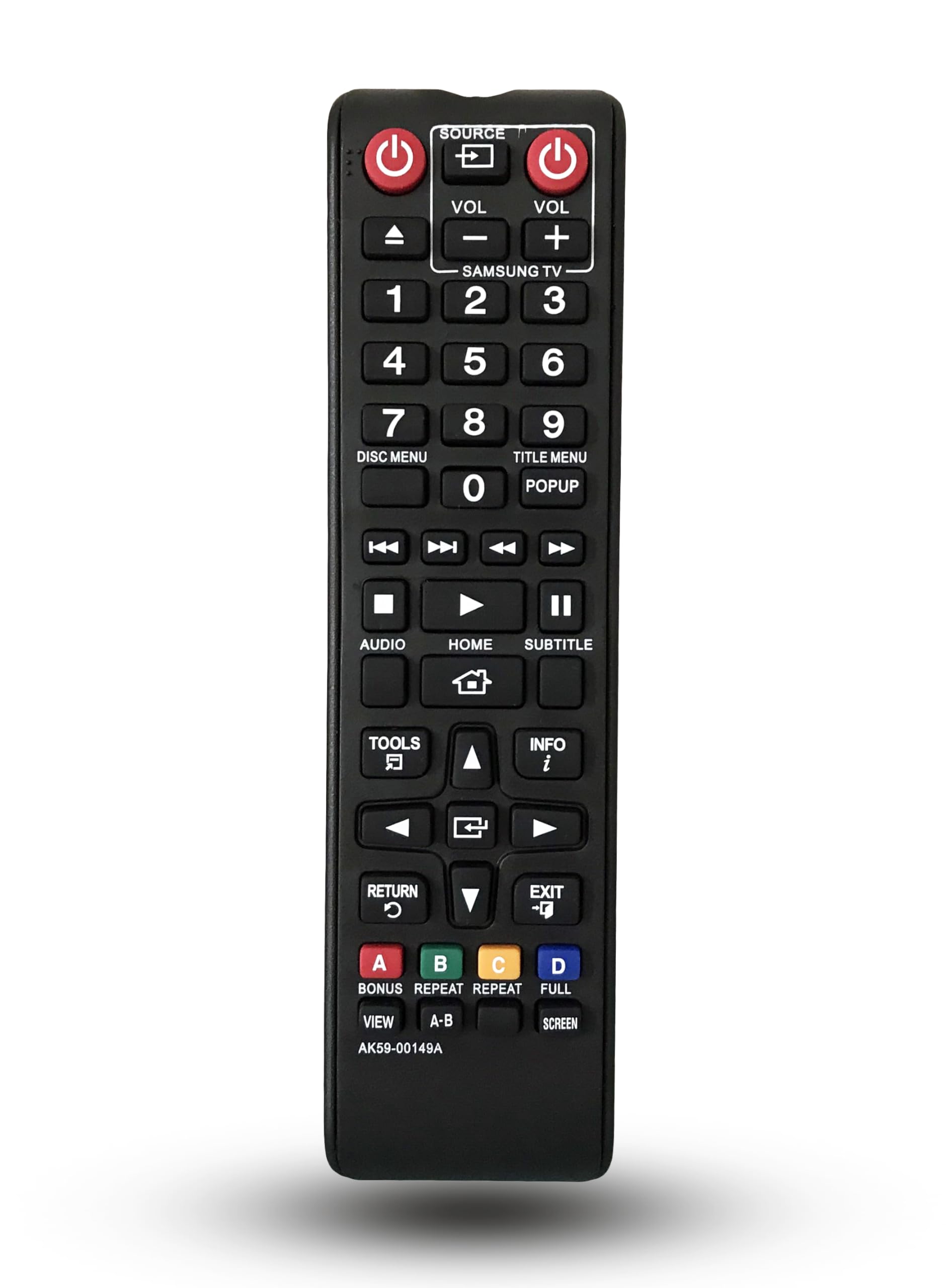
More than twice the buttons of its rival, built for owners who actually use disc menus.
Where the BOMAZ handset strips things down, this MONSIATUG universal goes the other way. Its 25-button layout more than doubles the 10 buttons on the pick above — which means dedicated keys for disc menus, subtitles, and navigation that the slimmer remote leaves you to hunt for. If you dig into disc extras, those dedicated menu and subtitle keys save you hunting through cycles.
The compatibility list is broad and specific: BD-J5900, BD-JM57, BD-JM57C, BD-JM51, BD-HM51, BD-FM51, BD-FM57C, BD-J5700, BD-J5700/ZA, BD-J5100, BD-F5100, BD-ES5000, and BD-ES5300. It is built around the AK59-00149A model reference, so check that against your player if you want a second confirmation. The infrared signal reaches 10 metres, giving you comfortable range from anywhere in a typical room.
Two caveats worth knowing. It runs on two AAA batteries that you supply, and the listing explicitly notes that instructions and batteries are not included — so budget for a battery run. A 90-day warranty backs it. For the button count it offers, the trade is minor: a fuller keypad takes slightly longer to memorize than a ten-key pad.
The better fit for button-hungry users: anyone who navigates discs deeply and wants every function within thumb reach.
Not your match if: you want the simplest possible two-button experience and never touch a subtitle menu.
3. SAMSUNG AK5900179A Blu-Ray DVD Player Remote Control

The original manufacturer’s part for buyers who refuse to gamble on a copy.
This is the one to buy when you want the remote that Samsung itself made for its players. The AK59-00179A carries the genuine Samsung part number, wears the Samsung brand, and is a direct OEM replacement rather than a third-party copy. That certainty is what you are paying the premium for — no compatibility guesswork, no “will this actually match my deck” anxiety at checkout.
At 2.4 ounces it has a heft that budget-copy plastic lacks. The infrared signal reaches 10 metres, matching the other two picks’ range for reliable couch-side control. It controls one player and is built specifically for DVD and Blu-ray deck use. For anyone who had a genuine remote fail and wants the exact same feel and button response, this is the cleanest path back.
The honest catch is sourcing. The listing notes that the package may have been opened and may or may not arrive in original OEM packaging — so a perfect box is not promised. That does not change the remote itself, but a collector who wants factory-sealed should know it up front.
The case for originality: genuine Samsung build, the real AK59-00179A part number, and 10-metre infrared range in a 2.4-ounce body.
The realistic caveat: packaging may not be sealed OEM — the remote is authentic, the wrapping may not be.
Buy this when: you had the genuine Samsung remote fail and want an identical OEM replacement, packaging quirks aside.
Look elsewhere if: you want the most buttons or the leanest spend for basic playback.
Know the Specs
Button Quantity
More buttons means dedicated keys for disc menus, subtitles, and navigation instead of forcing you to cycle through a bare minimum. A 10-button layout covers play, pause, skip, and power. A 25-button layout adds the shortcuts you reach for during a film. Match the count to how deeply you actually use your player.
Infrared Range
Every pick here lists a 10-metre maximum range, which means you can fire commands from across a large room without aiming carefully. Infrared needs a clear line of sight, so a remote tucked behind a cushion or blocked by a tall piece of furniture may still miss — keep the path from hand to player unobstructed.
Battery Type
These handsets run on standard AAA batteries, a size most households already keep on hand. None of the three ships with batteries included, so plan a quick battery run when the remote arrives. Ordinary AAAs typically last months of regular viewing, though heavy button use will drain them faster.
Model Compatibility
The single most important spec is the list of supported player models. A remote built for BD-H6500 may not drive a BD-J5900, even though both are Samsung. Always cross-check your player’s printed model number against the compatibility list before ordering, and confirm whether the remote is a third-party replacement or a genuine OEM part.
Common Questions
Will a replacement remote work with any Samsung Blu-ray player?
Do I need to program these remotes before they work?
What batteries do these Samsung Blu-ray remotes use?
How far away can I use a Blu-ray remote control?
What is the difference between a genuine Samsung remote and a replacement?
How many buttons do I need on a Blu-ray remote?
Does the genuine Samsung remote come in original packaging?
What warranty comes with these replacement remotes?
Can one of these remotes control more than one device?
What if my Samsung player model is not on the compatibility list?
The Bottom Line
For most people replacing a dead Samsung Blu-ray handset, the BOMAZ Replacement Remote is the sensible first stop. It covers the widest spread of common Samsung model codes, needs no programming, and reaches better than 8 metres — so a fresh set of AAAs gets you back to watching a film the same evening. Its 4.5+ star rating across 70+ owners makes it the crowd favourite of the three.
If your viewing leans into disc menus, subtitles, and special features, the MONSIATUG Universal Remote gives you 25 buttons against the BOMAZ’s 10 — a layout that finally puts every function within thumb reach. And if you simply want the exact remote Samsung built for its players, the genuine Samsung AK59-00179A is the certainty play, packaging quirks and all.
How we choose
We do not accept paid placement. Every pick is matched to a real buyer and a real use-case; we do not hands-on test units.
Sources
Specifications: manufacturer listings and product documentation. Review insights: verified customer reviews, as of November 2026. Pricing: not shown on this page (it changes often); check the current price via the retailer link.
As an Amazon Associate, Gamepad Test earns from qualifying purchases. This does not affect which products we feature.