
Heads up: This post contains affiliate links. As an Amazon Associate I earn from qualifying purchases, at no extra cost to you. Learn more
Specs are compiled from manufacturer listings and verified buyer reviews and can change over time — please confirm the key details on the product page before buying.
Here is the answer before the details: the uDraw Studio disc for Nintendo Wii is the safest buy of the three, because it is the only one here that ships as a software disc built around the drawing tablet’s core tools — and it is the one most Wii households already own the hardware for. The catch every buyer needs to hear first is that two of these three listings are games only, with no tablet in the box. If you do not already own a uDraw GameTablet, none of these discs will do anything on your console.
This guide is built by comparing the manufacturers’ published specifications and the patterns across verified customer reviews, so you get each pick’s real strengths and trade-offs instead of marketing spin.
The uDraw platform split hard between the Wii and the Xbox 360, and the discs are not interchangeable between them — so check your console before anything else. Below you will find the best udraw game tablet games separated by what each disc actually asks of your hardware.
Top Picks
How To Choose The Best Udraw Game Tablet Games
Buying a uDraw game is not like buying a normal console game, because the disc is only half the product. The tablet is the other half, and it is not in every box. Get that pairing wrong and the disc will not run at all.
Confirm the disc matches your console first
A Wii disc will not run on an Xbox 360 and an Xbox 360 disc will not run on a Wii — these are separate builds of the same franchise. The Marvel title here lists Microsoft Xbox 360 and Xbox 360 E as its compatible consoles, while the Studio and SpongeBob discs list Nintendo Wii, Wii Mini and Wii U. Read the platform line on the listing before you read anything else, because it is the one spec you cannot work around.
Know whether you are buying software or a bundle
The uDraw Studio listing is described as DVD only, which means the disc arrives without the drawing tablet. The tablet and the Studio software were originally sold together as one package, so a software-only copy is a good fit for a household that already has the peripheral and a poor fit for anyone starting from scratch. If your Wii has never had a uDraw tablet plugged in, budget for the hardware too.
Match the game to the player’s age and patience
There is a real spread here. The Marvel disc is rated Everyone 10+ and leans on combat drawn with the stylus. The Studio disc is rated Everyone and centers on painting, coloring and sketching. SpongeBob Squigglepants is rated Everyone but drives its play through more than 100 timed Nanogame challenges, which moves fast and does not wait for a slow hand.
Think about how much the tablet gets used after the novelty
A drawing game lives or dies on whether the stylus feels natural in the hand. Tilt and touch tricks — like the Earthquake tablet-tilt and the Zipper Rift touch ability in the Marvel game — are fun for a session and thin over a month. A disc with a genuine creative toolkit, like Studio’s templates and Replay feature, tends to hold attention longer because the player supplies the content.
Side-by-Side Comparison
| Model | Best For | Console | Players | Age Rating | Amazon |
|---|---|---|---|---|---|
| uDraw Marvel Super Hero Squad: Comic Combat★ Best Overall | Older kids who want to draw attacks | Xbox 360, Xbox 360 E | 1 | Everyone 10+ | Amazon |
| uDraw Studio (DVD only) | Owners who already have the tablet | Nintendo Wii, Wii Mini, Wii U | 1 | Everyone | Amazon |
| Spongebob Squigglepants | Fast, silly short-burst play | Nintendo Wii | 1 | Everyone | Amazon |
Detailed Reviews
1. uDraw Marvel Super Hero Squad: Comic Combat – Xbox 360
Ten Marvel heroes, and you sketch their attacks rather than button-mash them.
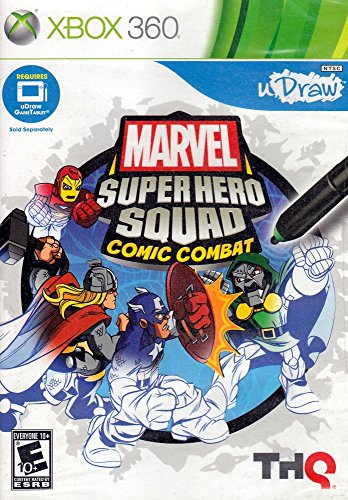
This is the uDraw title for the Xbox 360, and that single line in the spec sheet decides most of the purchase. It lists Microsoft Xbox 360 and Xbox 360 E as compatible consoles, so a Wii household cannot use it at all — unlike the Studio disc above, there is no Wii build here. It is a one-player game sold as a disc, and the case is the largest of the three at 10.7 x 7.6 x 2.7 inches versus SpongeBob Squigglepants at 5.3 x 7.5 x 0.6 inches, so it takes noticeably more shelf space for the same job.
What it does with the tablet is the interesting part. You fight as 10 different Marvel heroes against Dr. Doom and his crew, and your attacks are drawn and sketched with the stylus rather than triggered from a face button. Two abilities lean on the hardware directly: Earthquake uses tablet tilt, so you physically tip the peripheral, and Zipper Rift uses touch activation on the surface. The game runs across 6 comic book issues set in Super Hero City, including the Helicarrier, the Baxter Building, the Vault and the Sanctum Sanctorum, and there is a progression layer of hero points, ink meter upgrades and costumes to collect.
Set expectations on how this sits against the rest of the range, though. The game is rated Everyone 10+ rather than Everyone, and it holds a 3.3 rating, the lowest in this lineup — behind the Wii Studio disc’s 4.0 and just under SpongeBob’s 3.4. The tilt and touch abilities are the sort of trick that impresses for an evening, and the drawing input is really a combat trigger rather than a sketchbook. If a young child wants to actually draw, this disc will frustrate them; if an older player wants a Marvel brawler with a stylus gimmick, it lands better.
Where this disc is strongest: the hero roster and the 6-issue campaign give it more structure than a party-style uDraw title, and the Earthquake tilt ability is a use of the tablet you will not find on the other two discs.
What you give up: it is Xbox 360 only, it is the lowest-rated pick here, and the stylus work is combat input rather than free drawing — so it is a poor match for an art-minded kid.
Reach for this if: you have an Xbox 360 and a uDraw tablet, and a Marvel fan over ten wants a game with fights and collectibles.
Look elsewhere if: your console is a Wii, or the person who will hold the stylus wants to sketch for its own sake.
2. uDraw Studio – Nintendo Wii (DVD only)

The blank-canvas disc that turns a Wii and a stylus into a colouring table.
If you already own the uDraw GameTablet and a Wii, this is the disc to own with it. It is the closest thing on this list to a full creative suite: you paint, draw, color and sketch using the tablet, and you can start from templates or from nothing at all. At 3.2 ounces it is a light disc in a standard case, and it carries a rating of Everyone, so it suits a household with small children as well as adults.
The feature that earns it the top spot is the Replay Feature, which shows a work of art being created stroke by stroke. That is genuinely useful for a beginner holding a stylus for the first time, because you watch the motion before you copy it. Sharing is handled through an SD card — you save your finished pieces to the card and hand it to friends and family. Just be aware the SD card is your own; nothing in the listing suggests one is included.
Now the honest part, and it is the reason some buyers walk away unhappy. This listing is DVD only. The drawing tablet is not in the box, even though the tablet and the Studio software originally shipped together, and a share of the frustration in the review pages comes directly from that surprise. The drawing tools themselves also divide people: some take to the stylus quickly, while others find the options thin and the controls slow to click. It is also the crowd favorite of the three, with 4.0+ stars across 500+ ratings and more owner feedback than the other two combined.
What earns the top spot
- Four creative modes — paint, draw, color and sketch — all driven by the tablet and stylus
- Replay Feature shows each artwork built stroke by stroke, so a first-timer can learn by watching
- Save finished pieces to an SD card and share them with family and friends
- Rated Everyone, and the game software itself draws a strong run of positive feedback for age-appropriateness
What to check before checkout
- DVD only — the uDraw GameTablet is not included, so this is a dead disc without the peripheral
- The drawing tools divide opinion: some find the options limited and the controls fiddly
- Single player, so it is a solo creative session rather than a family competition
Buy it when: a Wii and a uDraw tablet are already sitting under your television and you want something to actually run on them.
Hold off when: you are starting from nothing — the hardware will not arrive with this disc, and you will need it before anything on screen works.
3. Spongebob Squigglepants – uDraw – Nintendo Wii

Tilt, flick, tap and draw your way through over 100 timed challenges.
This one is built for laughs rather than artistry. You clear more than 100 Nanogame challenges — each a fast, frantically timed micro-task — by tilting, flicking, tapping and drawing with the tablet and stylus. It is Wii only, listed for the Nintendo Wii alone rather than the Wii Mini and Wii U coverage the Studio disc carries, so check that first. At 5.3 x 7.5 x 0.6 inches it is the slimmest case in this lineup, and it ships at 3.04 ounces versus the Studio disc’s 3.2 ounces.
The SpongeBob dressing is unusually generous for a minigame collection. Six zany worlds hold never-before-seen art collections open up from the Nickelodeon vault, and Patchy the Pirate — the president of SpongeBob’s fan club — serves as your guide through a live-action framing sequence. There is also a proper creation mode tucked in: custom paint, palettes, stamps and art tools, and with uDraw GameTablet capability you can save, share and print what you make. That save-and-print option lifts it above a pure minigame disc, giving the tablet a use after the challenges start repeating.
Fair warning on the difficulty, which is the loudest complaint attached to this disc. The Nanogame format is frantic on purpose, and a chunk of the challenges land too hard for younger or slower-reacting players. The game is rated Everyone and children genuinely enjoy it, but there is a gap between the cartoon branding and what the timing actually asks of the player. It is also the least-reviewed disc of the three, so its track record is thinner than the Studio disc’s. Go in expecting a party game that will make a nine-year-old shriek with laughter — and may make a five-year-old hand back the stylus.
The one-line version: the most charming disc here, and the most likely to be abandoned once the timed challenges hit their difficulty wall.
The right shelf: a Wii household with an existing uDraw tablet and kids who want quick, noisy rounds rather than a long painting session.
Think carefully about: the time pressure — the Nanogame difficulty is what divides this one, and it is a real obstacle for younger hands.
Know the Specs
Console compatibility
Every uDraw disc is built for one console family, so this is the first spec to read. A Wii disc works in a Wii, Wii Mini or Wii U; an Xbox 360 disc works in an Xbox 360 or Xbox 360 E. There is no crossover, and the disc will simply refuse to boot on the wrong machine. Match this before you look at anything else on the listing.
Tablet inclusion
The uDraw GameTablet is the motion-and-stylus peripheral the discs control. It was sold bundled with some software and separately with others, so a disc may ship alone. A listing marked DVD only or software only means no tablet. If you own the tablet already, this is harmless; if you do not, the disc alone does nothing.
Player count
All three discs here are listed as 1 player. That matters for a family that expects to share a session on one screen — a drawing game in single player means one person holds the stylus at a time, and others watch or wait their turn. Plan around it rather than expecting a two-player mode.
Age rating
Every disc in this lineup is rated Everyone except the Marvel title, which is Everyone 10+. The rating tracks the content: cartoon combat with drawn attacks versus painting and coloring tools. Use it alongside the difficulty, not instead of it — an Everyone rating on a timed microgame collection still means fast hands are needed.
Common Questions
Do these uDraw games include the drawing tablet?
Will the Xbox 360 Marvel disc work on a Nintendo Wii?
Is uDraw Studio a game or just a drawing program?
How do you save and share artwork made on the uDraw tablet?
Is Spongebob Squigglepants too hard for young children?
What does the Replay Feature on uDraw Studio actually do?
Can you draw actual attacks in the Marvel uDraw game?
How many players can play these uDraw discs at once?
Does Spongebob Squigglepants work on a Wii U?
The Bottom Line
The strongest pick among these udraw game tablet games is the uDraw Studio disc for Nintendo Wii: four creative modes, SD card sharing and a Replay Feature that teaches a first-timer the stylus, backed by the deepest bank of owner feedback here. If your household owns an Xbox 360 and someone over ten wants drawn attacks and a 6-issue Marvel campaign, the Marvel Super Hero Squad: Comic Combat is the fit. And for a Wii family that wants fast, silly, tilt-and-flick rounds with a save-and-print art mode bolted on, the Spongebob Squigglepants disc is the one to reach for.
How we choose
We do not accept paid placement. Every pick is matched to a real buyer and a real use-case; we do not hands-on test units.
Sources
Specifications: manufacturer listings and product documentation. Review insights: verified customer reviews, as of November 2026. Pricing: not shown on this page (it changes often); check the current price via the retailer link.
As an Amazon Associate, Gamepad Test earns from qualifying purchases. This does not affect which products we feature.